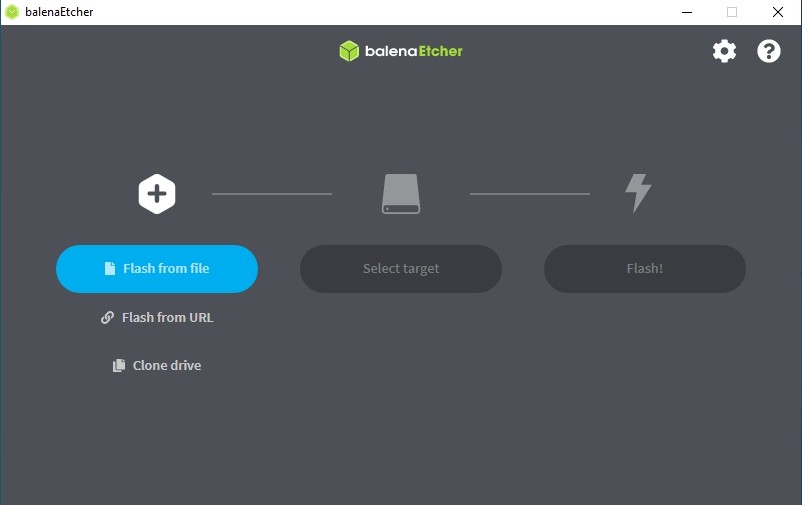
BalenaEtcher is a versatile and reliable tool that allows you to turn USB drives, SD cards, and other external drives into bootable devices quickly and safely. Its simple three-step interface makes it easy to burn disk images in various formats to the removable storage of your choice, whether it’s a USB drive, SD card, or external hard drive.
You can use BalenaEtcher to install a new operating system, reformat an existing one, or simply create a backup installation copy for future use. The application ensures that your device is properly formatted and that the flashing process is completed successfully, preventing errors that could interfere with booting.
BalenaEtcher is open source and developed with JavaScript, HTML, Node.js, and Electron, which means it is free to use and will remain so. For users with more advanced needs, BalenaEtcher Pro, the paid version, allows flashing up to 16 drives simultaneously, offering maximum efficiency and flexibility.
The software is compatible with Windows, macOS, and Linux, making it accessible to virtually any user. Compared to traditional disk duplicators, BalenaEtcher is faster, more affordable, and easier to use, while maintaining high reliability and compatibility across nearly any operating system.
Why Should I Download BalenaEtcher?
It's a straightforward software that's designed to simplify an otherwise quite complex process, but balenaEtcher guides you through it in 3 simple steps so you don't get confused or distracted by too many settings and options. First, you need to select the disc image you'd like to use (you can also select a CD/DVD drive), then choose the target external drive, and finally, just start the flashing process to create that bootable device. The tool protects you from making a mistake and wiping your whole hard drive by simply not showing it in the list of target devices you can select from. Even if you add a larger external storage, it will prompt you to confirm that you're, in fact, selecting the device you want.
When you download it, you'll find that it supports multiple disc image formats beyond just ISO. They include BIN, BZ2, ZIP, IMG, ETCH, SDCARD, and XZ, but you need to remember that if the software detects you're trying to boot a Windows disc image, it will throw an error and won't allow you to proceed. The software works well with other OS, though, and there are other solutions on the market to help you with Windows bootable devices, so just check the list of alternatives below.
Once your device is burned with the disc image, the software verifies if there were any issues during the process or with formatting your target device. This automatic verification is very important, as it allows you to avoid boot failures or corrupted system installations, which could, in turn, cause more problems.
The tool is a highly efficient utility, and you will notice how quickly it works even with larger system files. You can also continue using your computer as you would typically because it doesn't use a lot of system resources to flash images into external drives. It also comes from an open-source project, so it is regularly updated by its community to fix bugs and offer improvements.
BalenaEtcher is a great cross-platform solution that can be downloaded on Windows, macOS, and Linux. It is especially helpful if you regularly switch between OS and need a tool that supports various environments. IT professionals and other business users can use this software to quickly set up multiple systems across various machines or troubleshoot issues with the current installation. It also offers advanced settings if you require something more than its default 3-step process.
Is BalenaEtcher Free?
Any updates released by its developer community, as well as the software itself, are free to download and use. This model invites other contributors to work on the project freely, offer enhancements, or develop it independently under the open-source license.
What Operating Systems Are Compatible with BalenaEtcher?
The software can be downloaded for Windows 10 and 11 with both 32-bit and 64-bit architecture, macOS starting from version 10.13, and multiple Linux distributions.
This way, users in different environments can use it to create bootable devices. The tool itself is optimized for all of them to ensure the best performance and the quickest completion of the burning process.
What Are the Alternatives to BalenaEtcher?
As the name suggests, ISO to USB is a tool that can write disc images in the ISO format on external USB drives. You can use it for free on Windows computers, and the whole process is simplified, so you only need to select your ISO file and then the target device. While it has more limited options and platform support than this tool, it's perfect for users who want to perform just this one action and don't need anything more.
If you're looking for something more robust and with a bigger feature set, you might want to download Ventoy. This utility allows you to create USB drives that support multibooting so that you can burn multiple images of OS on a single external storage stick. You don't even need to reformat your external drive each time you want to install another system on it. Ventoy also has a lot of configuration options for you to choose from, so it will be the perfect solution for more advanced users who require a more versatile and powerful tool. What people also find great is that Ventoy is developed as an open-source project and, as such, is completely free to use. You can install it on Windows and Linux computers, but Mac users are also supported by Ventoy’s web-based services.
Another alternative that merges simplicity and functionality is called UNetbootin. You can install it for free on Windows, macOS, and Linux, and you can create bootable devices for many operating systems. UNetbootin has a simple interface but also allows you to automatically download files for various Linux distributions or even search for disc images of different OS, which you can then write to a USB drive. While it's not as advanced as balenaEtcher and doesn't include automatic verification of the process, UNetbootin is a reliable choice with just enough options to make it one of the most popular tools for creating external devices, especially if Linux is your most common working environment.