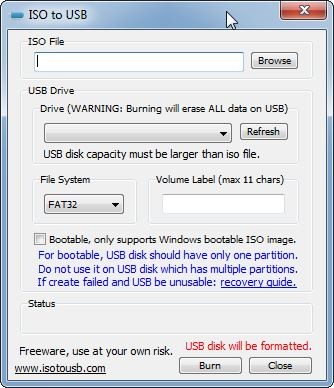
The small and effective software solution named ISO to USB allows users to burn ISO files onto their USB storage devices to create a bootable disk. An ISO file provides a complete duplicate of disk systems, which contains every file system and structure needed for operation as an actual physical disc. The tool functions best to create bootable USB drives that enable users to install Windows or Linux OS. Users can streamline their installation process by using ISO to USB, since it provides an alternative to traditional disk-based ISO file burning for USB drive data transfer.
The creators designed this utility to be straightforward in its operation. Unlike more complex tools, ISO to USB focuses solely on writing ISO images to USB storage devices without unnecessary features. The software serves users well who seek a basic solution for generating bootable USB drives. Users can choose FAT, FAT32, exFAT, or NTFS file systems for OS installation compatibility. This utility enables users to create Windows installation USBs and also enables live Linux bootable USB drive creation for multiple distributions. The tool provides a critical solution for current computing requirements, as it no longer requires the outdated CD and DVD formats.
Why Should I Download ISO to USB?
Any person who relies on operating system installation and backup procedures requires ISO to USB as their essential tool. Through it, users can make bootable USB drives easily by replacing physical discs, which improves both installation speed and accessibility. You need ISO to USB because it transforms the process of new computer setup, system recovery, and corrupted system repair, as well as alternative OS installation into smooth, efficient operations.
ISO to USB is very simple to operate because of its easy-to-use functionality. Tools with comparable functions often have complicated selection choices that make them challenging for beginner users to understand. Basic functionality remains the key feature of ISO to USB. Users navigate the system through three simple steps that enable them to pick an ISO file and assign a USB drive before starting the procedure by clicking once.
Users should choose ISO to USB due to its ability to work with multiple file system types. This utility establishes proper file system formats, including FAT, FAT32, exFAT, and NTFS for your USB drive according to its designated application. This application brings value to Windows platform users since it allows them to develop bootable USB drives for both older system versions and the newest available Windows updates.
Touching-speed performance provides a strong advantage to make ISO to USB your best conversion tool. The speed of USB drives surpasses that of CDs and DVDs, thus speeding up installation routines as well as system recovery procedures. The speed of bootable USB drives enables software installation in just a matter of minutes, a process that discs would slow down significantly. The utility stands as an essential choice for IT professionals, system administrators, and casual users who perform operating system repairs and reinstallation processes.
ISO to USB serves its most relevant purpose when used for system recovery operations. Users can troubleshoot and repair their system by using a bootable USB drive that they have created using this utility after their computer fails to start because of corruption or malware or software conflicts. A bootable USB drive maintained by IT professionals enables them to recover malfunctioning computers as a backup solution that functions independently of external CDs or DVDs during crises.
Having a bootable USB drive is a dependable, lightweight option for anyone who needs this type of solution. The program provides users with essential features while operating without complex settings, which results in task completion speed. This essential utility serves every user who needs to handle ISO files and produce bootable USB drives because of its professional and personal applications.
Is ISO to USB Free?
ISO to USB can be obtained at no cost by users. It comes with an entirely free service that does not require payments or subscriptions to get full functionality. The software allows users to download and install it without facing additional feature-related expenses. ISO to USB presents its complete set of features in the free version, so users can find this tool ideal for their requirements when writing ISO files to USB drives.
What Operating Systems Are Compatible with ISO to USB?
Users who operate Windows computers can utilize the ISO to USB program. This utility functions seamlessly on Windows XP and higher versions. It works effectively on any Windows device, ranging from old to new ones, without using many system resources.
At present, there exists no authorized version of ISO to USB software compatible with either macOS or Linux systems. Users need different tools that can perform ISO file burning to USB drives because these platforms lack this capability: Ventoy for Linux or UNetbootin for macOS. The Windows community considers ISO to USB among the most straightforward methods for fast and efficient bootable USB drive creation.
What Are the Alternatives to ISO to USB?
The user base considers Rufus as one of the most popular options. Many users prefer this tool because it speeds up and delivers reliable performance during the creation of bootable USB drives. Rufus provides extra customization modes beyond ISO to USB, which enable users to produce drives with alternative partition formatting and system types. Users who require flexible installation media options will access UEFI and legacy boot mode support, so it is a suitable choice. Rufus operates as a free, lightweight tool that maintains regular updates, so users can build disks that will run on modern operating systems.
For Linux bootable USB drive creation, users should consider the application UNetbootin as their preferred choice. Those who need Linux-specific bootability through persistent storage should select UNetbootin because this utility offers multiple Linux distributions, while ISO to USB mainly performs Windows installation duties. The tool serves Linux OS testers and installers very well since it functions across Windows and Linux platforms.
Users requiring USB solutions across different platforms can find ideal support in BalenaEtcher software. These OS platforms make BalenaEtcher more flexible than ISO to USB since it supports Windows, macOS, and Linux systems. BalenaEtcher design features a contemporary user interface that enables effortless USB drive ISO file burning for its users. The embedded file validation feature helps users prevent installation errors due to incorrect file writing. Etcher positions itself as one of the best user-friendly ISO to USB tools despite its lack of advanced Rufus capabilities.