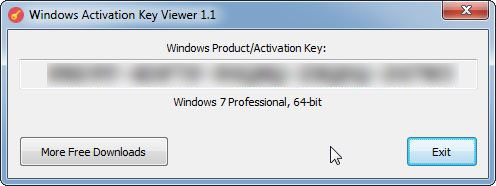
Whether you’re doing a clean reinstallation of the operating system, troubleshooting issues with system activation and booting, trying to upgrade to a newer version, or switching to a new computer, you’ll need to know the license key. Windows Activation Key Viewer is a utility that allows you to quickly get and copy the product key, which can then be used to reactivate your Windows license.
This free utility provided by Microsoft lets you recover your Windows key easily, no matter which version of Windows you are using (Windows 11, 10, 8, 7, or Windows Server 2022, 2019, 2016, or 2012). You don’t even need to install it. Just launch the program, and it instantly displays your 25-character key.
It’s important to remember that your key is essential in many situations, for example, when you reinstall your system, activate Windows on a new device, or upgrade to a newer version. If your system crashes and won’t reboot, it'll be too late to recover your key, so it’s better to do it in advance. For users who want to reinstall Windows 10, Microsoft also offers the Windows 10 Media Creation Tool, which helps make the installation process quick and easy.
Why Should I Download Windows Activation Key Viewer?
Typically, retrieving the Windows license product key isn’t very straightforward. You’d either need to dig deep into various settings or use command-line tools to get it, as it can also be stored within the system registry. With this utility, you get it quickly, and the software doesn’t require any installation, so you can find your license code without any headaches. This utility simply displays it within its interface after you select the type of Windows you have installed and its architecture (32 or 64-bit). Everyone is able to use this tool, no matter their computer literacy.
The key is also used to verify if your Windows version is genuine and wasn’t hacked, so it’s helpful to have this utility handy. You can launch it without installing it. It doesn’t need any specific requirements and supports all Windows versions, including Home, Pro, Enterprise, and other editions. You can transfer it to a USB stick drive and then use it even without access to the internet, as the tool pulls the product key directly from the system registry.
Please be aware that there are different types of product keys that Windows can be activated on. One of the types is OEM (Original Equipment Manufacturer) keys that are pre-installed on your computer by a manufacturer like HP or Lenovo. Another type is Retail keys, which are sold independently of the computer and can be transferred between devices. When you use this utility, it definitely helps you retrieve these two types of keys. Still, there’s also a third type called Volume License Keys, which are usually used by companies and professionals to activate multiple machines in bulk. These keys would most likely not be recovered by the Key Viewer utility.
Use this utility to avoid searching through old documents, emails, or even system packaging if you still have it. With this utility, you can be sure that even if you’re doing a clean installation of Windows, there won’t be any licensing issues you could stumble upon. System administrators and IT professionals can also benefit from the tool, as it gives them access to product keys from multiple machines, for example, if they need to fix or troubleshoot the computers.
Is Windows Activation Key Viewer Free?
Yes, the tool is free, and it doesn’t require payment to display your Windows license key. One thing to keep in mind is to get this utility from a trusted source (like our direct link to the official website) to ensure your system won’t be attacked with adware or other unwanted software that hackers could build into it if you get it from an unreliable website.
What Operating Systems are Compatible With Windows Activation Key Viewer?
As the name suggests, you can download this utility when you need to display your product key for the Windows operating system. You can use it to retrieve your license key for Windows 7, Windows 8 and 8.1, Windows 10, and Windows 11 on both 32 and 64-bit architectures. It is also available for Windows Server 2022, 2019, 2016, and 2012.
What’s worth keeping in mind is that in the past, the product keys were kept in the system registry, which makes this utility helpful for older machines. For some years now, Microsoft has introduced digital licenses that are linked to your Microsoft account, so if you need to reinstall your system or have issues with activating your digital license, check your account for information.
What Are The alternatives to Windows Activation Key Viewer?
ProduKey also recovers software keys for tools such as Microsoft Word, Excel, and other tools included in the Microsoft Office bundle. Additionally, it can also get you your license key for Windows XP and Vista, so versions that aren’t supported by the Key Viewer utility.
If you need a solution that’s not limited to one operating system, try Magical Jelly Bean Keyfinder. It also works for recovering macOS product keys as well as over 300 other programs, in its free version. If you want, you can also buy the premium version, which supports over 10,000 products and can also do a remote scan of your network computer.
Users who are looking for a utility for macOS systems can try Mac Product Key Finder. It was designed specifically with the macOS system and its architecture in mind and allows you to retrieve keys not only for the operating system but also for other programs, including Microsoft and Adobe products. The tool has a free version that has limits on how many product keys you can recover and from how many apps (89), and may not support the newest macOS versions. Suppose you decide to purchase the full version of Mac Product Key Finder. In that case, it supports almost 900 programs, can scan other Mac on the same network, export your product keys to multiple formats, and is compatible with even the newest versions of macOS, such as Sequoia.
With all of those alternatives, you need to keep in mind that nowadays, many of the newest applications don’t actually run on a product key but are licensed digitally or through a subscription, so these tools won’t help recover the license codes for such products.