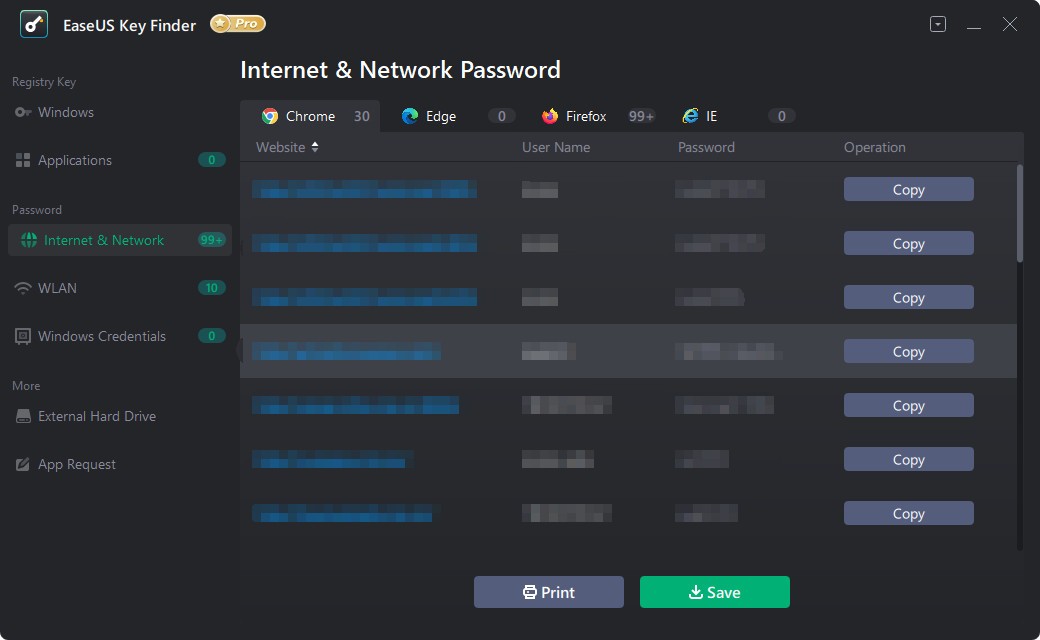
EaseUS Key Finder makes it easy for anyone to restore lost product keys for their software. It expertly searches your PC for serial numbers and account activation codes connected to your operating system, programs, and accounts. We rarely think much about license codes until something needs our license key to reinstall an app, reinstall Windows, or move to another computer. Even if you pay for the software, you’ll get nowhere because you need that key. It’s at this point that EaseUS Key Finder can help you out.
Recovering Windows product keys isn’t the only reason you need to do this. The software also helps with Microsoft Office, Adobe applications, and old programs that keep track of registration in parts of the system that aren’t easy to find. Rather than wasting time looking through your emails, file,s or paperwork, it all appears on this software so you can easily save it. It’s not a hard job, but it’s necessary, particularly if you don't want to repurchase the software because the key is gone.
Why Should I Download EaseUS Key Finder?
It’s something that happens to most of us at one time or another. Whether it’s a new PC or a reinstallation, you will soon be asked to enter the product key. No doubt, you’ve seen this before—whether it was in an old email, printed on a box, or found in your old message history. Still, when the moment arrives, you don’t remember where. A few characters and numbers can make everything grind to a halt. That’s why EaseUS Key Finder is in place. It’s a tool you need to use before you’ve had the issue.
Its reason for its popularity is that people already own the apps. You’re not trying to get around anything—you just want information you have already bought. It gets into parts of your computer that are hidden from us and unearths your missing files in a simple form. How to do it isn’t complicated. Just install the program, start a scan, and you’ll see your results. It’s straightforward enough that a typical user can work through it, but IT professionals will still find it to be very useful.
EaseUS Key Finder provides your Windows, Microsoft Office, Adobe, and other common program license keys. It’s also very easy to see your Wi-Fi password, which is useful if you’re adding a new device and forget the one you normally use. It’s mostly this kind of simple, useful experience that keeps people using the tool. Even if it isn’t your regular habit to use software like this, it makes solving your problem faster and without the stress of finding paperwork.
It can make us feel less anxious if things in our home seem to stop functioning. Think of a time when you are setting up software for a work project and must bring back a computer after a crash, and suddenly, again, you can’t find the license key. When we’re unsure, it can disrupt everything we’re planning. EaseUS Key Finder saves the day before you start to panic. Just a few minutes and you have your license information ready. It creates order amid disorder, saving all those keys from getting lost in emails or files we no longer check. Keeping that backup available can easily save you time and prevent stress.
It’s comforting to realize there is such a tool available. It doesn’t make noise or try to fill a room with unnecessary elements. All it does is its job by making your keys visible. If you’re fixing a computer for someone in your family, EaseUS Key Finder helps out and makes the process smooth and easy. You don’t need much space for it, and it won’t slow your computer down. When you need help the most, it’s right there at your fingertips.
Is EaseUS Key Finder Free?
Key Finder by EaseUS can pick up some simple keys for free, but you’ll want to pay for the program to get advanced options and features. With the free trial, you can check what’s found on your system before deciding if it’s worth having.
What Operating Systems Are Compatible with EaseUS Key Finder?
Using the EaseUS Key Finder is possible on Windows 11, 10, 8 and 7. Running a modern Windows PC makes it likely you’re compatible. Because it’s created for Windows, Mac systems will require a separate solution. You won’t notice any sharp rise in your system’s needs, since the installation is lightweight and the software runs quietly in the background. It’s created to help you right away instead of leaving it on permanently.
What Are the Alternatives to EaseUS Key Finder?
Although EaseUS Key Finder performs well, users often look at several similar choices as well. All of them do things differently, and which one fits your needs will depend on what you want to do. Windows Activation Key Viewer, ProduKey, and Magical Jelly Bean Keyfinder are three of the simplest ways to find your key. There have already been many of these on the market, and they’re used for various reasons.
Windows Activation Key Viewer has a simple and light build. The tool only does one thing, which is quickly looking up your Windows key. There aren’t any fancy extras or interesting UI here. It is perfect if all you require is the Windows key. If you try to find keys for different programs or want to recover more information, this tool doesn’t do much. Yet, it runs smoothly and doesn’t need a lot from your system.
ProduKey is another useful small tool from NirSoft. It’s been used for years, and it’s famous for being straightforward. You can see your Office and Windows product keys quickly after running the tool. Sometimes, when an antivirus detects it incorrectly, it’s because Osquery pulls information that looks suspicious. Yet, you shouldn’t worry about it if you download from the main website. Choose ProduKey if you like simple, fast, and straightforward software.
Magical Jelly Bean Keyfinder stands out, but it’s valuable software. Many PC users rely on this tool to scan their computers and display license keys in a clear, easy-to-read format. It also makes recovery easy, just like EaseUS Key Finder. People like that the older interface doesn’t emulate modern design trends. It doesn’t do much, but it just does its job. The free version works great for most users, but the paid edition gives you access to even more features.