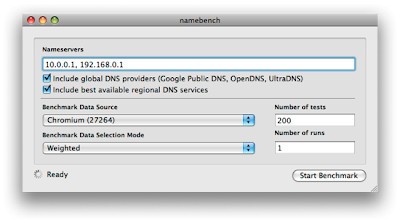
Free, open-source Namebench serves as a benchmarking program that identifies the top DNS servers for users' specific locations while considering their browsing history. The engineers at Google initiated Namebench as a 20% project that started as an experimental project among other programs at the company.
Created in 2010, the program continues to serve users who need DNS testing features despite its lack of substantial revisions during the past few years. The application analyzes your present DNS configuration, then probes multiple public servers to identify suitable options for reduced latency and better response time. Your browsing history, tcpdump logs, or standardized datasets permit the tool to find the fastest DNS configuration by analysis.
Its unique feature sets it apart because it tests DNS performance with the specific website access patterns and online services that users normally handle. Personalized testing results from this method offer highly specific information rather than general responses. The lightweight Namebench program serves one clear primary task to help users discover better Internet performance, although it remains simple and dedicated to its purpose.
Why Should I Download Namebench?
The source of slow internet connections does not always stem from either your computer system or router, but instead comes from improper DNS configuration. Domain names that include google.com take in IP addresses through the Internet's phonebook system called DNS. Your entire browsing pace gets affected by a DNS system that operates slowly or misconfigures itself.
That’s where Namebench comes in. You conduct this test to identify which DNS servers provide the fastest connection because of your geographic position and internet usage patterns. It’s not a one-size-fits-all situation. The speed performance of certain DNS servers differs between countries. Your DNS provider might suffer from excessive load or reliability issues that you remain unaware of at this time.
The advantage of Namebench lies in its capability to perform real-world testing instead of abstract laboratory testing. Through analysis of your real browser usage or data acquired from services like Google and Alexa, it determines the best-suited DNS servers for your websites. The program generates recommendations built upon actual website usage instead of operating on predicted theoretical figures. Namebench requires no special technical expertise from its users. The application functions through both a GUI and a command-line interface before creating easy-to-read recommendations in a report format.
The system requires no guessing and skips complicated logs or data searches to determine its final output. This application lets you make all decisions since it stays under your control. The system provides information without implementing changes, which certain users who prefer full visibility appreciate during the process of modification.
Your online speed performance changes following a DNS switch, depending on both what you currently use and how many ways DNS selection alters your internet speed capabilities. The effect of changing DNS servers on web page speed varies between websites, yet may enhance both streaming service and game performance. People living in rural areas with poor internet infrastructure benefit greatly from finding better source routes for DNS.
The built-in service of Namebench provides advanced users with a method to monitor their system efficiency. Users who desire a better understanding of internet connection functionality should consider running this program because it serves as a wise tool. The Namebench program functions as both an application and a teaching instrument. Using Namebench results in either confirmation of your existing best DNS choice or a performance improvement benefit.
Is Namebench Free?
You can obtain Namebench without any cost because it provides complete free access. The tool operates without hidden payment obligations and maintains total accessibility, since it does not ask for payments or introduce advertisements.
Users can access Namebench as open-source software because the program provides complete access to its modifying code. The application only needs to be purchased once because it operates as a single-use tool that demands no recurring payments or subscriptions.
What Operating Systems Are Compatible with Namebench?
The Namebench software system operates effectively with the majority of popular operating systems available. Users can run Namebench on Windows, macOS, and Linux platforms, yet installation functions may differ depending on the operating system type and version. The newest versions of macOS require specific adjustments for software operation, and Linux users must install needed Python libraries to execute the program, yet this platform remains accessible to standard operating system users.
What Are the Alternatives to Namebench?
Namebench serves users well, but is a little outdated. Fortunately, alternative DNS testing tools exist for people who require different functionalities. The emergence of additional DNS testing tools and management tools across the years provides users with various modern interface designs alongside multiple additional functionality options.
DNS Jumper stands as a reliable solution among the DNS tester alternatives. HRuffy offers both compact size along an instant way to switch between different DNS services through its basic interface click operation. DNS Jumper enables users to directly execute DNS service changes after the tool recommends them, while Namebench provides only recommendations. The tool includes built-in DNS server collections for quick access and integrates basic test functions that help users bypass manual online searching for addresses and configuration procedures. DNS Jumper provides an effortless and speedy solution for DNS management, especially for novices and users who need a straightforward experience.
One suitable substitute for Namebench users is Smart DNS Proxy. Namebench provides benchmarking features that differ from Smart DNS Proxy’s focus on commercial streaming and performance enhancement features. Your DNS traffic will be redirected by the service through its extensive network to bypass censorship and geo-blocks. Smart DNS Proxy provides accessibility and unblocking capabilities, which Namebench lacks for users who watch a variety of content online or need to bypass geo-blocks. The service operates through payment and therefore costs more than similar products. Users experience an uncomplicated operation, while support services provide assistance to new users.
The third viable solution available for users is DNSCrypt. Although DNSCrypt provides better security than speed, it treats users seeking maximum privacy and encryption with comparable benefits to Namebench. DNSCrypt protects your DNS traffic with encryption, thus preventing both your ISP and other entities from knowing your visited website destinations. The current situation regarding privacy demands this particular product because it makes a real difference to everyday users. You can select DNS servers of your choice, including privacy-oriented options, through this application, even though benchmark testing is unavailable.