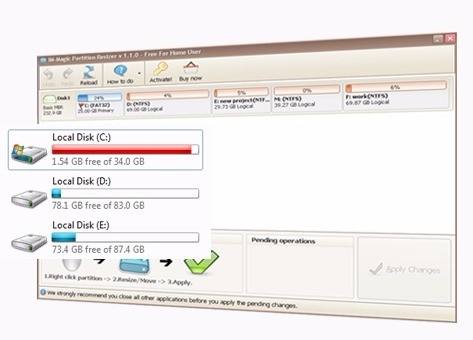
With IM-Magic Partition Resizer, you can manage your disk and its different partitions, as well as resize them to optimize your storage space on Windows computers. When you use this disk utility, no data will be erased in the process, as you don't need to reformat your disk in order to reorganize the hard drive.
IM-Magic Partition Resizer has a simple interface so that even users who are not fluent in command-line tools or complicated setups can quickly manage their disks. All you have to do is drag and drop when you wish to shift the space allocated between different partitions.
With support for NTFS and FAT32 and automation of most tasks, IM-Magic Partition Resizer helps you avoid human errors during the process and keeps your data safe. It's the perfect tool if you want to create new partitions or change how your storage space is divided. This utility first scans your hard drive to check how it can move the free space around while also maintaining your data integrity.
Why should I download the IM-Magic Partition Resizer?
Many users who have disk partitions on their Windows computers struggle with reallocating space and managing storage without reformatting the hard drive. Anyone who wants to easily resize, move, extend, or shrink their existing partitions should download IM-Magic Partition Resizer. While you can perform various operations on your hard drive, this tool ensures all your files and data remain intact. You no longer need to reinstall your operating system or back up your drive and reformat it to achieve the same result.
When you download the IM-Magic Partition Resizer and launch it, you'll notice that the interface creates a visual map of your partitions. Then, all you have to do is use drag-and-drop to adjust your partition sizes, and as you move the sliders, you will see real-time size data. It's an intuitive approach that beats using command-line tools like DiskPart, which are dedicated to more advanced users.
With IM-Magic Partition Resizer, you can work on both BIOS-based systems and the newer UEFI machines, as the tool supports MBR and GPT partition schemes. This utility is also a great choice when you want to work on portable storage devices like USB flash drives, external HDDS, or even SD cards.
You can also move partitions, which is especially useful if you're utilizing the dual-boot system or want to install another operating system on the same machine.
Out of the box, with IM-Magic Partition Resizer, you get volume-checking tools that scan for errors, run disk health diagnostics, and check your partition's integrity before you take any actions. It also has a built-in tool for basic defragmentation if you need it.
IM-Magic Partition Resizer comes in both free and paid versions, each giving you access to different tools depending on your needs. The software is available only on Windows machines, though it supports legacy versions of this system.
Is IM-Magic Partition Resizer free?
You can download the IM-Magic Partition Resizer for free and use it without any cost if you need it for non-commercial, personal purposes. The free version offers all the core features like resizing non-system partitions, moving them, shrinking and extending volumes, and checking your partitions' integrity.
For users that need to work on their system partition (like the C: drive) or have a disk that is larger than 2 TB, then you need to get a paid version of IM-Magic Partition Resizer, and different versions unlock various features that include full partition access, compatibility with Windows Server, creating bootable USBs, and commercial usage.
What operating systems are compatible with IM-Magic Partition Resizer?
As a Windows-only tool, the great news is that you can download IM-Magic Partition Resizer on various editions of the system, starting from Windows XP or Vista, all the way to Windows 10 and 11 on both 32- and 64-bit architectures.
IM-Magic Partition Resizer supports MBR and GPT partition tables, NTFS, FAT16, and FAT32 file systems, as well as HDDs, SSDs, USB drives, and SD cards.
What are the alternatives to IM-Magic Partition Resizer?
A widely used alternative is called Minitool Partition Wizard, which is a disk management utility where you can resize, merge, format, or check your partitions and file systems. It also has a built-in tool for analyzing your disk space, and you can generate a benchmark of hard drives. The paid version adds features like converting system Disks from MBR to GPT, data recovery tools, and advanced partition options. You can install Minitool Partition Wizard on Windows Vista, 7, 8, 10, and 11.
Another option for Windows users is EaseUS Partition Master, which allows you to resize and format drives or merge partitions for free. If you opt-in for the paid version, you are also able to copy or recover disks and even migrate your operating system from HDD to SSD drives. It's a versatile and stable disk management utility for Windows machines, but it doesn't support other operating systems like Linux or macOS. It's a great option that can support both personal computers as well as professional machines with advanced hardware configurations.
The next tool is AOMEI Partition Assistant, which in its free version allows you to resize, merge, split, and clone partitions, and it has a wide support of Windows systems (XP, Vista, 7, 8, 10, and 11). You can use it on disk with both MBR and GPT layouts, and if you choose to go with the paid Pro version, you will also get support for dynamic disks and system recovery. AOMEI Partition Assistant can also create bootable USB drives or transfer your system to an SSD hard drive. It has an easy-to-understand interface, and the tool also works on servers, which can be useful for more advanced users.