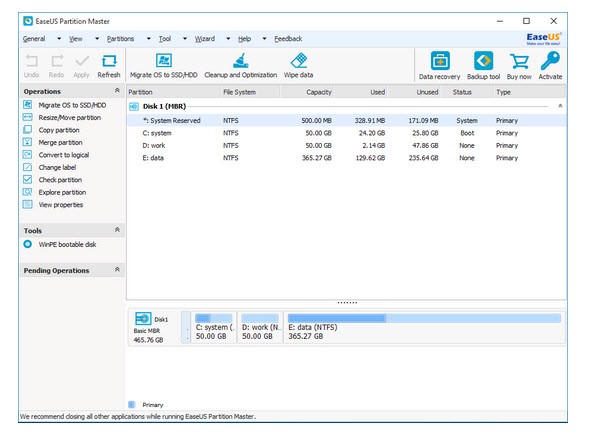
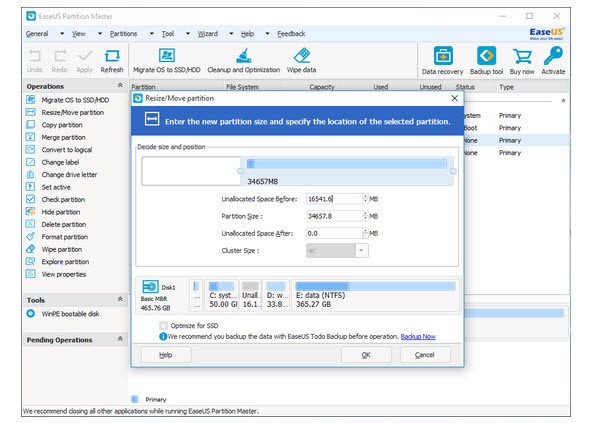
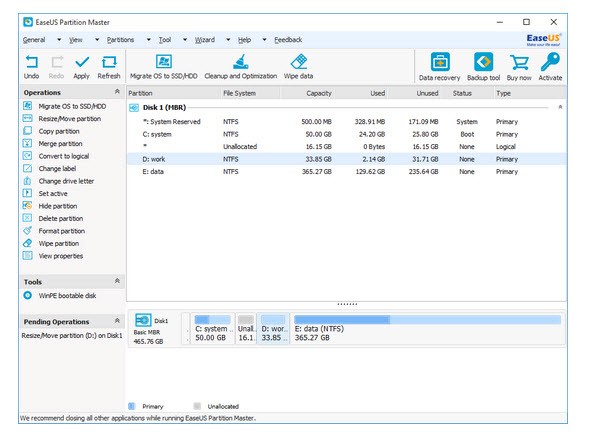
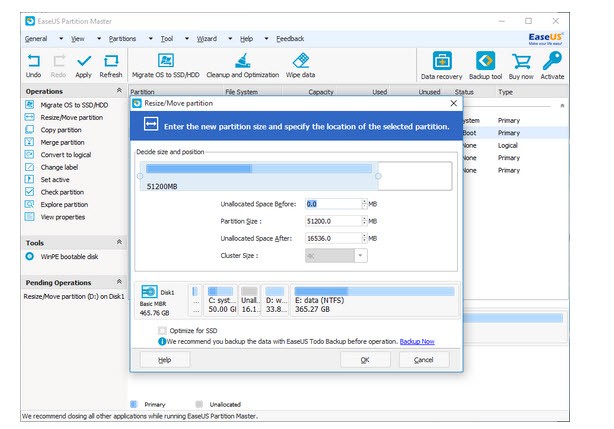
With its user-friendly interface, EaseUS Partition Master helps users manage their hard drive partitions, thereby reducing system management challenges. The tool enables you to change partition dimensions, select convenient locations for partitions, and perform partition uniting and splitting operations, as well as formatting and secure disk partition deletion, while maintaining your data integrity.
People who avoid system settings or disk management tools can benefit from this tool's easy method to complete tasks that require advanced technical expertise. The application provides safe drive protection, serving as a protective layer during drive organization and troubleshooting.
The digital storage smart tool available through EaseUS Partition Master assists you with disk and system organization needs, including creating dual-boot setups, upgrading large disks, and cleaning up disk space. Visual organization replaces commands and irreversible actions because EaseUS Partition Master provides users with step-by-step visual instructions for every process.
The software supports SSDs and HDDs and allows users to work with disk formats, including GPT and MBR. The software provides ordinary non-technical users with exceptional partition management solutions for expanding their C: drive or repairing partitions.
Why Should I Download EaseUS Partition Master?
Ordinary computer tools become insufficient for specific tasks, especially when drive merging, system cloning, or recovery from a lost partition is required. EaseUS Partition Master delivers its functionality because of its performance. It enables casual users to perform tasks that require either professional intervention or the dangerous application of built-in tools.
The program makes what seems challenging simple to perform. The program manages sector boundaries and unallocated space without needing user input for their manipulation. The tool manages complex issues in the background so you can concentrate on the task objectives.
Safety is a major reason for pursuing this program. Disk changes require proper tools, as these operations carry a high risk of failure when performed without specialized instruments. Your attempt to manage files using operating system tools can result in the accidental loss of essential data or system damage.
EaseUS implements a preview-and-apply operating system that delays execution of the current changes until you explicitly confirm the process. The system enables users to create a plan, which is displayed as a visualization before executing the actions. An unfortunate preview allows users to cancel and avoid action. The program presents a tiny interface function that helps users avoid serious complications. The careful system allows users to feel at ease when operating on their system drives.
The software provides useful functionality for handling fresh hardware devices. Before installation, your SSD needs to be cloned from your current drive, but EaseUS provides easy-to-use migration tools to help you do so. Every user on this configuration task can perform the update without starting a fresh system installation.
EaseUS provides users with migration tools that simplify the process of moving their entire system components (OS, installed apps, and configuration) to a new drive through step-by-step instructions. Such software tools make computer system upgrades easy for users who perform such transitions. Restoring your Windows system becomes unnecessary due to the elimination of extensive weekend reinstallations.
The accessibility features of this tool deserve high praise. EaseUS provides assistance to users who lack technical expertise. The application provides visualizations that show partition status using color codes and explains each performed step. The program explains partition basics, such as "convert dynamic to basic" definitions and "raw" partition attributes. The software provides helpful guides and support links for users who experience confusion during their work. The program has been designed to serve users rather than overload them.
EaseUS Partition Master provides the flexibility and support you will love when your basic tools become insufficient for driver management, system setup, data transfer, or space recovery.
Is EaseUS Partition Master Free?
Users can access the free version of EaseUS Partition Master, which provides main partition tools for resizing, creating, deleting, formatting operations, along with basic disk verification features.
Some advanced OS migration and dynamic disk management abilities, along with recovery functions, are reserved exclusively for the paid Pro edition. Users with casual partitioning needs can meet their needs with the free version, which provides sufficient tools for basic changes.
What Operating Systems Are Compatible with EaseUS Partition Master?
EaseUS Partition Master primarily operates in Windows environments. The software is compatible with Windows versions from Windows 11 to Windows 7. EaseUS Partition Master supports Windows Vista and Windows XP for older systems.
The software platform operates equally well with both BIOS system setups and UEFI system setups. It supports several file systems, including NTFS, FAT32, exFAT, EXT2/3, and ReFS. The program lacks Mac support, but Windows users can access it via Boot Camp or virtual machines without problems.
What Are the Alternatives to EaseUS Partition Master?
Most people choose MiniTool Partition Wizard as their preferred partition management software. The free version of this software includes basic partitioning functions, while the paid edition adds additional capabilities for OS migration and partition recovery. The software interface is easy to use for users and provides many functions for work. This software solution offers strong document support, making it a powerful rival. The product takes performance testing and drive diagnostics to another level, as these features are built directly into its user interface.
The data recovery tool Disk Drill primarily focuses on data recovery rather than partition management. The application enables users to inspect disk health and manage partitions for data recovery, even after partition loss. Disk Drill complements EaseUS partition management and offers users additional value by helping restore inaccessible drives. The application offers a modern outlook, along with simple interfaces that make file retrieval easy for those who need only basic functions.
DiskGenius is the third solution because it combines data recovery capabilities with advanced partitioning features in a single tool. Power users find the application suitable because it offers detailed menus and manual editing options. The interface display creates a precise experience, even though it appears outdated to specific users. DiskGenius performs well for disk image maintenance, partition table repair, and ultralow-level system corrections. Advanced users of personal systems often choose DiskGenius for its detailed management features.