As a compatibility tool, KDE Connect enables your computer and mobile device to interact through actions that make day-to-day tasks easier. The KDE Connect application is part of KDE but functions across KDE desktop environments and Linux platforms, and maintains compatibility with Windows, macOS, and Android systems.
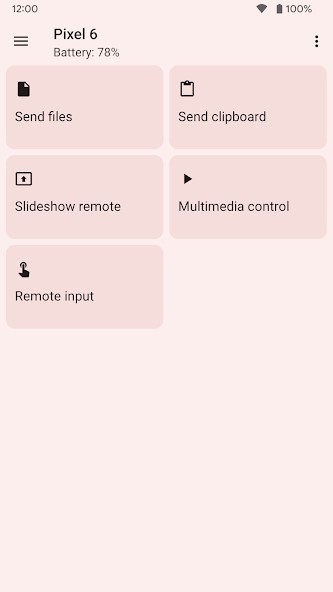
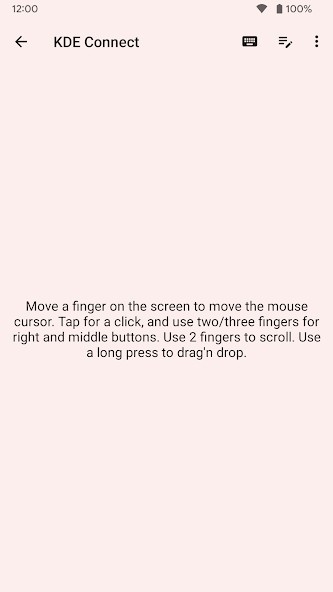
KDE Connect achieves its purpose by enabling an uninterrupted connection between mobile devices and PCs, allowing them to function as extended versions of each other. The system enables users to transmit documents and manage alerts and message replies, while regulating media playback and serving as a trackpad and controller for your PC.
Everything in KDE Connect operates through your local network because it does not require a data storage server. It’s peer-to-peer, secure, and straightforward. Your phone and computer form a single system through this connection method. KDE Connect transforms basic operations such as file duplication, message checking, and volume adjustment into smooth interfaces that span across your devices. The basic appearance of KDE Connect becomes a matter of convenience when you discover how well your phone and computer connect to form a single networked device.
Why Should I Download KDE Connect?
Switching between a handset and a laptop imposes unavoidable daily strain. The incoming message arrives on your phone during your laptop work session. You grab your mobile to read the text, enter your reply, and then place the mobile device back down. The time you spend on phone tasks accumulates, even though each session lasts less than a couple of seconds. KDE Connect removes that friction.
With KDE Connect, you can manage your phone's duties directly on your computer screen, which provides message reading and notification dismissal, with built-in keyboard typing capabilities, directly on your desktop. This application aims to link your phone to your desktop rather than replace your mobile interface.
One distinct aspect of KDE Connect sets it apart from other solutions: it avoids implementing cloud-based synchronization. Users need neither create a profile nor upload files to external server platforms to use the application. All your network activities, including file sharing, message transmission, and media control functions, remain contained within your network configuration. The present-day practice of forcing users to "log in and sync with the cloud and give permissions" barely exists because KDE Connect stands apart with its native software approach. You can access all KDE Connect functions without dealing with any unnecessary overhead.
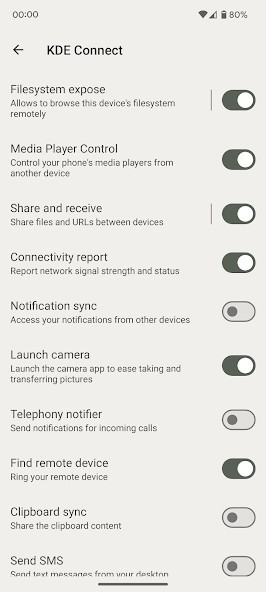
Finally, the app contains several features that demonstrate attentive design. The app lets you transfer clipboard data between your computer and your mobile phone. When you copy a link on your computer, it becomes available for direct pasting on your phone, and vice versa. Pinging your lost phone is possible using your computer to locate it within your residence.
Your desktop lets you access files directly on your smartphone. With your smartphone, you can operate both presentations and act as an audio remote control. Multiple small features enable your devices to communicate more effectively and develop a deeper understanding of one another.
And it's open-source. Code development on this platform is driven by community involvement, with full access granted to review and modify code or create adaptations. That transparency builds trust. The system operates without hiding its actions from users, and it refrains from intercepting personal data to advertise products. The tool functions as a life-improving system that operates with people dedicated to privacy and user experience standards.
KDE Connect provides users with a robust solution for linking their devices, enhancing convenience while maintaining full system control. The program delivers its functions with uncomplicated design features while giving users an unexpected, deep sense of satisfaction.
Is KDE Connect Free?
KDE Connect is free. You download KDE Connect on all platforms it supports through its free version, which contains no advertisements, requires no subscriptions, and limits no features.
Users can find KDE Connect either in official application stores or software package collections based on their device type. Our links are the official ones.
What Operating Systems Are Compatible with KDE Connect?
KDE Connect supports installation across multiple systems. The application supports most Linux distributions, including KDE Plasma, and works in GNOME and other desktop environments. The Windows and macOS versions of KDE Connect exist but exhibit minor interface differences compared to their Linux counterparts.
Users running Android devices can access it officially, and developers provide an experimental iOS version. You need to ensure your phone and computer are connected to the same local Wi-Fi network, as KDE Connect relies on direct communication between devices to work optimally.
What Are the Alternatives to KDE Connect?
The Phone Link by Microsoft application operates as a main alternative solution that works seamlessly with Windows 10 and 11 operating systems. The platform functions effectively with Android, but has now started to support iPhones. Users whose Android devices support this platform can view notifications, make calls and send messages, and view recent apps and photos. The system performs best on devices running Samsung operating systems and offers greater functionality when paired with Samsung phones. Windows Phone faces limitations for users working with Linux or applications outside the Microsoft platform.
Vysor is a bit different, as it displays Android screen content on both Mac and PC interfaces. Vysor lets you view a replica of your phone's display on your computer without any background file sharing or notification synchronization. The mouse and keyboard of your computer enable you to control your phone functions for tasks including presentations and remote support, as well as typing lengthy messages. Among its limited set of features, this program serves as a direct solution for controlling Android device screens. The paid version of the application disables some features, making it a potentially important factor for those who would only use the service occasionally.
In the past, there was another alternative. It was called Intel Unison. Unfortunately, Intel stopped developing it.