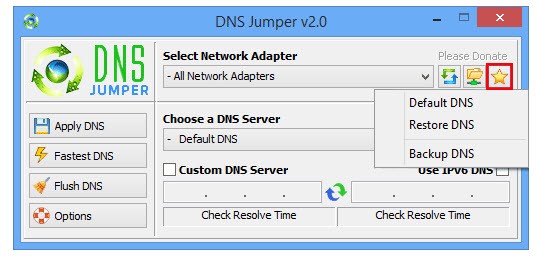
DNS Jumper serves as a small portable application for users to immediately select from different DNS servers without modifying their network configuration manually. The tool offers a selection of capabilities to tap into the fastest DNS service with optimal security features in order to boost internet speed and security, alongside improved accessibility. DNS servers determine website loading times and connection quality, making DNS Jumper a useful tool that allows users to improve their performance via quick interface-driven operations.
DNS Jumper provides users with a friendly interface that lets them bypass the complicated procedure of operating system DNS configuration, which forces users to jump between various menus. Multiple DNS servers become accessible through this program, so users can select the one that leads to the fastest response time for enhanced browsing performance. DNS Jumper enables users to bypass regional restrictions and censorship through its function that provides access to unrestricted DNS services.
Users who encounter slow internet experiences because of their default DNS server’s performance should use DNS Jumper to improve their browsing speed through a different DNS provider. Moving to a rapid DNS server provides users with enhanced webpage loading performance and online gaming speed, as well as increased network quality. The solution provides a convenient tool for all users since it operates without needing installation or delays, making it a lightweight application to enhance the internet experience.
Why Should I Download DNS Jumper?
DNS Jumper delivers an accessible solution that enables users to handle their DNS configurations independently from complicated network setups while resolving slow browsing problems, unreliable connection issues, and website restrictions. Users who need to test DNS server performance for their location should consider this software because it provides the perfect solution. Quality DNS servers operate at different speeds, so real-time comparison allows users to select the fastest ones that suit their needs.
DNS Jumper improves internet speed capacity through its main functionality. The default DNS servers set by internet service providers (IPV) do not necessarily optimize speed, which results in slower web page loading times. Users who transition to faster DNS solutions recover their browsing time, which results in improved page loading speeds. The tool serves online gamers effectively because it enhances performance speed and minimizes streaming buffer delays.
The need for security stands as one of the main reasons why DNS Jumper should be used. The protection of users against phishing attempts along with malware threats, and unsafe websites is available through certain DNS providers. Users should pick a DNS provider that actively detects harmful websites over default DNS options due to their enhanced security capabilities for protecting web activities.
DNS Jumper provides users with an important capability to avoid internet blockages. Internet service providers (IPV) together with governments implement website blocking practices in specific regions of the world. Users who change to a different DNS service can remove blocking limitations that prevented them from accessing restricted content. The ability to change DNS enables users to gain access from new regions when traveling or when needing alternative website connections across different countries.
DNS Jumper enables users to check and diagnose their network problems. When websites do not load as expected, changing the DNS server can be a possible solution to fix this problem. With DNS Jumper, users can easily experiment with different servers by skipping the need for entering server addresses or implementing basic restarts on their devices. The application uses automatic testing to identify the fastest DNS servers, which ensures users can access top performance at all times.
Is DNS Jumper Free?
DNS Jumper exists as a totally free application for all users. It comes from Sordum, which operates as a software company that gives away this application at no cost while avoiding subscription fees and in-app payment requirements. The application enables users to obtain its complete functionality at no cost with unlimited downloads. This tool functions as a portable solution that does not need installation, providing a barrier-free DNS setting management option to users who prefer easy solutions.
What Operating Systems Are Compatible with DNS Jumper?
The developers designed DNS Jumper specifically for running on Windows operating systems. The software operates with Windows 11, Windows 10, Windows 8, Windows 7, as well as the older Windows XP and Vista versions. Running DNS Jumper as a portable tool means it operates without requiring extensive system resources, thus it supports both new and outdated machines.
This software lacks support for macOS versions or Linux operating systems when used as a native application. Users of Linux can modify DNS settings by entering terminal commands, but macOS system preferences serve as the interface for DNS adjustments. Users of Windows operating systems can benefit from DNS Jumper, but users of other operating systems must turn to built-in system tools or additional third-party programs for DNS setting adjustment.
What Are the Alternatives to DNS Jumper?
DNS Jumper stands as a great DNS management application, but users can find other available tools with matching features alongside specific advantages. Some focus on simplicity, while others offer additional security and customization options for advanced users.
The popular tool Namebench works as an alternative to aid users in discovering the fastest DNS server available in their geographical area. Google developed this tool to execute DNS provider tests, which result in ranked speed performances. Users obtain performance metrics for DNS selection through this tool, but must manually choose new settings compared to automatic DNS switching found in DNS Jumper.
Smart DNS Proxy operates as an alternative service with a primary function of breaking geo-restrictions instead of speed optimization. DNS settings allow users to modify servers, which enables them to bypass geographic service restrictions on platforms like Netflix, Hulu, and BBC iPlayer. Users need to pay for the Smart DNS Proxy service since it is not provided for free, as DNS Jumper users enjoy.
DNSCrypt provides users with an excellent level of security in addition to being an effective alternative. It offers the advantage of encryption for DNS traffic because it secures the DNS queries from monitoring by both internet providers and attackers. The service serves users best who require protection from DNS-based attacks as well as absolute privacy enhancement. DNSCrypt provides encryption on top of the speed benefits that DNS Jumper offers, thus making it the superior choice when speed and security matter to users.