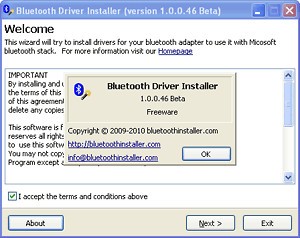
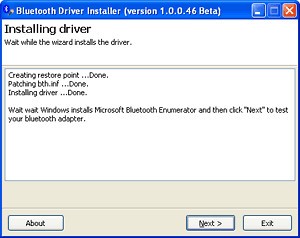
Bluetooth Driver Installer functions as a specialized program used to manage and install Bluetooth drivers for Windows operating system computers. Bluetooth Driver Installer proves essential because it fixes built-in driver malfunctions and helps resolve connection problems between Windows systems and Bluetooth peripherals. The tool establishes proper driver installation, therefore enabling computers to communicate smoothly with peripherals and other Bluetooth devices. It uses a reliable patching method that modifies the Windows “bth.inf” file to force the installation of a universal Microsoft Bluetooth driver, which helps recognize adapters that are not natively supported.
The Bluetooth adapter recognition issues, together with driver failures due to compatibility issues, regularly affect Windows computer users. Bluetooth Driver Installer helps users solve their device driver challenges by organizing the proper driver detection together with driver installation without demanding complex technical expertise. Users facing Bluetooth issues with their PCs will benefit from this universal software because it supports multiple Bluetooth adapter models.
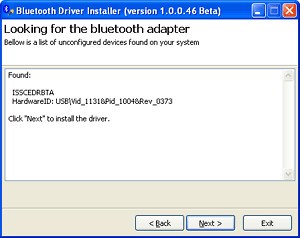
One vital advantage provided by Bluetooth Driver Installer is its automatic restore point creation function, which becomes activated before installing any modifications. During driver installations, users can protect their system by enabling the program to create restore points automatically, which allows them to return to an earlier status without data loss. The software offers a step-by-step installation wizard that facilitates the setup process by providing users with plain prompts and automatic hardware detection.
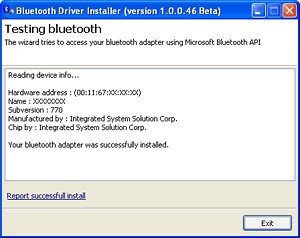
A detailed report regarding the detected adapter, manufacturer, and driver version is displayed upon the completion of the procedure. The installation process of this software remains simple and easy to understand because it is designed for non-tech users, too. It is a lightweight utility that requires minimal disk space and runs efficiently even on older systems, maintaining high stability during driver updates.
Why Should I Download Bluetooth Driver Installer?
Users who need to resolve persistent Bluetooth connection problems on Windows PCs should obtain Bluetooth Driver Installer for a solution. Users should download this software because it offers a general solution to Bluetooth driver failures, which automatically enables wireless peripherals to work efficiently without the necessity of manual diagnosis.
Most Windows users face issues with Bluetooth drivers, either because these drivers become outdated or they become corrupt or fail to be compatible with upgrade packages. The system develops communication breakdowns as well as performance delays, which cause Bluetooth devices to become undetectable. The driver scanner utility built into Bluetooth Driver Installer enables automatic driver replacement of faulty or absent drivers to prevent users from conducting individual driver searches.
The automated driver solution transforms it into a necessary application for restoring Bluetooth connectivity through simplified device operations. It's different from other driver tools that are specific to one maker because it offers a universal driver solution that works with a lot of hardware from different companies. This means that it can be used with both built-in and external USB Bluetooth dongles.
The benefit of using Bluetooth Driver Installer is that it operates with numerous Bluetooth adapter models. The software offers universal driver functionality between various hardware setups because it differs from manufacturer-specific official driver solutions. Users who have either internal laptop adapters or external USB Bluetooth dongles can depend on this software to install proper drivers, which operate without consideration of manufacturer origins. It’s available in English, Japanese, and other languages, making it easy for people everywhere to use.
User-friendly design serves as an attractive advantage of this solution. The process of driver installation demands considerable time, along with sophisticated device management expertise from users. Users benefit from Bluetooth Driver Installer because the software delivers easy one-click driver installation, which requires limited interaction from users. The system finds device problems automatically while continuously installing the right drivers and conducting verification for instant completion of the process to return Bluetooth functionality to users. Its built-in automatic verification ensures the correct driver is installed before completion, helping avoid misconfiguration or incompatible setups.
Before making changes, the software enables users to create system restore backups through its built-in function. A system backup at the previous state is achievable through this functionality, so users can revert their system in case new drivers cause issues. The safety feature enables users to maintain Bluetooth functionality at all times while eliminating the risk of permanent driver-related Bluetooth malfunction. Users should note that some third-party download packages of Bluetooth Driver Installer may include optional software offers, which can be declined during setup to ensure a clean installation.
Is Bluetooth Driver Installer Free?
Free status of Bluetooth Driver Installer enables all users to resolve their Bluetooth driver issues by avoiding any fees. Users can utilize the entire functionality of this software tool without any payment barriers, as it provides all features free of charge to its users.
The use of Bluetooth Driver Installer remains unrestricted for all downloaders who choose to install and implement it. The software comes with no conditions for use, as it requires no registration, license key, or hidden fees. Users select Bluetooth Driver Installer because the software does not require any payment for its operation, making it an economical driver solution for Bluetooth problems.
Users should download Bluetooth Driver Installer from reliable sources because improper downloads from unknown locations may introduce risky third-party modifications.
What Operating Systems Are Compatible with Bluetooth Driver Installer?
The main purpose of Bluetooth Driver Installer operate on Windows operating systems, so users with PC Bluetooth issues can find value in this software tool. Bluetooth Driver Installer works seamlessly with all editions of Windows 7 through Windows 11. The application works across numerous operating system versions, which enables all users, from older platform owners to the newest Windows system owners, to benefit from it.
Bluetooth Driver Installer provides a solution by connecting Windows devices to their hardware through an interface that functions properly across all Windows versions, even when built-in Windows drivers are unavailable. The software possesses the ability to identify what platform a user operates and then apply the appropriate driver installation for 32-bit and 64-bit systems.
Bluetooth Driver Installer shows effective compatibility with Windows machines, yet it fails to support macOS or Linux computer operations. Those who need Bluetooth driver solutions must find alternative solutions for their particular operating system, since these platforms are not supported.
What Are the Alternatives to Bluetooth Driver Installer?
Driver Easy serves as an established alternative to Bluetooth Driver Installer by performing complete driver scans and deploying optimal versions for installation. This program delivers Bluetooth driver fixes together with its capability to handle multiple system drivers, which makes it a complete driver-updating solution for customers who need to manage all their drivers simultaneously. The free edition of Driver Easy blocks automatic driver updates, so users need to upgrade to the premium version to gain this capability. It also includes features like driver backup and restore, driver uninstallation, offline scanning (to detect drivers even without Internet access), scheduling of scans, filtering and hiding future updates for specific devices, and support for WHQL-certified drivers.
Users can resolve driver issues through Snappy Driver Installer because this free and open-source application updates missing drivers regardless of an internet connection. The program offers a crucial solution for resolving Bluetooth driver issues on computers without internet connectivity. Although easy to use for all users, Snappy Driver Installer provides limited automatic capabilities because users need to control all operations, unlike Bluetooth Driver Installer's automated suite. The software is fully portable (no installation needed), supports scripting and automation, uses a driver matching algorithm, allows updates of driver packs, supports a multilingual interface, and can clean invalid or unused driver entries.
Driver Genius is another alternative to Bluetooth Driver Installer. Like both prior ones, Driver Genius offers not only Bluetooth drivers, but also other types of drivers for all your hardware. The software is easy to use and to understand, even for beginners. In addition, the software provides driver cleanup (removing invalid drivers), real-time hardware monitoring (temperatures for CPU, GPU, HDD), system optimization tools (System Booster, SSD Speeder), rollback to prior driver versions, packaging drivers into executable self-installers, and live update of its database. You can try Driver Genius free of charge, but the full version requires a paid license.