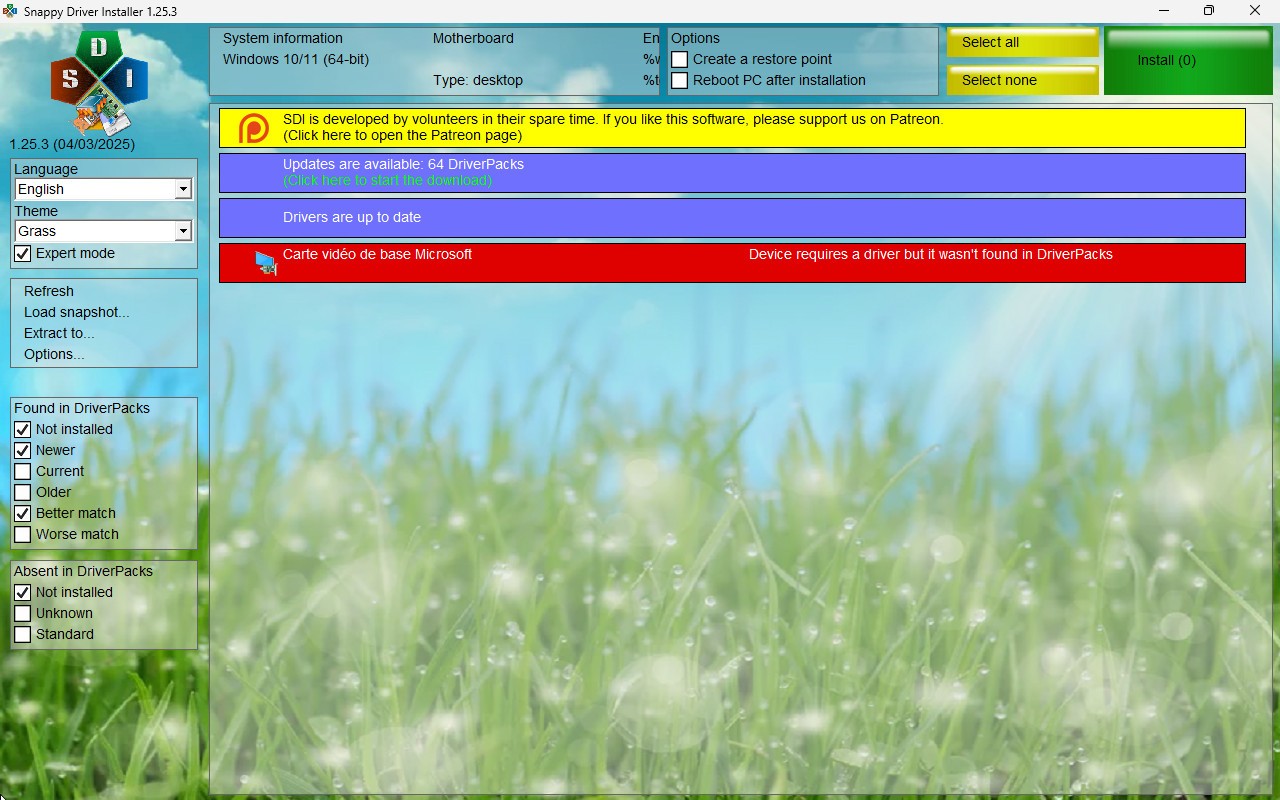
Snappy Driver Installer functions as a totally free open-source platform that focuses on driver installation alongside updating for Windows-based PCs. Users can benefit from its offline capabilities, which allow them to download a complete selection of drivers without the need for an internet connection. Unlike other tools that require users to connect to the internet to download drivers, Snappy Driver Installer provides complete packages that can be accessed via external drives or USBs, making it useful for IT professionals, technicians, and users who work on multiple computers.
Snappy Driver Installer's main benefit is its massive database, which includes every major computer component, including video cards, network adapters, and sound cards, as well as printers and scanners. The widespread popularity of this tool among users comes from its unrestricted daily updates without access restrictions, since the solution provides totally free driver management without restrictions.
The product does not deliver any hidden software alongside its installation, since its interface remains commercial-free and without cumbersome elements. The regular pack updates establish reliable Windows performance and prevent users from wasting time on manual driver searches.
Keep in mind that this tool is not compatible with macOS or Linux, so users on those platforms will need to seek alternative solutions.
Why Should I Download Snappy Driver Installer?
Users who download this tool can save time on maintaining their system's drivers by automating the process. Its most significant advantage comes from the offline operation feature. The tool allows users to download all necessary drivers before they need them, which they can then store on local devices. It works best in offline scenarios when computer systems lack operational network drivers.
Users should choose Snappy Driver Installer because it stands out with free and open-source properties. The entire functionality is available free of charge to users, as the tool does not require any subscriptions or additional payments.
Despite its features, the software gives users full control over installations. They can specify which drivers need to be updated via the software interface, as well as review their driver versions and select any necessary prior versions. Expert users benefit from this feature because it gives them complete control over their machine configuration.
Users appreciate Snappy Driver Installer's fast performance. The scanning process finishes quickly because all necessary drivers exist locally, which results in faster installation speed than tools that require real-time downloads. IT administrators and PC repair specialists find this an excellent solution since they need to update drivers on multiple computers frequently.
The software package contains no unnecessary elements. Many similar utilities force users to install additional programs with advertising pop-ups to push premium versions of the software onto users. The user experience remains uninterruptedly focused on driver updating and installation because the tool excludes all extraneous elements.
You should trust Snappy Driver Installer to handle outdated and uncommon devices because of its effectiveness in this domain. Some devices have older components that use hard-to-find drivers, which are absent from manufacturer website directories. Through its massive database, the software raises the odds of finding compatible drivers for antique hardware to enable you to operate older systems.
Snappy Driver Installer provides users with the functionality to install multiple drivers simultaneously. Through the software interface, they can choose to install several drivers simultaneously, thus reducing both process time and manual labor. The tool provides excellent benefits to new Windows systems, since users need to create multiple drivers when installing fresh.
People who need a solution for hassle-free driver management should consider this program because it provides efficient offline functionality. They benefit from this solution because it streamlines driver maintenance on computers, together with user-controlled installations throughout the OS.
Is Snappy Driver Installer Free?
The software exists as a totally free platform for all users. Its open-source nature implies that no payments are required because users receive full functionality for free.
The whole functionality of Snappy Driver Installer is completely accessible for free usage, since it does not force premium version purchases to give users complete access to all functions. The no-cost nature of this program establishes it as the most useful free solution.
What Operating Systems Are Compatible with Snappy Driver Installer?
The developers of Snappy Driver Installer have created it specifically to operate on all Windows OS versions. The software supports operation on Windows 11 in addition to Windows 10, Windows 8, Windows 7, Windows Vista, and Windows XP. It functions on all combinations between 32-bit and 64-bit systems because it maintains support for both types of architectural frameworks.
Users can run the tool without requiring any installation step because it works as a portable application. IT professionals who maintain multiple machines can run it from external USB drives and hard drives to update their machine drivers through its portable design. The tool lacks compatibility with macOS and Linux computer systems, so users of those platforms need different solutions.
What Are the Alternatives to Snappy Driver Installer?
Although Snappy Driver Installer stands as a powerful tool. It competes against alternative programs that deliver various functional and user interface dimensions. The three widely used applications are IObit Driver Booster and Driver Easy, with Driver Genius as the final option.
IObit Driver Booster maintains automatic driver detection and update features. It functions differently from Snappy Driver Installer by accessing updates from manufacturer databases online during operations. Users can use the free version for essential features, whereas the Pro version includes automatic backup functions alongside prioritized update capabilities. The software delivers a straightforward interface that makes it a good solution for users who wish to approach driver update management in a hands-off manner.
Driver Easy provides users with an easy method to keep their drivers up-to-date. They can initiate updates by allowing the software to detect outdated drivers and perform automatic downloads via its simple interface. Those who use the basic free version need to execute driver installation manually, yet the Pro upgrade provides instant automatic driver update capability. The useful feature of this software attracts users who need an uncomplicated interface and need technical expertise for its operation.
Driver Genius provides users with updates as well as system optimization capabilities. The application provides driver scanning alongside updating capabilities together with system cleanup functions and performance improvement features and hardware monitoring capabilities. The advanced capabilities make it suitable to serve users seeking total system enhancements beyond basic driver maintenance. People who want to test the capabilities of this paid software before buying can use its trial version free of charge.