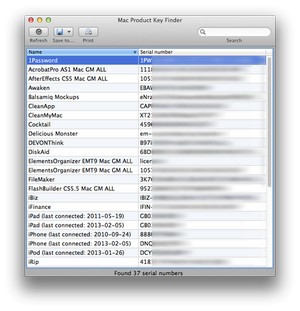
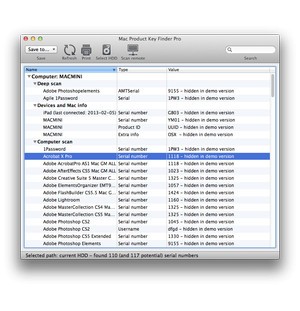
With the Mac Product Key Finder, you can scan your entire operating system and various installed programs to retrieve lost license keys or serial codes from system files.
The tool uses an advanced engine, which makes it usable beyond recovering a product key for macOS. It supports hundreds of different applications from which it can extract license information, and you can even get serial numbers for your Apple devices. It's perfect when you need to reinstall your system and all the software, but don't want to rummage through old emails or look for original packaging.
You can choose between a quick scan and a deep one that will attempt to recover all license data available on your machine. It can also scan Mac machines in your network. While there's a limited free version that supports fewer applications, you need to upgrade to Pro to use all Mac Product Key Finder features.
Why should I download Mac Product Key Finder?
Currently, a lot of software comes preinstalled on your machine, so you rarely know where to look for the license keys, which might be a problem when you need to reinstall or recover a system. With Mac Product Key Finder, you can scan your entire system for any activation and license details stored on it and get the results in a list format. You can use Mac Product Key Finder to recover product keys from the macOS operating system, Microsoft Office (up to version 2011), Adobe apps, and hundreds of others.
You don't need to have technical knowledge to download Mac Product Key Finder and use it, as it has a straightforward interface, so it's super easy to perform a scan when you launch it. It takes just a moment for the Mac Product Key Finder to recover the keys and display a list of the application name, version, and license details. You can then print or export the results into TXT, CSV, PDF, or XML files to keep them for later use.
While the free version offers limited functionality, the paid Pro edition is able to recover keys from different partitions or hard drives, as well as perform network scanning on computers connected to the same network. It's perfect if you need to administer a lot of different machines or work in an enterprise setting. You can also use a deep scan feature that granularly searches system files and hidden configuration directories, even through multiple user accounts.
With Mac Product Key Finder, you can scan TimeMachine backups and use the command line interface to integrate the tool into automatic processes and scripts. You can use Product Key Finder on Mac machines even when you're offline, and the tool doesn't show any ads or collect your data.
Is Product Key Finder free?
Yes, you can download Mac Product Key Finder for free and there are two tiers in which you can use this utility. The free one only gives you access to recovering keys from 69 applications, macOS license details, and serial numbers from your other Apple products.
Once you purchase the paid Professional option, you unlock deep scans, command-line tools, scanning of different hard drives or partitions, TimeMachine backups, and other network Mac computers.
What operating systems are compatible with Product Key Finder?
As a tool dedicated to Mac computers, you can use it from macOS 10.6 to version 15.0. The tool also supports only certain versions of Microsoft Office (up to the 2011 version), and it can't recover keys for software purchased through the Apple App Store.
While this utility doesn't have versions for other operating systems, there are multiple other alternatives that work on Windows, Linux, and more.
What are the alternatives to Product Key Finder?
If you need a simple utility that can recover your Windows product key, then Windows Activation Key Viewer is a lightweight solution that does just that. It requires no installation, and you can download it for free, but it can't recover product keys for software installed on your computer. You can use Windows Activation Key Viewer on Windows 7, 8, 8.1, 10, and 11.
Magical Jelly Bean Keyfinder is a more robust solution that's adapted to Windows computers, but also has a version dedicated to macOS systems. You can use it to recover license details both for your operating system as well as thousands of applications if you go with the paid Pro option ( the free version supports over 300 programs). On top of that, it also supports key recovery from Adobe products, can perform deep system scans, export your license details to multiple formats, and even scan your network computers for product keys. Magical Jelly Bean Keyfinder also works with non-bootable Windows versions or external hard drives and has a portable edition for USB drives.
Another solution for Windows systems is called ProduKey, which is developed by NirSoft. You can use it to recover product keys from local and remote machines, and it works with Windows (starting from Windows 98/ME all the way to Windows 10), Microsoft Office (2000 till 2010), but also SQL Server (200 and 2005 versions), and Exchange environments (2000 and 2003). It's the preferred tool you should consider downloading if you're working in the IT industry, as ProduKey also supports scripting and command line interfaces and can be easily implemented in automated processes. You can download and use this solution for free, but please note that it doesn't offer support for macOS or Linux operating systems. It is also available in multiple languages, which makes the tool more available for non-English speakers, but it doesn't work with third-party apps, apart from some legacy versions of Adobe products and Autodesk programs.