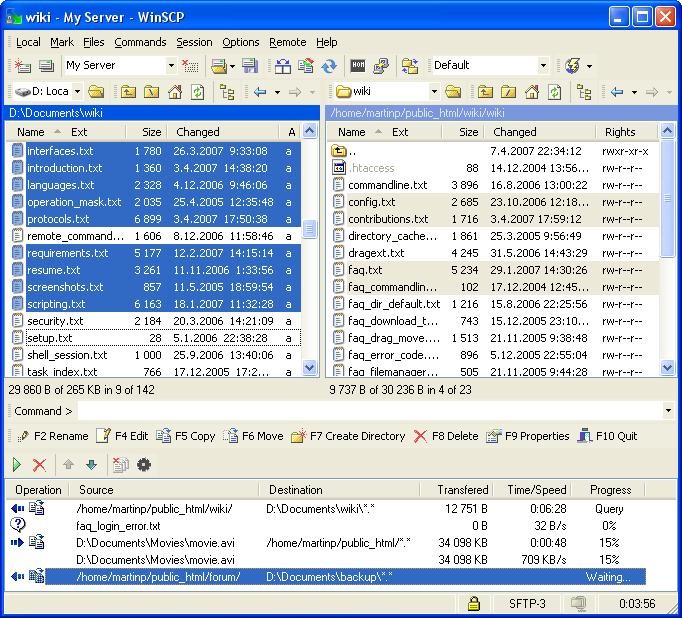
WinSCP operates as an open-source, lightweight tool to transfer files from local devices to a remote server connection. The tool exists specifically to provide Windows users with trusted file transfer security through FTP and SFTP, and SCP, as well as WebDAV protocol options. The core functionality of WinSCP remains simple yet powerful in a way that does not burden users with complex procedures. It operates as a tool that connects your file system to your desired destination server, regardless of its location.
Users select WinSCP because it operates in two overlapping domains. WinSCP functions either as an ordinary file management tool with drag-and-drop features or transforms into an automated system operation through scripted functions. WinSCP delivers trustworthy functionality for secure file management, which suits personal websites and business server management, and offline file backups.
WinSCP continues to remain faithful to its original purpose while persistently advancing forward with a dedication to handling files in a quiet yet protected manner, while eliminating pointless disruptions. Any user seeking dependable file transfer without complicated features should choose WinSCP due to its natural simplicity.
Why Should I Download WinSCP?
Using software that performs tasks efficiently provides users a reassuring feeling because it avoids taking control of system operations or delivering confusing surplus features. WinSCP represents one of these specialized file transfer programs. The program delivers basic file transfer capabilities that any user, including beginners, can use without extensive computer knowledge.
The program shields you from massive documentation because its user interface provides clear instructions for connecting servers as well as file dragging protocols alongside security protocols. The application adjusts its functions to match the skills of anyone who wants to use remote file transfers, from beginners to server administration professionals.
Users should consider downloading WinSCP because the software grants extensive control abilities. Under a user-friendly appearance, WinSCP provides advanced tools for people who need detailed control. Users can use scripts for automation and link them with their preferred text editor, as well as set scheduled tasks through the Windows Task Scheduler. After setup, WinSCP will continue executing repetitive tasks independently.
The application supports user preferences for choosing technical depth in accessing its features. The product suits users who require adaptable software because WinSCP adjusts its functionality as your needs evolve rather than requiring complete upfront knowledge of the system.
Security function at WinSCP constitutes a major element in its narrative. During network file transfers, you carry materials of great importance that require protection against both loss and unauthorized exposure. Through a strong encryption method, WinSCP ensures your file transfer operations remain confidential. The platform enables users to activate the session locking feature and password management to prevent unauthorized access while they are away from their work area. The system enables you to handle files with full security precautions.
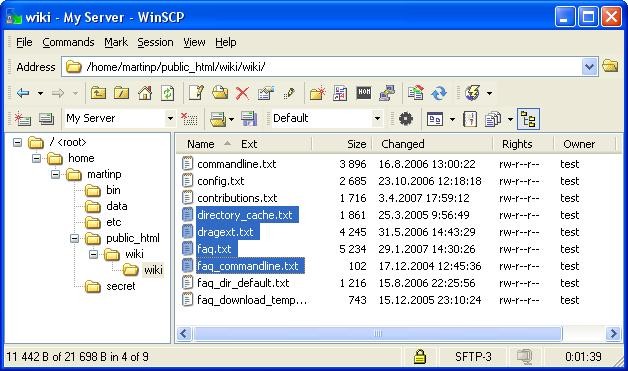
A quiet praise should be given to WinSCP's interface design. The interface does not seek attention, but it handles its tasks effectively. It provides users with two interface styles to choose from: Commander-style two-panel view and Explorer-style single-panel layout to accommodate different thinking preferences. The program avoids demanding complicated learning procedures from its users. The system provides you with all essential tools which let you proceed with your work without interruptions.
WinSCP functions as more than an instrument because its reliability proves trustworthy throughout extended usage periods. Special software like WinSCP evolves into your workflow background support because it helps you execute tasks without requesting excessive demands from users. Among similar tools, WinSCP operates as the premier choice when it comes to such requirements.
Is WinSCP Free?
You can obtain WinSCP without charge because it provides free, unrestricted access to its software download. WinSCP runs as an open-source project that provides both free cost usage and transparent development through a community focused on secure file transfer accessibility for every person.
What Operating Systems Are Compatible with WinSCP?
The developers created WinSCP exclusively for operating systems based on Microsoft Windows. The program provides reliable performance on every version of Windows, starting from Windows 7 through Windows 11. The program's lightweight nature ensures easy use on older machines that avoiding performance-related problems. The software maintains updated enhancements that support newer Windows system builds while providing users with stable and dependable experiences across all Windows versions.
What Are the Alternatives to WinSCP?
WinSCP provides excellent security for file transfers, but users have alternative choices for safe file transfer systems. Diverse users can find multiple competing file management solutions that would fit their needs best among the available alternatives.
FileZilla stands out as the most recognized substitute for WinSCP. This open-source program serves users through FTP and SFTP protocol transfers without any cost. FileZilla maintains a good reputation for basic users because of its easy interface, but some users avoid it due to bundled software during installation unless they get the correct version. Users find a trouble-free experience after careful installation, while the application meets the fundamental requirements of most users. The interface of this product contains more complexity than WinSCP, yet multiple users utilizing high-volume file transfers find this interface comfortable to use.
The commercial version of SmartFTP serves users who require this type of program. After the trial period, SmartFTP demands payment, whereas WinSCP and FileZilla provide free services. The application presents a polished interface that includes professional-grade features, including cloud storage integration and multi-connection transfers, and strong automation tools. Some businesses requiring high-level support networks and enhanced synchronization capabilities tend to use SmartFTP as their preferred choice. The main advantage of SmartFTP is its high-end professional design, yet its top-end capabilities might be excessive for users who only do occasional file transfer tasks.
Cyberduck is another popular choice. WinSCP operates as a Windows-specific program while Cyberduck functions on both Windows and Mac operating systems. The program operates by linking with numerous storage protocols beyond FTP servers. Through Cyberduck, users can connect their Amazon S3 account together with Google Drive and Dropbox storage and WebDAV systems, exactly like they would with typical server systems. Users appreciate the interface design of Cyberduck because it strikes a good balance between a simple yet uncluttered design, but others miss the more detailed layout of two-panel file managers. Cyberduck works effectively as a tool that allows users to manage both server files and cloud storage needs.