AVG TuneUp is a utility that helps you optimize performance on your devices by automating routine cleanup tasks as well as giving you easy access to more complex operations in its intuitive dashboard. With a single click, you can clean up your disk, remove cache, or optimize your system in different ways without advanced configurations.
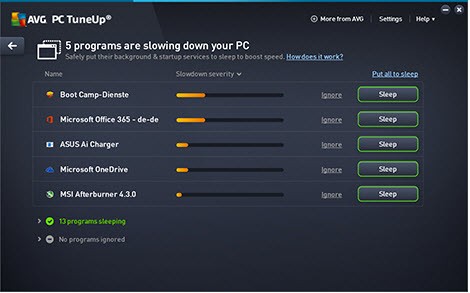
When you download AVG TuneUp on a Windows computer, you can use the tool to deep clean your registry and turn off unnecessary startup apps. Even on macOS computers, you can clear your system cache and logs, remove obsolete language files, and free up your disk space. The dedicated Sleep Mode allows you to pause resource-heavy apps that run in the background and free up CPU and RAM for active tasks. There are also features in AVG TuneUp that can quickly fine-tune your system settings and hibernate apps you're not using often.
With the mobile version of AVG TuneUp, you can remove various junk files, optimize your battery usage, and manage background apps. On any platform, this software offers one-click optimization, scheduled maintenance tasks, as well as detailed health reports.
Why should I download AVG TuneUp?
With AVG TuneUp, you get a wide suite of tools that can help you maintain different aspects of your machine's health through automated tasks. While this program is a complete solution for various purposes, the features offered by versions for different operating systems can vary slightly.
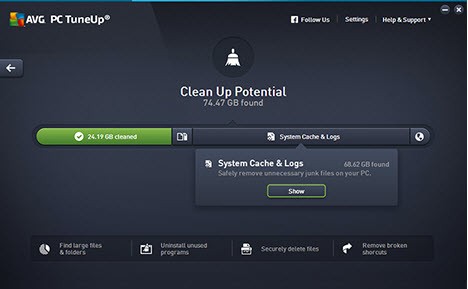
If you download AVG TuneUp on a Windows PC, you get access to Automated Maintenance, where tasks such as cleaning temporary files, broken shortcuts, browser cache, and unused registry entries are performed based on a schedule you define. There's no need for any manual intervention as all of those processes happen in the background to keep your machine clean. If you have any update checkers or tray utilities that run in the background, you can suspend them by using the Sleep Mode. This way, you can regain some of the CPU and RAM resources without the need to uninstall programs completely.
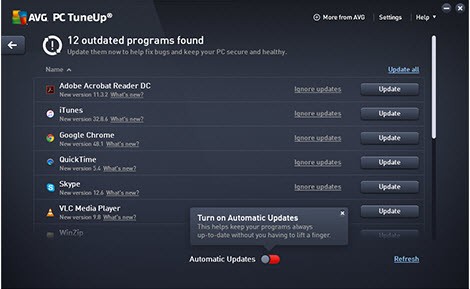
AVG TuneUp also offers a Disk Cleaner that you can use to remove clutter from system sources as well as third-party software, like browsers. This utility can also remove any junk data that is left from installing or uninstalling applications. You can also get a notification from AVG TuneUp when there's a new version of your installed apps to ensure you always have the most recent update.
If you want, you can also identify unused software through the Uninstall Manager or use a Duplicate Finder to quickly scan your system, identify duplicate files, and remove them to free up storage space. There are also features designed specifically for Windows users, such as Registry Cleaner and Disk Defragmentation, that help you resolve issues related to broken files or unneeded registry entries, as well as consolidate scattered files on traditional HDDs.
When you download AVG TuneUp on macOS, you get access to a set of similar features such as Disk Cleaner, App Uninstaller, Large File Finder, and Duplicate Finder, but due to system restrictions, you won't find the Sleep Mode or registry tools.
AVG TuneUp mobile apps for iOS and Android offer a different feature set that includes things like photo cleaner, app hibernation, battery profiles, cache cleaner, and a storage scanner.
Is AVG TuneUp free?
Depending on the platform, you can download AVG TuneUp and use it for free for up to 30 days. After that, you need to purchase a paid license. You can choose between one-year or two-year subscription plans that you can share between different devices.
On the free trial version, you only get access to limited features such as scans and diagnostic reports, one-time cleanups, and restricted scheduled maintenance. In order to use more advanced tools like automatic maintenance, Sleep Mode, app hibernation, registry cleaning, and multi-device coverage, you need to have a paid version of AVG TuneUp.
What operating systems are compatible with AVG TuneUp?
You can download AVG TuneUp on various platforms and system versions. The utility supports Windows 7, 8, 10, and 11 (both 32-bit and 64-bit), macOS starting from version 10.10, and mobile operating systems with Android 9.0 or higher and iOS 15 or newer.
Please note that each system gets a set of features adjusted to its specifics, so on Windows, you will get the whole range of features AVG TuneUp has. You can enjoy core utilities for storage, apps, and cleanup on macOS, while mobile devices have other tools available.
What are the alternatives to AVG TuneUp?
You can check out Microsoft PC Manager for basic maintenance of your Windows-based computer. This tool allows you to clear temporary files, manage startup programs, or check for Windows updates. Even though it has fewer features than AVG TuneUp, it's free software that integrates well with the Windows environment, and it's a great solution for those who just want basic clean-up tools.
If you need something for both Windows and macOS machines, then CCleaner is one of the most popular options on the market. With its free version, you can repair your registry, remove temporary files, and manage your startup programs. Tools like real-time monitoring, scheduled cleanups, or automatic updates require a paid version of CCleaner. It has a bit more limited feature set, but it's a lightweight app with a more focused purpose and an extremely easy interface, making it suitable even for older or non-tech-savvy users.
Advanced SystemCare is a more complex solution for Windows computers where you can find features like malware detection, browser optimization, or even hardware monitoring, apart from just junk cleanup. You can use basic optimization tools for free, but to get access to the whole set of features, you need a Pro version that also unlocks RAM optimization, privacy sweepers, and driver update utilities.