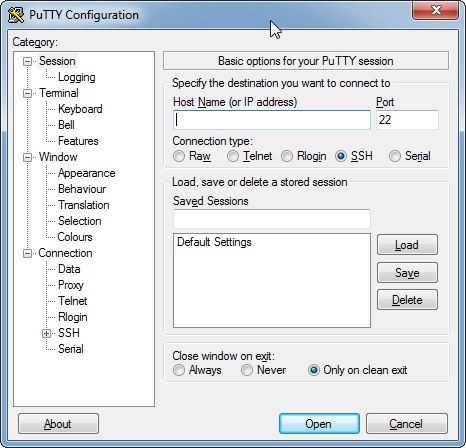
PuTTY serves as a popular terminal emulator that supports SSH, Telnet, and serial communication needs. Network administrators, developers, and IT professionals typically use PuTTY for secure connections with remote systems, along with server management and command execution required in a protected space. PuTTY functions as a bridging tool that enables users to access remote computers along with network devices through encrypted connections instead of restricting itself to a single system like traditional command-line interfaces.
Both SSH-1 and SSH-2 protocols are supported by PuTTY, which also comes with Pageant as an authentication agent to safely handle private keys and PuTTYgen for creating SSH key pairs. Additionally, the suite offers session logging for auditing reasons as well as PSCP and PSFTP tools for safe file transfers. PuTTY also supports connections via HTTP, SOCKS or Telnet proxies, as well as port forwarding and tunneling.
The reason PuTTY enjoys widespread popularity stems from its basic design and its compact structure. Users can run this application without installation to make it a portable tool for direct execution from either USB drives or computers. Through configuration, users can access Linux-based servers using a Windows machine to perform commands and file transfers while resolving network problems in a protected manner.
PuTTY implements SSH and other protocols to guarantee encrypted communication, thus blocking any attempt at unauthorized access or intercepting data while in transit. Users who perform system management tasks in IT environments need PuTTY because it serves as their essential remote tool. The application has established itself as developers' primary tool for safely accessing cloud servers, together with routers and networked devices. Professionals and technologists choose PuTTY because it remains their top selection for reliable, secure distant connection management.
Why Should I Download PuTTY?
PuTTY serves as a modern secure connection software suitable for users who want remote system access. The application framework presents a basic user interface to let users access servers, execute commands, and manage network settings through a straightforward process. Remote access tools that require subscriptions or heavy installations differ from PuTTY because this tool provides free, lightweight, efficient services.
Deciding to use PuTTY results from its ability to work with Secure Shell (SSH), which presents an encryption-focused remote protocol. Secure Shell (SSH) enables protected data transmission because it operates through unsecured connections, which prevents unauthorized access to confidential information in modern digital security environments. Users can achieve encrypted remote sessions between their PC and server through PuTTY to protect their file transfers and application management procedures.
PuTTY offers superior versatility in addition to its other features. The program supports connections through SSH, Telnet, rlogin, and the serial protocol. Users can perform many different networking tasks using this tool, which includes both basic command execution on distant devices and configuring router and switch hardware. No matter which role someone plays as an IT administrator or developer, they need access to Linux servers or cloud environments since PuTTY functions as their secure connection solution. Users can also customize the terminal extensively, adjusting fonts, colors, cursor behavior, and other visual elements to their preferences.
The software PuTTY is recognized for its ability to run on different platforms. Each user benefits from the standalone executable file format of PuTTY because they need to conduct only simple launch operations. The application offers practicality to users who work between diverse machines or require instant access to their connection tool. The USB portable format of PuTTY enables technicians to provide secure access to various systems without changing system configurations when working at different locations.
Users choose PuTTY because the software allows extensive customization and modifications. Through the application, users have the ability to set their session choices and store ongoing connections, and adjust terminal visual elements. Key authentication parameters make it possible to establish safe cryptographic logins that do not require conventional password-based authentication. Its adaptable features let this tool match various user requirements.
Is PuTTY Free?
Users can obtain PuTTY free of charge because it functions as an open-source release under the MIT license. You can enjoy PuTTY free of charge, and the application has no restrictions or premium versions, or additional subscription costs. People are free to install and operate PuTTY in personal or professional settings.
The open-source nature allows the user community to take an active part in the continuous development and enhancement of the software. PuTTY maintains its status as a dependable tool for secure remote access because developers provide continuous security updates as well as bug fixes regularly. PuTTY delivers essential remote access capabilities to its users at no cost, whereas numerous professional remote access systems enforce financial licensing requirements.
What Operating Systems Are Compatible with PuTTY?
PuTTY functions best with Windows computers since it stands among the top SSH client solutions for Windows-based system users. PuTTY operates without glitches on Windows 10 and Windows 11 as well as Windows 7 and Windows XP, and all other Windows operating system versions.
PuTTY does not serve as the primary SSH connection tool for Linux and macOS systems because both operating systems include native terminal applications that support SSH communication. The package manager system enables access to PuTTY for Linux users who want to use this interface. Users can install PuTTY on macOS through iTerm2 or the built-in Terminal after conducting additional setup steps.
What Are the Alternatives to PuTTY?
The remote access solution MobaXterm has gained popularity because it offers an entire suite of features in one platform. The networking features of MobaXterm surpass those in PuTTY because it provides users with various utilities packed into a single solution, while PuTTY remains specialized in SSH and Telnet operations. The application contains a complete X server system together with support for multiple terminals and file exchange functionality. MobaXterm also supports RDP, VNC, FTP, SFTP, and serial connections, includes many Unix/Linux commands on Windows, and provides a portable version for USB execution. A user-friendly design supports users in handling multiple remote connections through one interface, so MobaXterm is a favored tool when advanced features are required.
Termius enables SSH connectivity on both computer desktops and mobile smartphones through its powerful application features. Termius supports Windows, macOS, Linux, iOS, as well as Android platforms and represents an advanced interface compared to PuTTY's design. The tool offers SSH key management tools and supports command history recall as well as cloud data synchronization, which makes it an appropriate option for those who work with multiple devices. It also allows multi-session management with tabbed or split-view interfaces, supports advanced authentication including ECDSA, Ed25519, and FIDO2 hardware keys, and lets users save and execute command snippets or scripts. The basic functions exist in the free version, yet premium users receive supplementary safety features, together with customization abilities.
The SSH platform openSSH exists as a native functionality that runs within many Linux and macOS systems. The built-in command-line tools of OpenSSH enable SSH connections, unlike the separate application PuTTY. The SSH solution is mainly deployed by system administrators who work through command-line tools to manage remote network access. OpenSSH provides users with secure file transfer capabilities together with advanced authentication methods, including SSH tunneling for port forwarding, use of ssh-agent, and integration with scp and sftp for secure transfers, while remaining an integrated, no-frills choice for users who want an integrated solution.