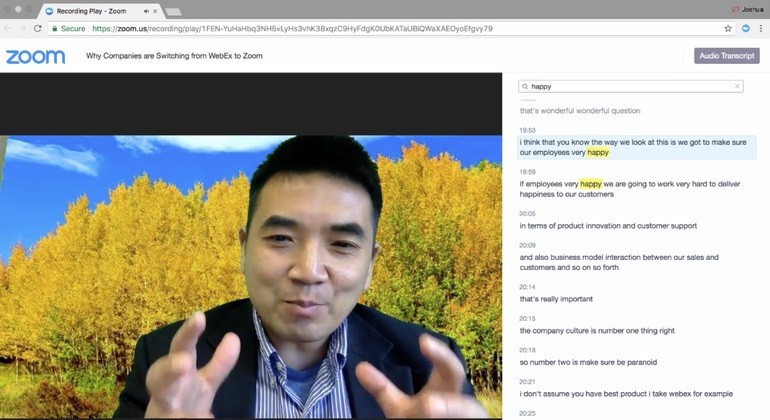
Users can conduct virtual communication through Zoom by using its cloud-based platform to host meetings and webinars, and make voice calls as well as instant message other participants. Zoom Video Communications released its software in 2011 to become one of the most popular communication platforms for businesses, educational organizations, and remote work groups. Users rely on Zoom because it provides high-definition audio and video, along with screen-sharing capabilities and real-time collaboration, making it an indispensable tool for connecting people within organizations or individually.
Zoom's user-friendly design means both novice and experienced users can easily participate in or run meetings. Through its platform, users can enjoy HD video conferencing, create virtual backgrounds, organize meetings using breakout rooms, and connect with third-party programs such as Slack, Microsoft Teams, and Google Calendar. Zoom also offers Immersive View, which places participants into a shared virtual background to create a more cohesive meeting environment, and Virtual Reality Integration, allowing users to join meetings in VR using avatars, enhancing engagement and interactivity. Its ability to scale across different group sizes makes it suitable for all kinds of events, from corporate gatherings to personal calls.
Zoom gained worldwide recognition when the shift to remote work and online education made it a practical replacement for face-to-face meetings. It stands out for its support of large groups, real-time text communication, and recording features that appeal to organizations, education, and content development teams. Live Transcription provides real-time captions during meetings, improving accessibility for participants who speak different languages or have hearing difficulties, and Zoom’s AI Companion assists with meeting summaries, task management, and content generation, streamlining workflow directly within the platform. Users get dependable, high-quality video conferencing from Zoom whether they use it for professional meetings, online training, or social interactions.
Why Should I Download Zoom?
Zoom stands out as one of the most flexible and productive tools for online communication available today. Ease of use is the main reason to download Zoom. Users can start or join meetings instantly through a straightforward interface that requires just one click. Guests who need to attend meetings quickly can do so without creating an account, which many other platforms require. This makes Zoom particularly useful for businesses that regularly connect with clients or external staff through video calls.
Zoom delivers strong video and audio quality that keeps communication clear throughout meetings. The platform's compression technology makes efficient use of available bandwidth, keeping it running smoothly even with limited internet access. Turning on HD video settings alongside customizable audio configurations improves the overall experience. Recording meetings is another valuable feature, giving teams access to captured discussions for training, content creation, and sharing. Zoom Docs enables collaborative document editing in real time, letting participants create, edit, and share documents during meetings without leaving the platform.
Screen sharing, file sharing, and whiteboarding make Zoom a strong choice for presentations and collaborative brainstorming sessions. The breakout rooms feature lets hosts divide participants into smaller discussion groups, which works well in online learning environments and corporate workshops. Virtual backgrounds help users maintain a professional appearance on video calls or simply add some creativity to casual interactions.
Security is a priority for the platform. Zoom protects meetings with passwords, host controls, and waiting rooms, alongside end-to-end encryption and access restrictions limiting attendance to invited participants only. Additional security features include participant muting, meeting locking, and screen sharing permission controls, along with advanced host controls that provide extra protection for sensitive meetings.
Zoom is highly adaptable, serving professional meetings, social calls, telemedicine appointments, and large-scale digital events with equal ease. Event organizers can host webinars with interactive features like polls, Q&A sessions, and chat moderation, making it a popular choice for virtual events. Continued development and new features keep Zoom growing as a capable real-time communication platform for a wide range of needs.
Is Zoom Free?
Zoom offers both free and paid plans to suit different budgets and needs. The free version includes unlimited one-on-one meetings and group meetings of up to 40 minutes with up to 100 participants. This covers most everyday needs for individual users, schools, and businesses with straightforward video call requirements.
Paid plans extend the maximum meeting duration, increase participant limits, and add cloud recording and advanced administrative controls. Business-focused plans give organizations, corporations, and event teams a more comprehensive set of communication tools. For personal use or basic business needs, the free version works well.
What Operating Systems Are Compatible with Zoom?
Zoom runs across all major operating systems and devices. On desktop, it supports Windows, macOS, and Linux, with regular updates that improve functionality and security across all platforms.
Mobile users can access Zoom through native iOS and Android apps, with full access to key features including screen sharing, chat, and virtual backgrounds. For users who prefer not to install the application, Zoom's web client lets you join meetings directly through a browser, which is useful for devices with limited storage or stricter software restrictions.
What Are the Alternatives to Zoom?
Microsoft Teams is the most widely recognized alternative, offering deep integration with the Microsoft 365 suite. It combines video conferencing with document sharing and collaborative editing, making it especially valuable for teams already working within the Office ecosystem. Microsoft 365 Copilot brings AI-powered agents to Teams that can prepare meeting agendas, summarize conversations, and manage projects in real time.
Google Meet is a strong choice for users in the Google ecosystem. Within Google Workspace, it connects directly with Google Calendar and Gmail for easy meeting scheduling and joining. Call quality is reliable, with encrypted connections and protection against meeting hijacking. Recent AI features include real-time speech translation between English and Spanish, along with AI-generated captions and subtitles in multiple languages, making meetings more accessible and inclusive.
Cisco Webex is a preferred option for businesses and government organizations that require enterprise-grade security. It delivers high-definition video, cloud recording, AI transcription, and strict administrative controls. For organizations handling sensitive information, Webex offers a dependable, secure alternative to Zoom. Recent updates have added AI-powered conversation summaries, voicemail transcription, and native call recording to further streamline communication.