Numerous devices run Windows 10 as the operating system version, which Microsoft created in 2015 to succeed Windows 8.1. The OS version serves as one of the most common platforms because Microsoft designed it to work on devices ranging from desktops to laptops to tablets to embedded systems.
The user-oriented Windows 10 system integrates classic desktop components into a single platform that offers speed and defense capabilities along with cloud-based functionality. The operating system also introduces the Microsoft Edge browser as its default web platform, replacing Internet Explorer with a faster and more secure browsing experience.
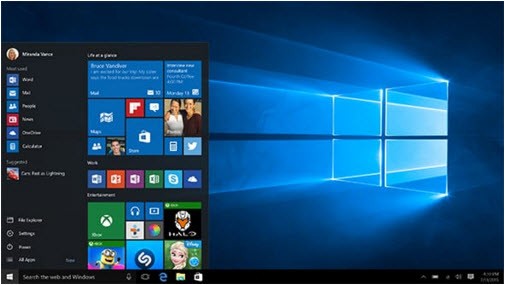
Windows 10 unites two main interfaces, as it maintains the original Start Menu of Windows 8, yet integrates a new design that accommodates touch-based and non-touchscreen devices. The user interface improved through cohesion and streamlining, delivering support both for legacy software and new-generation applications.
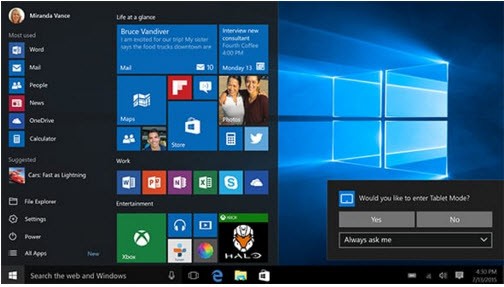
The system features a “Tablet Mode” (Continuum) that automatically adjusts the interface for touch-enabled devices, ensuring a seamless transition between desktop and tablet environments. Users can take advantage of Microsoft’s digital assistant Cortana through Windows 10 to connect with their system by voice command, search files, and set reminders. Speech Recognition and Dictation capabilities allow hands-free typing and system control, enhancing accessibility and productivity.
As Windows 10 support ended on October 14, 2025, we strongly recommend that you switch to another system. For example: Windows 11 (if your hardware is compatible) or a Linux distribution (you will find a small list in the alternative section).
Why Should I Download Windows 10?
Windows 10 demonstrates an excellent equilibrium between speed, performance, and protection features, which provides an excellent choice for home and office environment applications. The operating system supports an extensive variety of applications that cover both traditional desktop applications and Microsoft Store universal apps. Businesses and individuals who upgrade to Windows 10 through its backward compatibility feature will maintain disruption-free access to essential software programs. It also provides optional “Features on Demand,” enabling users to add or remove advanced system components like OpenSSH or graphics utilities as needed.
Security enhancements will be among your reasons to install Windows 10 when it is downloaded. Windows 10 stands apart because it obtains permanent security updates that shield users from internet dangers, along with spyware and exploitation attempts. Windows Defender includes built-in real-time virus and spyware protection through its security features, which render third-party antivirus programs unnecessary for users. Users can authenticate their Windows account through facial recognition or fingerprint scanning because Windows Hello has been integrated as an additional security feature.
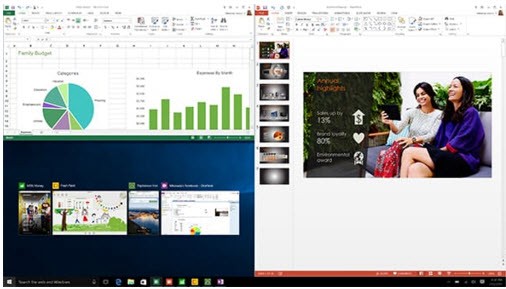
The multitasking features of Windows 10 remain at their highest level. Users benefit from Task View to create virtual desktops, which enables workspace organization and simultaneous application running. Users can achieve better productivity through Snap Assist, which offers an easy method for managing open windows. The Action Center combines notifications and quick settings to make Wi-Fi, Bluetooth, and Focus Assist (Do Not Disturb) functions easier to reach. This helps keep your workflow efficient. The enhanced Clipboard History also lets users sync copied items across devices for faster reuse. The combination of features suits busy experts who need to operate many tasks simultaneously while performing document editing and web activities, and video calls.
Gaming enthusiasts require Windows 10 since it offers essential optimizations for better performance in video games. The system supports DirectX technology that provides both improved graphics performance and minimized system delays, and boosts gaming speed. The Game Mode feature, along with its resource management capabilities, makes Windows 10 the first choice among gamers because it delivers optimal gameplay performance. Through the Xbox feature, users can stream games from their Xbox gaming console, in addition to using its features for social connection and quick control access through the Xbox Game Bar.
The main cloud connectivity features defined by Windows 10 now take center stage. OneDrive integration provides users with the ability to match their data files across different devices so they maintain access to important documents and media files. The system links Microsoft Office programs with its operating system features, enabling users to build connected work processes that boost their productivity. The cloud-based collaboration feature serves professionals well because they use team projects and remote work tools that rely on this functionality.
Is Windows 10 Free?
It is possible to obtain Windows 10 at no cost through specific methods, even though the operating system remains ineligible for full price exemption. Through a program Microsoft provided, free updates for Windows 7 and Windows 8.1 users who had a genuine version of their operating system, thus ensuring a cost-free transition for many users. Users can sometimes validate Windows 10 with previous activation keys obtained from specific versions of Windows, although Microsoft discontinued its official free upgrade initiative.
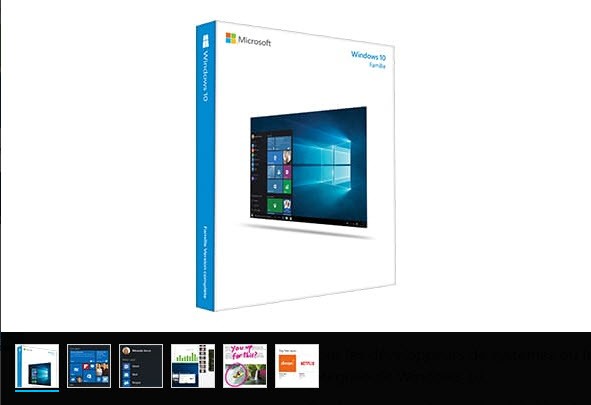
A license purchase through Windows 10 is necessary for users without existing licensing, and the available editions depend on individual user specifications. Windows 10 Home satisfies basic needs, but Windows 10 Pro provides expanded security characteristics together with work-focused capabilities required by business professionals.
Users can install Windows 10 for free through Microsoft without activation, yet this unactivated version displays desktop watermarks as well as limited customization capability. However, it’s important to note that Microsoft will officially end security updates and support for Windows 10 on October 14, 2025. After that date, your system will no longer receive protection patches or improvements. For long-term stability and security, it’s strongly recommended to upgrade to Windows 11 or consider a Linux distribution if you prefer an open-source alternative.
What Operating Systems Are Compatible with Windows 10?
Windows 10 behaves as an operating system but preserves compatibility with diverse hardware setups during operation. Windows 10 operates officially across platforms that include x86 and x64 CPU architectures, thus allowing usage on machines with 32-bit processors as well as modern ones with 64-bit processors.
Devices that use Windows 7, Windows 8, or Windows 8.1 can run Windows 10 when they fulfill the minimum system requirements. Windows 10 allows users to upgrade from previous versions of operating systems without requiring new hardware for effective performance. Microsoft advises that users will achieve the best results when operating Windows 10 on updated hardware components that include solid-state drives and 4 GB RAM, and contemporary processors.
Windows 10 exhibits excellent compatibility between different systems because it connects operationally with multiple operating systems. Users gain access to Linux distributions through Windows Subsystem for Linux (WSL), which lets developers and IT professionals execute Linux applications with Windows programs simultaneously. Through Microsoft’s Your Phone app, users can achieve well-rounded smartphone integration with Windows PCs to communicate and exchange data with their devices running Android operating systems.
What Are the Alternatives to Windows 10?
The latest version of Microsoft's operating system, called Windows 11, evolves as one of the most direct OS rivals for Windows 10. Windows 11 provides users with an upgraded design approach combined with advanced security protection, together with increased multiple-task handling features that deliver a contemporary computing experience. It introduces a centered Start Menu, rounded UI elements, and the Fluent Design “Mica” material for a modern look. It also integrates Microsoft Teams directly in the taskbar and supports Snap Layouts and Groups for advanced window management. The minimum hardware requirements for Windows 11 exceed some user specifications, thus making it a less appropriate choice for certain potential customers. Windows 11 also mandates TPM 2.0 and Secure Boot for enhanced hardware-level security, and it supports DirectStorage and Auto HDR for gaming performance.
People who prefer no-cost open-source operating systems can choose Ubuntu, Fedora, Linux Mint, or any other Linux distribution as suitable alternatives to traditional platforms. Linux delivers excellent security combined with stability features and customization options suitable for developers, along with IT departments and individuals concerned about privacy. It offers unmatched modularity: you can choose your desktop environment (GNOME, KDE, XFCE, etc.), install or remove any component, configure kernel settings, and automate updates. Linux also benefits from rapid security patches from its community-driven ecosystem and strong shell and scripting tools. New Linux users must learn its operating concepts after using Microsoft Windows environments, while specific commercial programs might work differently on Linux systems.
macOS by Apple represents a strong choice as an operating system, since it provides exceptional performance alongside a polished user experience to Mac users who belong to the Apple ecosystem. The exclusivity of the macOS operating system to Apple computers means users get limited flexibility when trying to install the OS on alternative hardware. macOS also includes built-in features such as Time Machine for seamless backups, tight ecosystem integration (iPhone, iPad, Handoff), strong sandboxing and Gatekeeper security, and optimizations between software and Apple hardware for great energy efficiency.