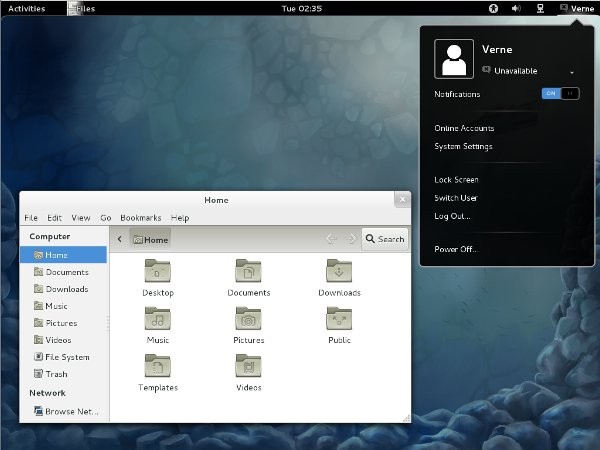
The Linux operating system Fedora places its main emphasis on open-source development, together with developer tools and modern software packages. Users benefit from an always-up-to-date system platform that delivers solid performance and security.
The Linux distribution Fedora offers a contemporary hardware platform for developer tools and the latest software applications, despite its reputation as a developer platform. Nevertheless, the OS offers benefits to user groups beyond developers. The Fedora distribution is slightly ahead of its time, receiving Linux kernel updates and the newest packages before other distributions.
The organization responsible for supporting Fedora is Red Hat, which has created a distinct profile through its dependable, stable operating environment. Developers use Fedora for its reliability, while system administrators use it as a testing platform before choosing enterprise distributions.
Users can select the Gnome desktop as the default interface, but Fedora also provides alternative desktop setups, like KDE, with different visual styles through its spin distribution options. The Linux desktop offers a pleasant user experience for those moving from Windows or Mac. By default, Fedora does not contain proprietary software because the operating system adheres to its strong open-source principles.
Why Should I Download Fedora?
People who wish to understand Linux software, or those who already use it, should consider Fedora their next step toward an open-source future. The operating system avoids forcing users to handle unnecessary legacy features for reasons of familiarity. This operating system invites users to feel a contemporary interface that maintains a clean, minimalistic view with optimized functionality.
Daily system usage improves significantly with this approach. The Fedora distribution avoids installing extra applications that users have not explicitly requested. The operating system provides absolute essentials for your work before you can customize your environment according to your needs.
The Fedora operating system serves users who seek both unrestricted control over computing and reliable access to emerging technologies in their environment. Fedora strikes a perfect balance between delivering cutting-edge technologies for developers and supplying users with rock-solid systems for daily tasks.
Update processes in Fedora move rapidly and with complete transparency because the development team prioritizes developers and contributors throughout the design process. Your Fedora system remains stable because its update procedures follow a clear pattern and maintain strict organizational rules.
Security features in Fedora surpass those of other operating systems. System protection against unwanted access becomes achievable through the default activation of SELinux. Your system operates without distracting you through repeated alerts and maintains its speed at all times.
The operating system runs silently during your work. The Fedora community remains highly active through its support channels, including forums and IRC, as well as documentation platforms that provide assistance free of charge and free of advertisements.
Is Fedora Free?
Fedora is completely free. The application does not require any subscriptions and has no hidden upsells during installation or in trial versions.
The entire collection of Fedora editions, from workstations to servers, runs under an open-source community-maintained system. The operating system offers complete freedom: you do not need registration or payment, and you are free to modify or share copies under its open-source license.
What Operating Systems Are Compatible with Fedora?
Fedora operates independently as an operating system. Fedora functions independently as an operating system, or it co-exists with Windows and macOS systems through dual-boot partitioning.
Both x86_64 and ARM architectures are supported by this operating system, enabling it to run on desktops and laptops with conventional processors, as well as on some Raspberry Pi models and compatible ARM-based computer boards.
Fedora operates optimally on advanced hardware platforms but performs adequately on equipment with standard specifications. A bootable USB drive or virtual machine setup is required for installation; it provides an easy-to-follow installer program. The system functions with diverse hardware requirements when users keep updates up to date.
What Are the Alternatives to Fedora?
Fedora is one of the many operating system alternatives.
People seeking entry-level system alternatives with comprehensive built-in assistance should consider Linux Mint as an excellent option. The operating system uses the Ubuntu distribution and provides a welcoming environment for users transitioning from Windows. Traditional desktop layouts are included, and the system requires minimal time for users to get familiar with it. The stability of Linux Mint surpasses that of Fedora because it avoids rapid design updates, making it an excellent option for users who demand a dependable computing system without the regular update hassles. Fedora offers package installation for multimedia codecs and additional tools after the product delivery date, whereas Mint delivers these tools directly during its initial setup.
The well-known Linux distribution Ubuntu serves as a perfect alternative to the previously mentioned options. The operating system shares many similarities with Fedora but targets a mainstream audience more than its counterpart. The LTS versions of this system offer 5 years of support, making them perfect for users who prefer to install and forget about their system requirements. The Ubuntu installer provides users with an easier interface for new installations, while the default bootloader supports proprietary drivers and essential codecs if you enable them at installation time. Users who want extensive documentation and regular application updates find that Ubuntu provides the best platform for entering Linux and staying within it.
Zorin OS offers users an original installation alternative. New users find this operating system approachable because it lets you select between Windows and macOS display themes during installation. The operating system uses the Ubuntu Foundation, which provides access to identical driver capabilities and software library features. Users who prefer ready-to-use systems and dislike system customization will find Zorin OS to be their ideal choice. Users can access Zorin OS through its cost-free basic version, as well as its premium edition, which adds additional capabilities, while the standard edition offers extensive functionality. Zorin provides a sophisticated user interface to assist users moving from Windows while maintaining a well-rounded under-the-hood functionality.