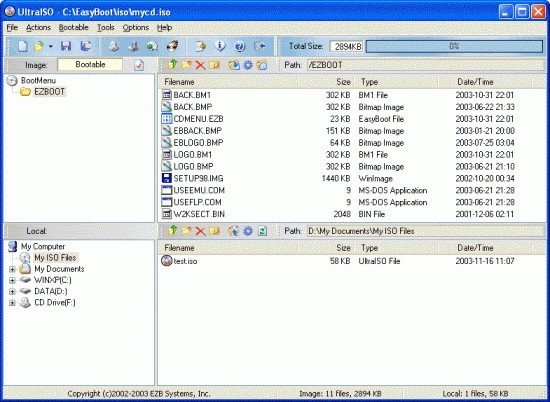
The powerful UltraISO system allows users to control various functions involving ISO image file administration. The application serves IT experts, software developers, and unprofessional users who work with ISO files in their everyday work. UltraISO provides simple methods for users to create bootable USB drives through ISO extraction and format conversion. The primary strength of UltraISO comprises direct ISO file modification that demands no extraction of contents beforehand. The application allows you to work with ISO files by adding, deleting, or modifying files without unpacking and repacking.
The software supports all major CD, DVD, and Blu-ray image file types, including ISO, BIN, IMG, CIF, NRG, and more. The software enables you to transform your CDs or DVDs into ISO images for both backup purposes and installation media creation. The program enables users to encrypt their files, while compression saves disk space and helps protect data. The interface of UltraISO presents basic functionality in a way that makes it usable by people with little technical knowledge.
UltraISO's extensive capabilities attract a large user base because the program extends beyond image creation and editing. Through virtual drives, UltraISO enables users to access ISO files exactly as they appear when burned to physical discs. The lack of physical CD or DVD drives in your system becomes no obstacle since this functionality enables installation from discs. UltraISO gives users the strength they need to manage bootable drives, software libraries, and disk images while maintaining a simple, non-confusing interface.
Why Should I Download UltraISO?
You should download UltraISO for its practical value when working with disk image files, as well as for your bootable USB drive requirements for operating system deployment. The key factors making UltraISO the preferred choice are its sophisticated features and a practical interface design. UltraISO distinguishes itself from other comparable applications by providing an interface without the distracting options users don't require. The application maintains a clean, well-organized interface, so you can handle tasks without extra interruptions.
The ability to create bootable USB drives is one of UltraISO's most beneficial features, as it helps users install operating systems and need portable recovery utilities. The application supports dual boot options between BIOS and UEFI, making it compatible with almost every contemporary computer system. The ability to adapt to different situations makes USB bootability essential for broken-system repairs and new-machine setups when an ordinary CD or DVD drive is unavailable.
The feature to convert different image formats into ISO files stands out as an essential motivation for users to obtain UltraISO. Less common file types, which your regular tools cannot manage, become compatible through UltraISO, which transforms them into ISO format for easy usage. You avoid any compatibility problems because you can mount or burn images effortlessly.
Is UltraISO Free?
UltraISO offers a free trial version, but full version access requires a license. Users of the trial version can only handle ISO files with size constraints during creation and editing. The premium license grants full feature access, including unrestricted editing capabilities and support for handling large files.
What Operating Systems Are Compatible with UltraISO?
The software application UltraISO operates seamlessly with Windows 7, Windows 8, Windows 8.1, Windows 10, and Windows 11. UltraISO operates exclusively on Windows, but users can run it through virtualization tools or compatibility layers on macOS and Linux. The Windows operating system compatibility, which ranges from old versions to new releases, provides maximum use for standard users.
What Are the Alternatives to UltraISO?
The powerful capabilities of UltraISO still do not eliminate many alternative tools that match or surpass its performance, depending on user needs. UNetbootin represents a widely used open-source program known for providing basic features to its users. UNetbootin functions as a dedicated solution to generate bootable USB drives from ISO files, which appeals strongly to Linux distribution users. Unlike UltraISO, this program operates at no cost and enables users to work across multiple systems, including Linux, macOS, and Windows. Unetbootin provides an ideal solution for bootable drive production when all you require is basic functionality without advanced options.
The program Rufus stands as an outstanding choice because it provides efficient bootable USB drive capabilities without overwhelming users with fluff. The tool operates at high speed compared to related tools while delivering high performance for creating installation media and generating low-level system tools. Rufus enables users to boot from either BIOS or UEFI to achieve the best compatibility with different operating systems. All users find it accessible because Rufus is an open-source tool available at no cost. Being updated frequently is essential for users who need to create new-generation bootable media because Rufus tracks new technology developments. The high-speed and reliability features of this program have made it popular with people who work in tech and IT fields.
The software application PowerISO functions similarly to UltraISO, providing users with complete management capabilities for image files, including creation, editing, mounting, and burning. The application handles multiple file formats, such as ISO, BIN, and NRG, through its user-friendly interface that users can navigate easily. The full version of the software demands a paid license, but users can experience its features through the available trial version without charge. The standout security feature of PowerISO is its ability to encrypt and compress image files, which enhances your data protection. The ability to mount ISO files using virtual drives is one of the key features of this program.