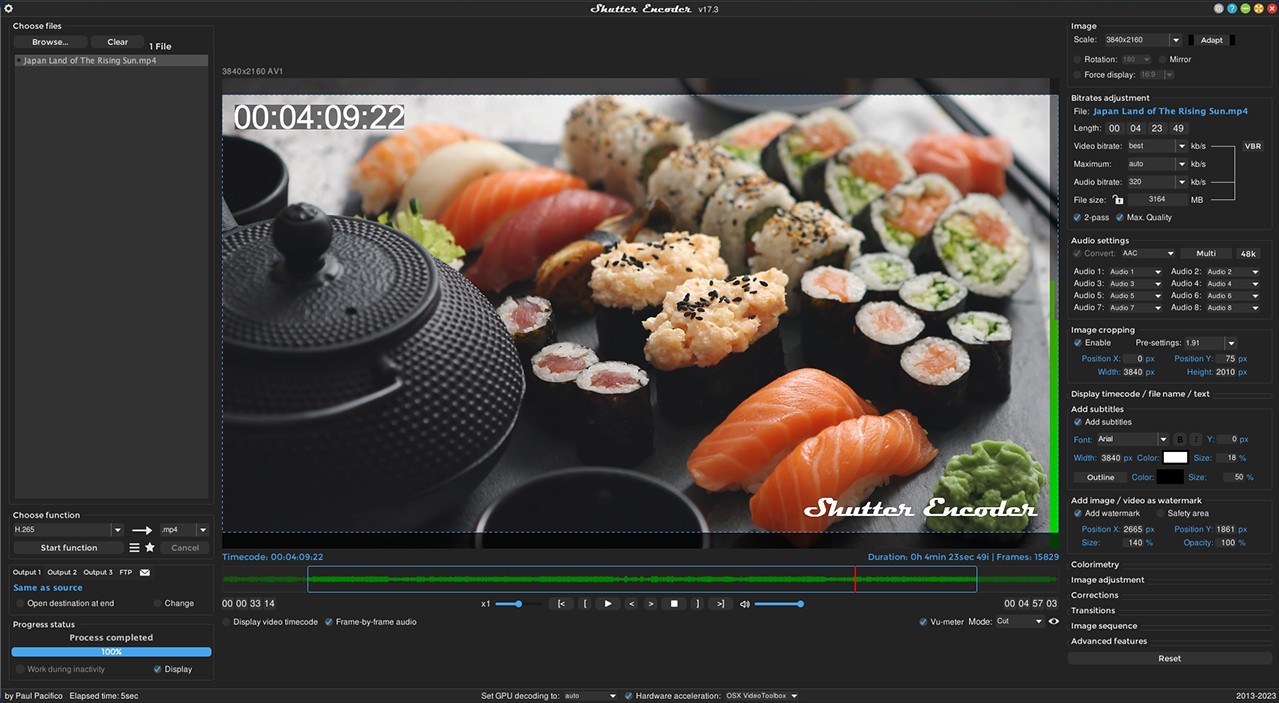
Shutter Encoder is a free and open-source program that converts media files and speeds up the process. It functions as an advanced converter beyond basic capabilities because it works with multiple file types using various codecs, allowing users to edit freely. Shutter Encoder is useful for users who work with media content because it supports both video and audio files, as well as various image formats. It is designed for both casual users and professionals who need to process files quickly and efficiently.
Shutter Encoder is a complete media solution that uses FFmpeg as its foundation throughout its development. The tool makes use of the entire FFmpeg framework but presents it to users via an intuitive graphical interface. Its capabilities include video content compression, format transcoding, and audio extraction from videos.
Shutter Encoder's primary advantage is its ability to process multiple tasks at the same time. The software's task queue feature allows users to prepare multiple documents in sequence, and the software completes all work independently. It is ideal for people who work with large media collections because it allows for the automatic processing of multiple documents at once. The tool offers multiple encoding options and custom configuration options, allowing users to create optimized output specifications. It allows you to adjust the bitrate, resolution, and codec options until you achieve the desired results.
Why Should I Download Shutter Encoder?
The main reason to choose Shutter Encoder for download comes from its reputation as a reliable converter with full control over media quality. Because the program supports a wide range of functions, the download provides access to a sophisticated application rather than a simple encoding tool. It provides precise control over your converted documents via customizable output settings to achieve the desired results.
The main reason for downloading Shutter Encoder is because it is an open-source application. The program provides everything without any hidden costs and eliminates any trial limitations or upgrade requirements. Shutter Encoder provides all of its services free of charge while maintaining advanced professional capabilities. It offers a full suite of professional tools to all users, including video editors and audio designers, as well as beginners who need to reduce file sizes without sacrificing quality.
Efficiency is another major draw. The process does not require you to waste your time repeating step-by-step conversions of individual files. The program supports batch processing, allowing users to send multiple jobs to the software for automated processing. It saves time and reduces stress for users who need to manage large projects. Raw footage compression and format transcoding of high-resolution videos become simple tasks that eliminate the frustration of repetitive work.
Shutter Encoder is notable for its ability to encode a variety of formats and codecs. This program enables users to convert files beyond several specific types, including MP4, MOV, FLAC, and PNG. It allows them to use any media file because it supports all formats without the need for additional adjustments. Any professional who needs to convert different file types must have this flexible solution in their workflow because reliable results matter in their field.
Is Shutter Encoder Free?
The Shutter Encoder app is completely free to use. Shutter Encoder presents itself as an open-source solution where users neither pay for functional capabilities nor receive intrusive ads nor need to upgrade to premium versions.
Shutter Encoder provides you with a professional-grade tool at no cost and with no hidden or recurring fees. The project welcomes donor support to continue development, but participation is entirely optional. Supporting the project is optional, but your contributions will help to keep things running smoothly.
What Operating Systems Are Compatible with Shutter Encoder?
Shutter Encoder's operating system compatibility includes Windows, macOS, and Linux, making it accessible to all types of users based on their operating system preferences. The program works seamlessly on any platform and delivers consistent performance across all supported environments.
Shutter Encoder's setup works flawlessly on all supported platforms, eliminating the problems associated with cross-platform bugs that plague many software apps. The tool integrates seamlessly with any Windows PC, macOS, or Linux system.
What Are the Alternatives to Shutter Encoder?
Understanding your other software options remains critical, even though Shutter Encoder performs admirably as a tool. Your requirements determine whether other tools will perform better than what you currently have. File Converter, HandBrake, and Format Factory are three popular software programs that users choose instead of Shutter Encoder.
File Converter is easy-to-use software that adds itself to your Windows system's context menu for quick file conversion. You do not need to launch a new application because you can use the right-click menu to select your preferred format at any time. The app provides quick execution while remaining efficient, making it ideal for completing quick tasks. Users are not overwhelmed by technical settings because this program's functionality is simple and straightforward. The fundamental approach of this software results in the absence of sophisticated customization options found in Shutter Encoder. If users only need simple conversion functions, the program is an excellent choice.
HandBrake provides users with advanced video encoding features, which earn it a reputation as an effective alternative for users with these needs. Many users consider this tool to be exceptional because it includes advanced file compression features as well as extensive settings options. The process entails more than just encoding files; you must optimize them for a variety of devices, including mobile phones and tablets, as well as web uploads. HandBrake's interface allows you to select a codec, as well as change the bitrate, resolution, and encode speed. When you choose to work with HandBrake, you can create precise output specifications to achieve your desired results. The program takes some practice to master, but those seeking advanced functionality will be pleased with its customization capabilities.
The media converter Format Factory exists as one tool that handles multiple types of files, including images and video and audio content. This tool allows users to convert multiple file types using a single interface, eliminating the need to use multiple programs. It offers users complete functionality by allowing batch processing and format conversion through a single interface, which replaces multiple standalone applications. In addition to standard capabilities, Format Factory allows users to crop files and merge multiple items to make simple content edits. The program has less automation than Shutter Encoder, but it provides adequate functionality for users working with various types of media.