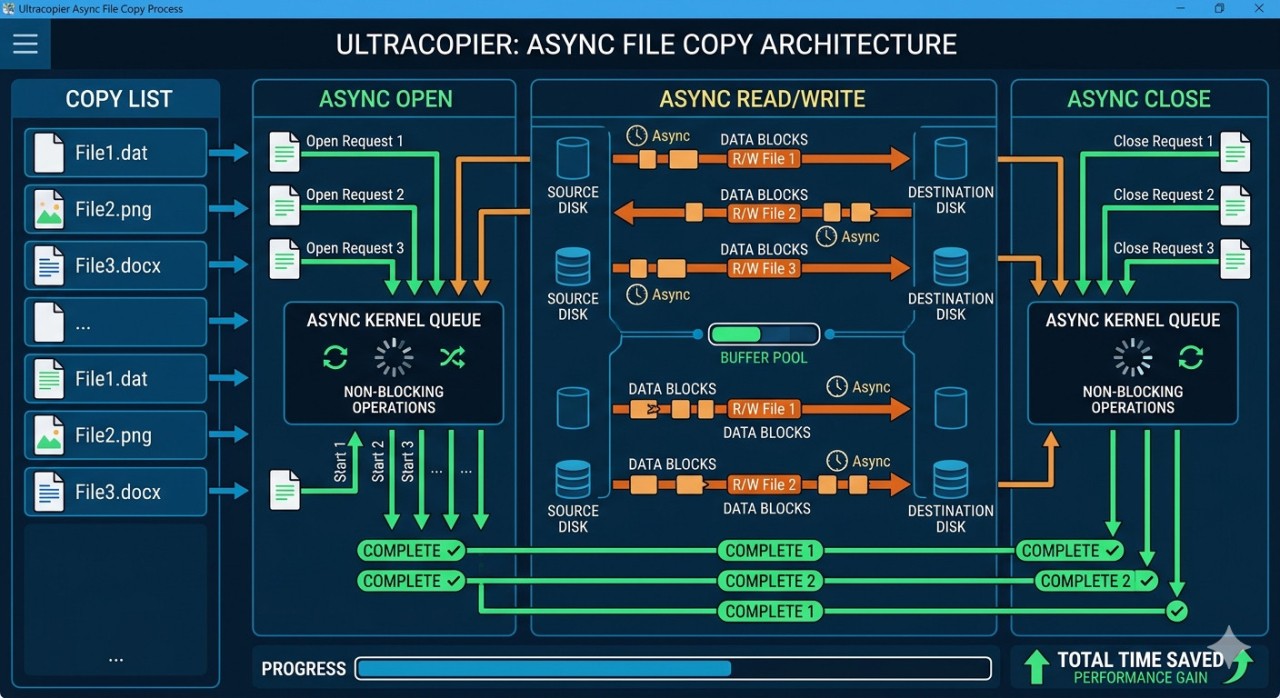
Ultracopier (aka SuperCopier) serves as a file transfer application with management tools that increase computer file movement speed. The software offers more capabilities than standard OS file copiers, providing extensive control and flexibility for large data transfers. The program helps users manage their files through fast and dependable procedures where they handle multimedia content and system backups, among other daily file operations.
Ultracopier distinguishes itself through its smooth handling of errors during file transfers. The software notifies users of ongoing transfers that have encountered issues and provides two options: either bypass difficult files or reattempt the transfer. The software delivers precise error messages to users that let them understand why their file copying stopped midway through. Ultracopier offers excellent benefits for large file collection management since it operates unassisted throughout the entire transfer process.
The software delivers impressive speed acceleration for any file transfers that take place. The built-in copying speed limitations from Windows or other operating systems do not limit you. Standard algorithms in Ultracopier enable users to achieve higher productivity output without compromising system stability. There is no chance for file corruption or data loss since even maximum performance operation will keep your files protected. Ultracopier implements two uncommon features for native file copying solutions through its file prioritization and its automatic on-error resume functionality. The file transfer control function of Ultracopier allows users to complete their operations without risking lost progress or requiring a new start of their work.
Why Should I Download Ultracopier?
Ultracopier is beneficial when you need to transfer large files and datasets regularly. Ultracopier provides a powerful replacement for built-in file-copy functions because it adjusts its capabilities to your system's demands. The file transfer process through Ultracopier provides continuous feedback to users instead of conventional methods that silently fail. Ultracopier informs users precisely about all transfer failures and file copy errors. Each detail in the error system and the friendly interface prompts enable users to effectively diagnose system problems.
Rapid data copying is the strongest motivation to choose Ultracopier as your preferred tool. This tool delivers superior performance benefits beyond standard operating system default functions. Ultracopier immediately demonstrates its speed during the transfer of entire media directories or between external storage devices. It prevents wasted transfer time because it enables effective use of your time by avoiding waiting periods, especially when dealing with deadlines and backup schedules.
Ultracopier demonstrates a distinctive level of flexibility across its feature set. You maintain full control over your file operations because this software does not impose reluctantly chosen default settings. Ultracopier provides users with tools to arrange transfer priorities and enables users to suspend and restart operations while letting them select handling methods for errors. Power users who need complete management optimization of their file practices will benefit from this control system. The application allows you to create custom workspaces that match your individual operation methods beyond standard factory defaults.
Is Ultracopier Free?
Users can download Ultracopier for free and use all its features at no cost. Users of Ultracopier can access this tool at no cost since it exists under the open-source framework.
The software contains all essential features at no cost, although you can support its development by making donations. The free version of Ultracopier comes with all features necessary for file management, combined with high-level copying functionality that does not impose any limitations or restrictions on users.
What Operating Systems Are Compatible with Ultracopier?
Ultracopier runs on Windows, Linux, and macOS. The software runs on multiple platforms, so you can choose it based on your system preferences.
The software operates without glitches on all principal editions of these operating systems to prevent both compatibility problems and crashes. Ultracopier provides users across different hardware platforms, which include Windows desktop devices as well as Mac laptop computers and Linux server systems, with a standardized and dependable file copying feature.
What Are the Alternatives to Ultracopier?
Above all, the powerful features of Ultracopier as a file management tool, other programs work equally well for users needing bulk data transfer assistance. Your workflow requirements may make different tools more suitable than Ultracopier. The file-copying alternatives to Ultracopier include Teracopy, FreeFileSync, and FastCopy.
TeraCopy stands as one of the leading alternative file transfer solutions that delivers fast and dependable services. Transfer delays and disconnections do not occur when you enable TeraCopy for your file operations. The application enables quick and efficient data transfer of large datasets while maintaining complete performance and avoiding data errors. The software provides a straightforward interface that enables users to handle all types of file transfer duties without difficulty. TeraCopy maintains error recovery functionality, which keeps the program working by trying to complete file copies when failure happens. The program conducts issue recovery operations to finish the process before it minimizes disruptions. The application continues to run through file transfers and offers a clear display of which files led to errors while continuing to work on other files.
As a backup tool, FreeFileSync proves itself an excellent solution when file-copying speed requirements are not met. The program operates as a file synchronization solution, yet provides above-average performance for large dataset copying projects. The data movement process becomes an opportunity to maintain consistent data backup between devices. This tool enables users to create automated backup procedures as well as synchronize directories between their computer drives and remote cloud storage. The main strength of FreeFileSync arises from its capability to process intricate directory structures without errors or omissions of files. The software requires no full backup replacement when specific files are modified during the backup process.
FastCopy stands as an alternative program with remarkable speed, which defines its popularity among users. This application offers quick data transmission speed because it operates both efficiently and rapidly while handling big file transfers. FastCopy exists solely to deliver rapid transfers without any additional features or mass that slow down its operations. The operating system cache remains inactive when FastCopy operates because its data writes and reads occur directly between devices for speed purposes. Total file transfer speed does not slow you down as you work and specifically helps with big backup processes and heavy workloads.