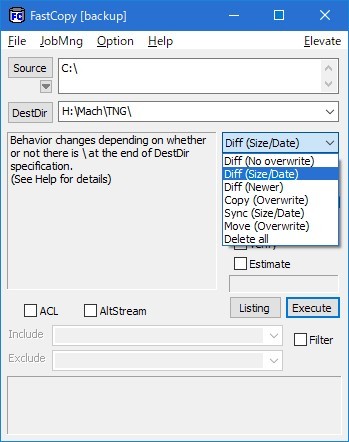
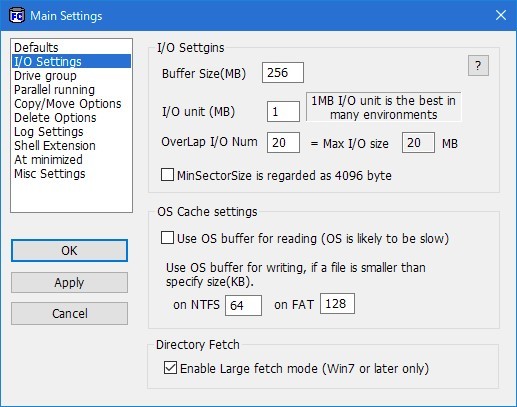
FastCopy is a small, no-nonsense tool built for one thing: moving files fast. It doesn't try to do anything flashy or overcomplicate the process. It just handles file transfers with a level of speed and reliability that makes the default Windows copy function feel outdated. Whether you're backing up a massive directory or moving documents between drives, FastCopy gets the job done without complaints, regardless of file size. If you've ever watched the Windows copy dialog crawl along or fail mid-transfer, FastCopy pretty much leaves that experience in the dust.
The software runs light on your system and doesn't put pressure on your resources. It uses multiple threads to maximize data transfer speed and efficiency, all while running in the background without chewing through your CPU or RAM. The interface looks minimal at first glance, but that simplicity is the whole point. There are no flashy design elements because the focus is entirely on performance.
Where FastCopy really proves itself is in the accuracy of its file transfers. It runs verification checks during copying to confirm that every file arrives exactly as it was in the original location. It handles large files and complex directory structures without issues, and it supports long file paths and Unicode characters, which means it works smoothly with all kinds of file types and naming conventions. There's no feature bloat here; you get fast, reliable file copying and nothing else. If efficiency through a clean, focused interface is what you're after, this tool is worth trying out.
Why Should I Download FastCopy?
On the surface, a standalone file copying tool might seem unnecessary since Windows already handles this built in. But anyone who's tried to move large amounts of data knows how slow and unreliable the default copy-paste can be. Once you try FastCopy for the first time, the difference in speed is hard to ignore, and going back to the standard method starts to feel like a step backward.
Speed is the first thing you'll notice. FastCopy uses smart algorithms to push transfer rates to the maximum your hardware can handle, which eliminates the long waits that come with moving big files or large numbers of smaller ones. Where other tools tend to bog down with huge directories or thousands of tiny files, FastCopy keeps moving without slowing down. It does the job without any unnecessary fuss.
Reliability is the other major factor. One of the worst things about conventional file transfers is when they stall or fail partway through. FastCopy includes verification options that check data integrity during the copy process, so you can be confident that every file landed in the right place and arrived intact. When you're dealing with critical data or important backups, that kind of assurance matters.
FastCopy is also more flexible than you might expect from such a focused tool. It offers different operating modes depending on what you need: you can sync directories, update only modified files, or overwrite existing data entirely. Instead of locking you into one workflow, it adapts to whatever your situation calls for.
Is FastCopy Free?
FastCopy is completely free to use. It's an open-source tool with no ads, no trial restrictions, and no locked features hiding behind a paywall.
You can install it on as many devices as you need without any licensing fees. The software does everything it advertises without ever pushing you toward a paid upgrade or premium version. It's genuinely free in every sense.
What Operating Systems Are Compatible with FastCopy?
FastCopy is built for Windows and supports every version from Windows XP through Windows 11. Regardless of whether you're running an older setup or the latest release, compatibility isn't a concern.
The tool is also portable, meaning you can run it without going through a formal installation process. Just download it, launch it, and start copying files. FastCopy doesn't support macOS or Linux, but for Windows users who need a fast and reliable download for file transfers, it's one of the most dependable utilities available.
What Are the Alternatives to FastCopy?
FastCopy is difficult to beat for pure speed, but a few other file transfer tools are worth considering depending on your needs.
TeraCopy is one of the most popular alternatives, and it shares a similar goal of optimizing transfer speeds. One of its strengths is that it integrates directly into Windows Explorer, so you can use it without opening a separate application. TeraCopy also offers pause and resume functionality, which is convenient when transferring large amounts of data in stages. It performs the same kind of file integrity checks as FastCopy, and its interface is a bit more polished, which may appeal to users who prefer a more visually refined experience.
FreeFileSync is primarily a synchronization tool, but it handles file movement between locations well too. It's particularly useful for managing backups and keeping directories in sync across different drives or devices. A standout feature is its ability to detect which files have changed before copying, which saves time and system resources by skipping anything that hasn't been modified. It doesn't match FastCopy in raw speed, but it provides reliable data consistency across multiple locations. There's a bit of a learning curve at first, but once you're familiar with it, FreeFileSync is a dependable choice.
Ultracopier is another file transfer tool that focuses on giving you more control over the process. You can manage transfer queues, set speed limits, and configure custom error-handling rules to suit your workflow. It offers more configuration options than FastCopy, though it trades some of that raw performance for the added flexibility. The user experience isn't quite as streamlined as FastCopy's, but if you want fine-grained control over how your file transfers are organized and executed, Ultracopier gives you those options.