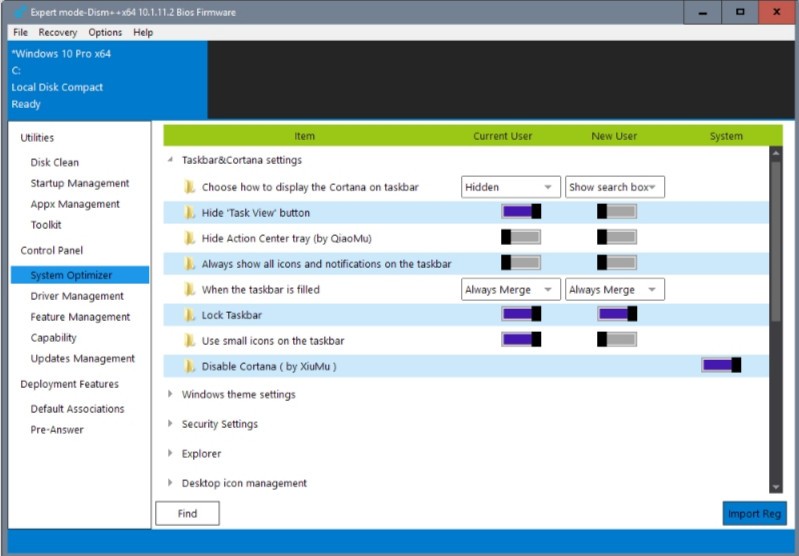
Dism++ is one of those system tools that doesn't get nearly the attention it deserves. It's essentially a graphical front end for Microsoft's Deployment Image Servicing and Management (DISM) command-line tool, but instead of making you type commands into a terminal, Dism++ wraps everything in a clean, accessible interface. That makes it practical for people who want to manage their Windows system files without needing to know command-line syntax.
With Dism++, you can handle system cleanup tasks that would normally require working in a terminal window. It covers the basics like removing junk files, but it also lets you manage startup items, tweak system settings, integrate Windows drivers, and strip out unneeded Windows components. It goes deeper than most cleanup utilities while keeping everything approachable.
Under the hood, Dism++ taps into the same native DISM capabilities that Microsoft built into Windows. Unlike a lot of flashy optimization software that promises big results and barely delivers, Dism++ keeps things straightforward and actually does what it says. It gives you real control over the technical side of Windows without adding unnecessary complexity. The tool is also lightweight and fully portable, which means it won't slow your system down with background processes or installation bloat.
Why Should I Download Dism++?
If you want to keep your Windows installation clean and running well without diving into system settings or memorizing command-line arguments, Dism++ is a practical download. It puts you in direct control of your Windows setup in a way that feels productive rather than tedious, which is more than most built-in maintenance tools can offer.
The feature set goes well beyond clearing out temporary files. Dism++ digs into deeper system areas, letting you manage Windows updates, optimize startup behavior, and remove broken updates that might be dragging your system down. It functions like a professional-grade maintenance tool that lets you make meaningful changes without putting essential system functions at risk. A built-in backup feature also lets you save your system state before making changes, so you can roll things back if a tweak doesn't work out.
One of the best things about Dism++ is how light it is. There's no bloated interface that takes forever to load, no pop-up ads trying to sell you something, and no upsell to a premium version. Every feature is available right out of the box, and the whole application stays out of your way while doing its job.
Portability is another advantage worth mentioning. You don't need to install Dism++ on your system at all. You can run it straight from a USB drive, which makes it perfect for troubleshooting other machines or performing maintenance on the go without leaving anything behind. That combination of power and simplicity, with no gimmicks attached, makes it a genuinely useful tool to have on hand.
Is Dism++ Free?
Yes, Dism++ is completely free to use. There are no subscription fees, no trial limitations, and no locked features waiting behind a paywall.
The project is open-source, so you get the full set of capabilities without needing to pay for updates or add-ons. You can download it and use it for both personal maintenance and professional system administration work without any restrictions.
What Operating Systems Are Compatible with Dism++?
Dism++ runs on Windows and supports versions from Windows 7 through Windows 11. It's especially useful on Windows 10 and 11, where managing updates and system cleanup manually can get frustrating without a dedicated utility.
The software doesn't support macOS or Linux, since it's tightly integrated with Windows system components. Both 32-bit and 64-bit configurations are supported, so it works regardless of which version of Windows you're running.
What Are the Alternatives to Dism++?
Dism++ covers a lot of ground for Windows maintenance, but a few other tools take different approaches that might work better for certain needs.
CCleaner has been one of the most recognized system cleanup tools for years. It offers a polished interface that makes it easy for anyone to free up storage space without needing technical expertise. Beyond basic cleaning, it handles startup management, browser data removal, and uninstalling unwanted programs. However, CCleaner's reputation took a hit after it was acquired by Avast, and users have noted increasingly aggressive subscription marketing. It remains a functional tool, but compared to Dism++, it feels more commercialized and less focused on giving you deep system-level control.
PrivaZer takes a privacy-first approach to system cleaning. Rather than general optimization, it specializes in scanning your computer for traces of deleted files, residual data, and other artifacts that could compromise your privacy. The cleaning process is thorough, and the software provides detailed reports of what it finds. PrivaZer is a strong choice if your primary concern is eliminating sensitive data remnants and digital traces from your system. It handles the privacy side of things very well, though it doesn't offer the broader system maintenance features that a tool like Dism++ provides.
Glary Utilities is more of an all-in-one system maintenance suite, bundling together a wide range of smaller tools for disk cleanup, registry repair, and general optimization. It covers more surface area than Dism++ in some respects, but that breadth can make it feel overwhelming since there are a lot of features packed into one interface. Where Dism++ stays focused on targeted, deep system maintenance, Glary Utilities spreads itself across many tasks at once. If you want a single tool that touches everything, Glary Utilities has appeal, but for precise Windows configuration and cleanup work, Dism++ remains the more specialized option.