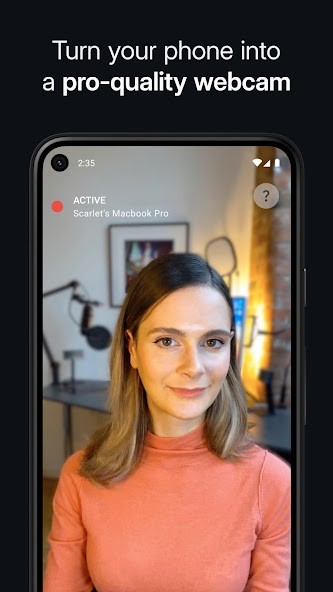
Camo allows you to connect your phone to your computer and use it as a webcam, and get a better video than the low-quality cameras built into laptops. Instead of buying an expensive external webcam, you can just use your mobile device, which usually has better hardware. With it, you can get full HD and up to 4K video and improve your camera stream during meetings, recordings, and live streams.
With Camo, you get a desktop app that works as the control center, where you can adjust focus, zoom, exposure, white balance, and color saturation in real time. If your phone has multiple lenses, you can switch between wide, telephoto, and ultra-wide cameras directly from your computer. There are also background effects, filters, and overlays, making it easy to adapt your video to different contexts.
You can also connect Camo with various tools like Zoom, Microsoft Teams, OBS Studio, Slack, Google Meet, and almost any app that uses webcam streams. You don’t need special drivers; the app is super easy to use, and you can even have long recording or streaming sessions, depending on your needs. You can download Camo for Windows, macOS, iOS, and Android, and use it for free or get a paid subscription.
Why Should I Download Camo?
Cameo is a great option that lets you easily upgrade the quality of your camera on laptops and PCs without getting additional equipment. Phone cameras have superior sensors and optics compared to built-in webcams, so by using your phone with Camo, you can get resolutions up to 4K, sharper detail, and better low-light performance without investing in new hardware. If you have a DSLR or a mirrorless camera, Camo can also work with them.
While many webcams leave you stuck with automatic settings, Camo lets you fine-tune every detail. You can manually adjust focus and exposure, lock white balance so your image doesn’t shift mid-call, and change framing with smooth digital zoom. These features let you look consistent and professional in different lighting conditions and get the results you need for any project or meeting. You can also choose different lenses if your smartphone has more than one, so you’re able to get wide shots to show your surroundings, or use your phone’s portrait mode for a professional look with a natural background blur.
Since Camo is meant to replace the built-in webcams, its integration options are also super important. It can work as a virtual webcam on your system, so it is instantly available in your meeting or streaming apps. You can easily use it with Twitch, YouTube, Zoom, Google Meet, Slack, and any other app where you need a camera stream. If you’re a streamer, Camo provides you with advanced overlays and branding options so that you can add logos, text, or custom graphics to your video.
It’s easy to start using Camo as it doesn’t need specific drivers or a complex configuration to work. It simply treats your phone as a video source, so there are no crashes and conflicts. You just need to install Camo Studio on your computer and then Camo Camera on your mobile device, and it will work. You can also save presets for different setups, such as one profile for casual video chats and another for professional webinars. Camo comes in both free and paid options, and you can download it on macOS computers as well as on iOS and Android mobile devices.
Is Camo Free?
You can start using Camo by downloading it for free and getting all the basic features. With it, you can connect your phone, stream video to your computer, and use standard-definition or HD resolutions. It’s a good enough option if you just want a simple upgrade from your built-in webcam.
For more advanced features, you can pay and upgrade to Camo Pro, which offers 4K resolution, manual control over camera settings, switching between lenses, overlays, background effects, and more. You can choose a monthly or annual subscription plan, and there’s also an enterprise option for companies.
What Operating Systems are Compatible with Camo?
Camo works on two major operating systems, and it requires macOS 10.13 or later or Windows 10 and 11. The mobile app for Camo runs on iOS 15.6 or newer and Android 7.0 or higher. It supports a wide range of devices, from older phones to the latest models with multiple lenses. You simply install the mobile app and connect it to your computer using a USB cable or WiFi.
What Are the Alternatives to Camo?
DroidCam can turn iOS and Android smartphones into webcams, and it works with Windows and Linux computers. It’s a free app that allows you to use both sound and audio from your mobile device during meetings or streaming, though only in standard definition. You can get the paid version to unlock better video qualities and more controls for things like zoom, exposure, focus, etc. It also offers custom overlays, and you can add text, images, and even other video files on top of your camera stream.
iVCam Webcam is another option for using your Android or iOS device as a webcam on your Windows computer, but to use this one, you need to get a paid plan or a permanent license. It allows you to connect multiple devices at the same time, can run in the background, can be connected via USB or WiFi, and supports up to 4K resolution. It offers professional-level adjustment options for frame rates, encoders, and quality, and can work in portrait and landscape modes.