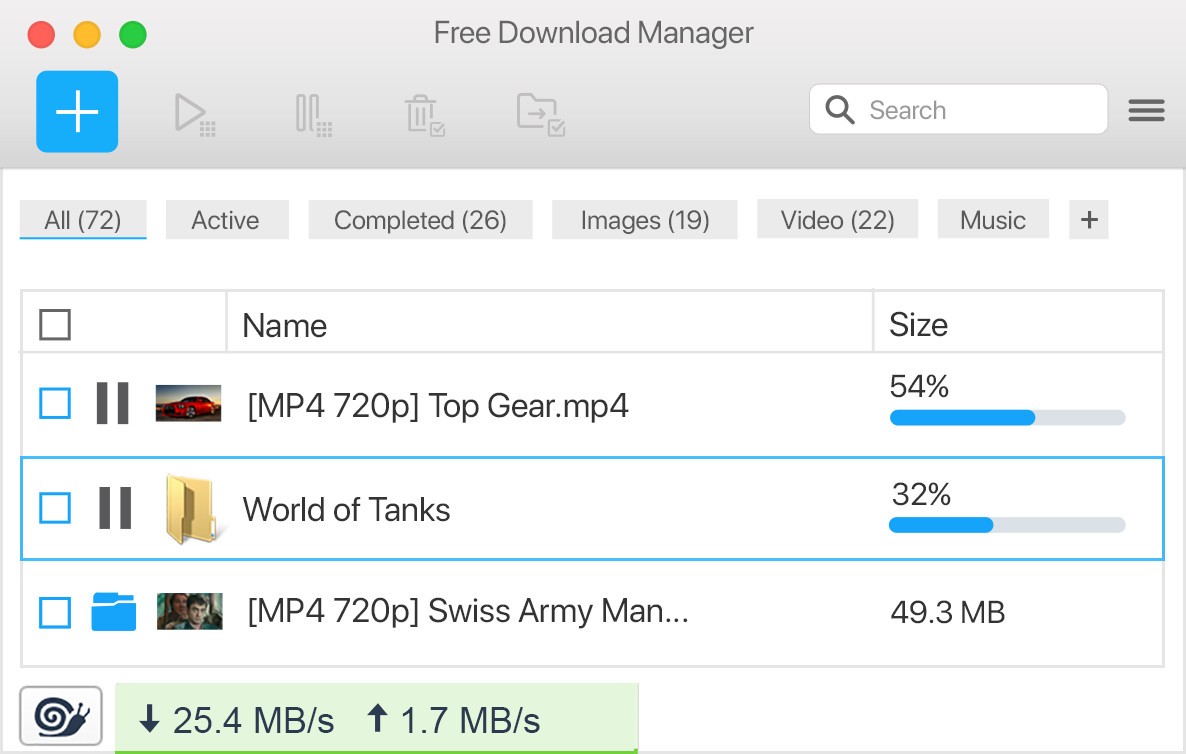
Free Download Manager (FDM) functions as an optimized and accessible software solution that enhances downloading capabilities. It serves users beyond basic download responsibilities since it provides a complete solution that supports all those who regularly download files. The speed of downloads increases through the Free Download Manager system because it divides files into multiple segments that run simultaneous downloads at once. The software helps users to continue their downloads after interruptions by maintaining unfinished sessions. You can carry on from your previous point of stopping without beginning at the beginning again.
Download files in various formats without any problems through FDM, while this application works smoothly with Chrome, Firefox, Edge, and Safari web browsers. The application allows you to retrieve any type of document, including software and multimedia content, together with torrent files. Within its software, you will find a built-in torrent client, which provides everything necessary to handle torrenting without installing extra programs. FDM provides a batch download feature as well as scheduling, which lets you organize your files better while preventing bandwidth usage during high-demand times.
Last of all, FDM offers the advantage of efficient file organization among its distinct features. The software enables you to assign file categories, which allows you to select specific output locations that help maintain organized download files. Users with no experience in download managers can easily access the interface because it combines basic design elements with contemporary features for easy navigation. The traffic usage modes inside FDM enable the customization of bandwidth distribution, thus preventing file downloads from disrupting ongoing activities online.
Free Download Manager provides support for people who need to obtain various file types, including large videos or program updates and small documents, without causing performance issues on their system. As a flexible software, it enhances downloading while also making it both faster and more systematic and easier to manage.
Why Should I Download Free Download Manager (FDM)?
Downloading files requires more than simply activating the download button, since it involves active participation. Free Download Manager simplifies every stage of file downloading and optimizes processes to grant users robust download control through user-friendly functionalities. The main benefit of acquiring FDM serves as its primary download attraction point. The software distributes files into multiple parts while it performs simultaneous downloads to reduce overall waiting times substantially. This function saves you many hours during downloads of large files.
The essential quality of reliability stands out as a reason to opt for FDM. Large file downloads become much more irritating because of their tendency to get interrupted. The resume feature of FDM protects you from wasting time when downloads stop because it can continue from where it left off. Through FDM, you can save time and minimize effort due to its ability to resume downloads from a certain point after interruptions such as system crashes or unstable internet connectivity.
FDM shows superiority in maintaining organized download files. FDM software enables you to sort files by categories while setting specific folders for different formats and determining where each download goes. A scheduling feature allows you to program download activities to occur at particular times, which improves your bandwidth utilization control during busy hours. The feature benefits from unstable internet connectivity by protecting downloads during peak usage periods on other devices. Bandwidth settings allow you to choose between speed and system performance during operation.
FDM provides you with download support for different file formats and torrent files, among other protocols. The program operates without requiring an additional torrent client, which helps maintain a clean system. The media conversion tools directly integrated into FDM enable you to transform your downloaded audio and video files into different formats right after completion. The program solves all downloading requirements through its unified platform, so you avoid installing various applications.
Lastly, FDM is completely free. Professional tools come directly to you through the free service that requires no license payments. FDM delivers a complete advertisement-free and restriction-free download manager package straight from the moment you install the program. FDM serves as an ideal download solution for those who need dependable and speedy organization through their content downloads.
Is Free Download Manager (FDM) Free?
All users of Free Download Manager (FDM) obtain access to the program as part of its completely free usage. Free Download Manager operates without any hidden fees because its entire feature set is provided at no cost to users.
The complete feature, fast download abilities, torrent management, and file transformation functionalities are available in Free Download Manager's free edition. As an open-source platform, Free Download Manager depends on its active community members for development and constant system improvements.
What Operating Systems Are Compatible with Free Download Manager (FDM)?
Free Download Manager is compatible with a wide range of operating systems, making it accessible to a large user base. Free Download Manager is fully compatible with both Windows and macOS.
The mobile application for Free Download Manager (FDM) functions for Android devices, which allows users to handle downloads from anywhere. You can access these advantages across any operating system because the tool supports multiple platforms.
FDM also offers browser extensions for Google Chrome, Mozilla Firefox, or Microsoft Edge.
What Are the Alternatives to Free Download Manager (FDM)?
The versatility of Free Download Manager stands out, but some users may opt for alternative download managers because FDM fails to fulfill their entire system requirements. The widely used download manager Internet Download Manager (IDM) delivers both high-speed acceleration and effective file management attributes. It provides dynamic file segmentation and adaptive downloading as advanced features in exchange for its paid software status. The program connects seamlessly with standard web browsers while delivering first-rate functionality that handles all HTTP and HTTPS together with FTP and MMS connections. IDM enables users to protect their work by resuming downloads from where they stopped whenever their connection fails. The interface allows them to modify it according to their preference needs.
Users looking for a free open-source downloading option can select JDownloader because it offers an extensive range of plugins and excellent flexibility features. Those who access different file hosting platforms will find this solution best because it recognizes CAPTCHAs while allowing people to prepare multiple downloads from multiple sites. After a file download finishes, JDownloader performs automatic archive extraction, which prevents you from performing manual unzip operations. Its supporting operating platforms of Windows, macOS, and Linux provide versatility to users. While JDownloader has no cost, there could be some undesirable adware during the installation process, which users need to watch out for. The streaming site video download feature, together with file hosting link management, enables this solution to serve as a complete downloading system for those who handle large file downloads.
Users searching for a basic but effective download manager should seriously consider selecting Xtreme Download Manager (XDM). The platform provides free open-source functionality that delivers speed acceleration for downloads, which reaches up to 500%. XDM works with multiple protocol standards and suits all users who have Chrome, Firefox, or Opera browsers. The program enables continued uninterrupted downloads while it provides video downloading capabilities against major streaming services, including YouTube. The built-in video converter of this application enables users to convert files without using extra third-party software. The downloading process can be scheduled using this feature, so they gain better control over bandwidth use. XDM stands out as a suitable choice for people who need a lightweight yet effective download manager that does not provide all the advanced features IDM supplies.