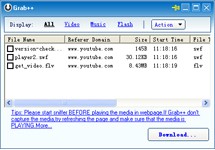
Orbit Downloader operates as a cost-free download manager that speeds up file downloading while providing optimization to your downloading process. The application expedites downloads through multithreaded protocol, which divides content into segments for simultaneous download operations. The method used both accelerates the time needed for completion and strengthens its reliability. The program shines during massive file downloads along with video and streaming media acquisitions from top websites. Users who need a smooth performance without system resource consumption can choose this software as their practical solution.
On one hand, Orbit Downloader stands out because it effortlessly connects to web browsers such as Chrome and Firefox, together with Opera and Internet Explorer. Its interface allows users to extract and save web content through direct web access instead of requiring URL copying. They benefit from Orbit Downloader, as it provides a straightforward solution to obtain videos, music, and software files from the web. Orbit Downloader works with HTTP, HTTPS, FTP, MMS, and RTSP protocols, giving them a broad selection of options. Through its resume function, the program enables you to continue your download after connection drops or computer restarts.
The software offers the capability to retrieve streaming website videos as downloadable files. Users who require offline video consumption should pick it because of its excellent functionality. Using the batch downloading feature allows them to put several files into a queue that Orbit Downloader will carry out execution one after the other. This program stands as an optimal option for internet file downloaders who need fast, dependable software to simplify their downloading tasks.
Why Should I Download Orbit Downloader?
Streaming files online becomes time-consuming when users need to retrieve large files because of their slow internet speed. Orbit Downloader provides improved speed alongside a robust reliability platform. The main reason to obtain Orbit Downloader is its ability to enhance download speed. Thanks to its multithreaded technology, Orbit Downloader reaches the full potential of your connection, thus enabling swift downloads that beat any standard browser speeds.
You should select Orbit Downloader because it enables you to continue incomplete downloads without any hassle. Getting a large file becomes inconvenient when your internet connection abruptly disconnects in the middle of the process. Starting over from the beginning is extremely annoying. You will not face any problems thanks to Orbit Downloader. The software maintains your download session, so it automatically begins from the interrupted point upon your network connection recovery. This program's value stems solely from its broken download resumption feature, which is useful for users who manage large files.
The simplistic nature of using Orbit Downloader remains a major benefit. Orbit Downloader's normal operation is made possible by seamless web browser integration, which allows for automatic media retrieval without requiring you to do anything extra. You can obtain streaming videos and music content directly through website portals by using Orbit Downloader without additional software or browser add-ons. Simply clicking on the software starts the automatic download process. It handles all downloading tasks without requiring much input from users who want to retrieve music playlists or videos.
The tool operates with multiple file formats along with protocols, which creates versatility during media consumption. It enables complete file selection, including videos, audio files, and documents, as well as entire website contents. It provides total saving capability to anyone who wants complete download optimization. The small operating requirements of Orbit Downloader make it avoid slowing down your system and consuming excessive computer resources. The tool operates discreetly during your active tasks, so it becomes an inconspicuous yet exceptionally powerful program addition to your software collection.
The product delivers dreamlike capability to people who frequently obtain files through streaming services. It both simplifies the task of video capture and gives you effective download management tools. It enables you to arrange files into queues and assign priority settings to optimize bandwidth usage while maintaining system stability. With its functions, Orbit Downloader allows you to speed up the task of obtaining music from YouTube and software updates while maintaining greater control and stability.
Is Orbit Downloader Free?
Orbit Downloader's free service allows users to use all of its functions for free. There are no hidden costs with the service. Orbit Downloader was released into the public domain by the developers in order to provide everyone with a powerful yet simple download management system.
What Operating Systems Are Compatible with Orbit Downloader?
The main platform for Orbit Downloader is Windows operating systems. It operates across Windows XP through Windows 10, which enables users from different spectra of OS versions to access it.
Using Orbit Downloader requires alternative download managers because it lacks default support for Mac along with Linux operating systems. The software runs smoothly on older computer hardware due to its low system resource requirements, making it an excellent choice for computers that require performance.
What Are the Alternatives to Orbit Downloader?
Orbit Downloader provides reliable features, yet numerous alternative download management tools exist in the market. Among the most used download manager alternatives is Internet Download Manager (IDM). Internet Download Manager speeds up downloads through its dynamic file segmentation system and brings top performance. It operates as a premium product; hence, users must purchase it after testing it through a trial period. Those who invest in these tools find that they receive excellent value because their system needs reliable performance along with superior features. IDM connects smoothly to web browsers and operates under similar protocols like Orbit Downloader. The strong resume and recovery capabilities of this application protect from data loss that could occur from unexpected system interruptions.
JDownloader serves as an open-source download manager that supports several file hosting services while remaining another strong alternative option. Those who need to download from websites that enforce wait times and CAPTCHA tests will find this tool highly beneficial. JDownloader simplifies downloading operations, thus reducing your work burden significantly. It operates on Windows, macOS, and Linux systems, which allows users on diverse operating systems to choose it as their download manager. The application is free to use, but safety precautions are needed because the installer may bundle adware components during the installation process. The tool attracts many people who handle large archives or media files because it performs simultaneous downloads and automatic compression extraction.
If you want an uncomplicated and quick downloader, then Xtreme Download Manager (XDM) functions as an ideal solution. XDM is a free open-source software that, like IDM, accelerates downloading by segmenting files. The XDM program allows you to pause and resume file transfers, as well as download videos from streaming platforms. Users who seek an open-source downloader should consider XDM as a useful replacement for Orbit Downloader because it provides both open-source integrity and fast performance. They can easily operate and control their downloads because the interface presents a neat design that requires minimum effort to understand. Once you download files, the built-in tools of this application let you transform video formats instantly.