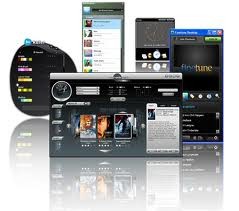
Adobe AIR serves as the abbreviation for Adobe Integrated Runtime to develop cross-platform runtime systems that permit developers to generate stand-alone desktop or mobile applications using rich internet interface frameworks. IPs operated with Adobe AIR and ran browser-independent programs using web-based HTML and JavaScript and ActionScript programming languages. Programmers find this tool valuable when they need to produce programs that operate across various devices and operating systems because it eliminates the need to develop separate code for each platform.
Adobe AIR excels by connecting web applications with desktop functionalities, which results in a better user experience. It enables designers to develop programs through system resource integration along with offline capabilities and high-performance display functionalities. All sorts of productivity tools, together with media players and gaming apps, have been developed using Adobe AIR because of its support for Flash media and complementary multimedia frameworks.
Since its launch, Adobe AIR has gained broad acceptance from the business sector and software industry, together with gaming studios, for constructing software programs that demand uniformity between multiple devices. The tool continues to serve some legacy applications and development projects, even though web standards have changed and Adobe no longer supports Flash-based technology.
Why Should I Download Adobe AIR?
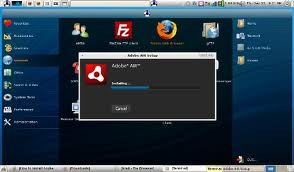
The installation of Adobe AIR serves users who need the functionality of applications designed with this runtime environment. The main advantage of installing Adobe AIR is that it provides users with a method to execute high-quality programs across multiple platforms without needing a web browser. The correct operation of numerous apps depends on Adobe AIR because it is essential for older multimedia applications, design tools, and business apps. A user requires Adobe AIR installation to use any of the available applications.
Through Adobe AIR, developers obtain an application framework that makes it easier to deploy their products across various operating systems. They benefit from Adobe AIR to build applications once with the framework, which then generates one executable file that functions across multiple devices. The development framework of Adobe AIR compiles applications into single executable files, which simultaneously quickens development times and maintains identical user interfaces in addition to system functionality between different platforms.
The performance capability of Adobe AIR is a vital reason why users should get this program. The native operation of AIR applications differs from typical web applications because they function without requiring browser usage. Users gain improved system resource access alongside better performance speed and better quality graphics that are essential features for games and multimedia applications.
Persistent educational tools, together with e-learning platforms and interactive training applications, use Adobe AIR as their base runtime because users depend on these applications for educational purposes. Users can operate specific applications without needing internet access while using this system.
Adobe has scaled back its AIR support, but the platform continues to be maintained by Harman, which operates as a Samsung subsidiary responsible for its development and maintenance. Users who rely on AIR-based applications will receive critical updates and security improvements to ensure application functionality.
Users who use older AIR versions in their applications can improve software performance by downloading and installing them. This allows those applications to run without encountering any compatibility issues. Adobe AIR maintains its value by assisting application developers with specific requirements that still necessitate the outdated programming framework.
Is Adobe AIR Free?
Individual users can obtain Adobe AIR for no cost. Users can use it for free to run applications that require the Adobe AIR runtime. Professionals must pay Harman management fees in order to distribute commercial AIR-based applications.
Users of AIR applications can access them for free, but development companies creating commercial AIR apps will require payments for maintenance and distribution options.
What Operating Systems Are Compatible with Adobe AIR?
Adobe AIR runs on both the Windows operating system and macOS. The platform enables users to execute AIR-based applications on Windows 7, Windows 8, Windows 10, and Windows 11 operating systems.
The application operates properly with current macOS versions, although it may need particular compatibility adjustments to function with older applications.
Adobe AIR also provides limited support for Linux platforms. You can download the AIR SDK for Linux as a ZIP file.
Adobe AIR maintained operating system compatibility for Android and iOS mobile programs through HARMAN. Mobile applications powered by Adobe AIR still exist, but development professionals often choose different frameworks because AIR is less commonly used for building new mobile apps.
What Are the Alternatives to Adobe AIR?
Adobe AIR used to rule the market for cross-platform app development until several better alternatives and improved versions emerged. Different users have numerous options for application development and runtime execution that can replace Adobe AIR solutions.
Electron stands as one of the most potent alternatives to Adobe AIR due to its capability for producing cross-platform applications through HTML, CSS, and JavaScript web platforms. Users commonly use Electron to create desktop programs because it enables them to develop Slack, Visual Studio Code, and Discord, among others. Constructing desktop programs with Electron leads to greater speed and extensibility since it deploys web technology standards, as opposed to Adobe AIR's dependency on a Flash-based approach.
Unity demonstrates itself as an appealing choice, particularly for video game development projects. Adobe AIR served designers for game development through Flash and ActionScript, but Unity stands as a superior choice for interactive application and game production. Electron operates across various platforms because it works with Windows and macOS, together with mobile and console systems. Launched by Unity for game creators, the platform has become their top preference after they previously used Adobe's AIR.
Web-based applications now find their current replacement through Progressive Web Apps, since they supersede Adobe AIR capabilities. Here, there's nothing to download; you can build your PWA using HTML, CSS, and JavaScript (using an IDE such as Eclipse, VSCODE, Theia, NetBeans, etc.). Development of PWAs enables creators to build web applications that work similarly to native apps while providing offline capabilities and system notifications alongside fluid performance. AIR programs face installation requirements for their runtime, yet PWAs bypass this step by directly running from browsers to offer broader device compatibility without installation needs.