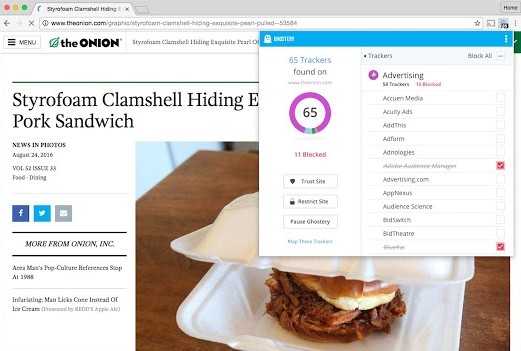
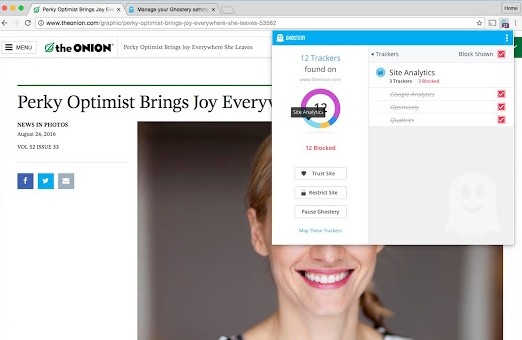
Commercial advertisers, together with analytics platforms and social media operators, and others utilize trackers to track your online interactions, including your clicks and origination points.
Ghostery is a browser extension that offers privacy-focused capabilities for users to acquire control of their online operations. It offers an advertisement blocker that stops data-tracking tools across websites. It works by hunting third-party tracking technology identification right after webpage loading and prevents their hidden data collection activities.
Ghostery delivers website speed improvements in addition to privacy protection when it stops tracking activities. Pages become speedier and consume less data because the background loading of additional content is disabled. From a dashboard, you can access real-time information about which trackers get blocked. Ghostery displays tracking entities for you to choose whether you want to permit or deny individual trackers.
The system helps manage website noise because it automatically removes both advertisements and excess scripts. Users aiming for improved privacy and speed in their web browsing experience should install Ghostery because it operates beneath the surface to deliver this package of benefits.
Why Should I Download Ghostery?
Users who dislike online tracking or frequent pop-up advertisements should look into downloading Ghostery because of its benefits. Online websites deploy invisible scripts that track users by gathering details such as their browsing records and machine specs, and exact geographic positions. These data points are used to generate personalized advertisements, which are also distributed to third-party enterprises.
Ghostery functions to block these types of web-based surveillance activities, which therefore protects your personal details. Ghostery makes tracking invisible scripts obvious since it blocks thousands of scripts after installation with every website visit.
Privacy exists beyond the capacity of people who want to conceal information. Every ordinary user deserves the freedom to protect their personal data from disclosure without necessary consent. Ghostery offers its users clear information about the specific functions of each tracker because it refuses to block everything indefinitely.
With Ghostery you can enable selected tracking services that you trust for accessing specific sites that require those services. Some monitoring tools enable the operational features on websites that include both comment sections and video players. Ghostery provides users total control over platform decisions to keep or delete items. It's privacy on your terms.
Ghostery increases your browsing speed because of its capabilities. Page loading speed suffers from trackers and ads, which particularly degrade performance when such elements include high-resolution images and autoplay videos. Ghostery improves web page loading times dramatically once it disables tracking scripts from running through its blocking function. The application provides an ideal option for both people who value privacy and those who wish to enjoy quick web browsing without delay.
Ghostery installs an integrated ad blocker as part of its features, which totally blocks all flashing banners and autoplay video ads during your browsing sessions. Ghostery filters ads by using its privacy protection features, so it both stops ads while avoiding the tracking systems that accompany them. The service operates seamlessly on all laptop, desktop, and mobile environments.
Your experience with the internet will undergo gradual transformations after adopting Ghostery. Your awareness grows about websites that track you extensively versus those that value your privacy as you use the platform. Exploration of internet operation makes you understand its internal mechanisms. Acceptance of the fact that sites monitor your online behavior creates power for both casual surfers and security-conscious professionals.
Is Ghostery Free?
You can use Ghostery at no cost to benefit from fundamental protection services such as tracker blocking together with ad blocking, and real-time privacy tracking. The free version of Ghostery includes robust security capabilities, and you can access advanced features through the premium subscription, but the basic security functions will protect you immediately.
What Operating Systems Are Compatible with Ghostery?
Ghostery provides its services to users through all prevailing browsers such as Google Chrome, Mozilla Firefox, Microsoft Edge, and Opera. After installing the extension, it starts automatically while eliminating any requirement for system-related configurations.
As an extension application format, Ghostery operates across all supported browsers without dependence on specific operating system requirements since it functions on browsers independently of macOS, Linux, or Windows platforms.
For mobile users, only iOS offers a Ghostery app. For ANdroid, you will have to use Firefox or Edge with the extensions (Chrome does not allow installing extensions on mobile, yet).
What Are the Alternatives to Ghostery?
Ghostery has competitors that provide similar strong privacy and ad-blocking features to users. Your selection among these options should align with the particular features you desire, since each solution offers distinct functionalities and loading speeds.
Among all ad-blocking tools, AdBlock stands out as the most popular one to users. The application works exclusively to prevent every type of advertisement from loading within your browser. YouTube video ads and news website pop-ups, along with other types of advertisements, are blocked by these products. AdBlock functions effectively as a visual distraction blocker for users who seek a minimal solution to browse without tracking issues, although it offers reduced data about tracking compared to Ghostery. With this functionality, users can choose particular websites they want to support by enabling their advertisements. The tool features straightforward usage, which attracts numerous users because of its basic operation.
Users typically find uBlock Origin to be a robust blocked content management tool. It is more than an ad blocker, since it functions as a complete content-blocking solution. Users of this advanced tool gain the ability to determine which content elements they want to block, including particular scripts and extensive lists containing known malicious tracking domains. Users who examine their privacy settings in detail will benefit from uBlock Origin, since it provides advanced control features not commonly seen in other programs. The program consumes fewer system resources than standard blocking tools, which makes it highly efficient. Starters should approach filters and block lists with caution, since they might not understand how these systems function.
AdGuard delivers complete functionality by extending its ad-blocking system between your browser environment and general network operations. The network-level operation enables this utility to protect beyond browser traffic against unwanted connections that originate from different programs running on your system. The AdGuard product comes with both browser extension and full desktop application options. Users depend on this program because it provides both security features, with its parental controls and privacy filters, and anti-malware capabilities. Although the paid edition of this tool includes more features, some essential ad and tracker protection remains accessible through its free version.