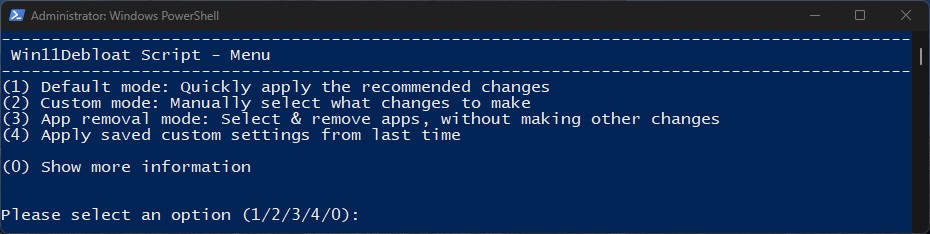
Win11Debloat is an open-source, free PowerShell script that removes redundant clutter, tracking, and extraneous default features of Windows. It is made mainly to work with Windows 11, but also on Windows 10. It is not a classic GUI application and is implemented to run in PowerShell, where it displays a menu- based interface, which allows the user to select the tweaks.
Fundamentally, Win11Debloat allows users to uninstall system pre-installed applications, disable telemetry and other tracking tools, modify interface display, and remove Microsoft components like Bing search or Copilot. These settings are packaged together, and therefore, users do not need to go through menus, registry settings, or even individual scripts.
One of the advantages is that the changes are not permanent. The majority of the deleted applications can be reinstalled, and most of the customizations can be reverted in case of necessity. This renders it more secure than the antique debloat scripts that destroyed system components irrevocably. The project is actively developed and changed to match the changes by Microsoft in new builds.
Win11Debloat is not designed to revolutionize Windows but rather to provide the user with the ability to streamline their installation process, reduce the amount of background execution, and customize Windows.
Why Should I Download Win11Debloat?
Win11Debloat is most often downloaded by users because Windows has many default applications, background services, and recommendations that they do not even use. It may be a tedious process to have to remove them manually, particularly for people who are unfamiliar with advanced settings or registry tweaks. Win11Debloat accelerates the process, as it gathers the most common adjustments into a guided workflow.
Privacy control is another reason. Windows gathers diagnostic information, usage, and displays recommendations or advertisements across the system. Win11Debloat allows one to disable most of these features under a single control instead of searching through buried menus. It does not render Windows anonymous but minimizes the amount of data that is collected and the visual noise.
The script is also useful when it is time to make a clean install. Once it is run, it provides a stable point. It is frequently used in audit mode by system administrators and power users as default profiles, so that new accounts can be created with the same settings.
It is important to note that Win11Debloat does not claim to be able to offer impressive speed improvements. Perceived improvement is commonly related to the reduced number of background processes and distracters, not the deep system optimization. When users remember this, they are more likely to be satisfied with the outcomes.
Assuming you can handle executing scripts and would like to have a controlled method of cleaning up Windows, one option can be downloading Win11Debloat.
Is Win11Debloat Free?
Yes. Win11Debloat is a free-to-use program. It is published under the MIT license, which allows people to run it, edit it, and republish it freely. The project includes none of the paid levels, subscriptions, or locked functionality, and none of the ads, trackers, or bundled software.
What Operating Systems Are Compatible with Win11Debloat?
Win11Debloat is Windows-specific tweaking software that can provide tweaks of a component nature, including Copilot, Recall, the new taskbar behavior, and File Explorer layouts for Windows 11. It is also compatible with Windows 10, but only the relevant settings can be used in this case. The tool is a PowerShell script, which does not imply any additional frameworks or installers. It is used on full Windows installations, clean installations, including manufacturer-supplied software. The majority of changes need administrative authority as they modify the settings of the systems and installed programs.
Part of the changes is version-dependent. As an example, some taskbar options, AI functionality, or Start Menu entries are exclusive to Windows 11, and others to Windows 10. Win11Debloat does not make unsupported changes on systems that are incompatible, which decreases mistakes. Win11Debloat only works with Windows.
What Are the Alternatives to Win11Debloat?
Bloatynosy Nue is easier to use compared to Win11Debloat. It is an interface-guided experience that deals with Windows personalization and debloating, instead of a script menu. It is easier to learn and is explained clearly; hence, it is popular among users who do not want it to sound aggressive. Nonetheless, its automation and audit-mode capabilities are not as complex as Win11Debloat. Many users choose to download Bloatynosy Nue when they want a calmer, more guided experience without dealing with scripts directly.
Nano11 has another philosophy. It assembles a bare Windows 11 setup picture instead of purifying a current system. The users download Nano11 and install a lightweight Windows setup, and delete the bundled components during installation. This is a permanent and irreversible strategy. Experienced users prefer using Nano11, where fewer Windows installs are required, particularly in older machines or in virtual machines. This option is usually downloaded by advanced users who are comfortable rebuilding Windows from scratch rather than tweaking an existing system.
Another Windows customization and debloating software is Flyoobe. It provides a less bloated interface and customizable choices, to the degree of control between Win11Debloat and Bloatynosy Nue. Flyoobe is frequently used by users who wish to have curated tweaks, but do not have the PowerShell knowledge. It is about privacy, UI cleanup, and system-behavior changes, yet it is not as automated (as Win11Debloat is) or system-wide profile management. Flyoobe is often downloaded by users who want quick adjustments without spending time learning technical Windows internals.