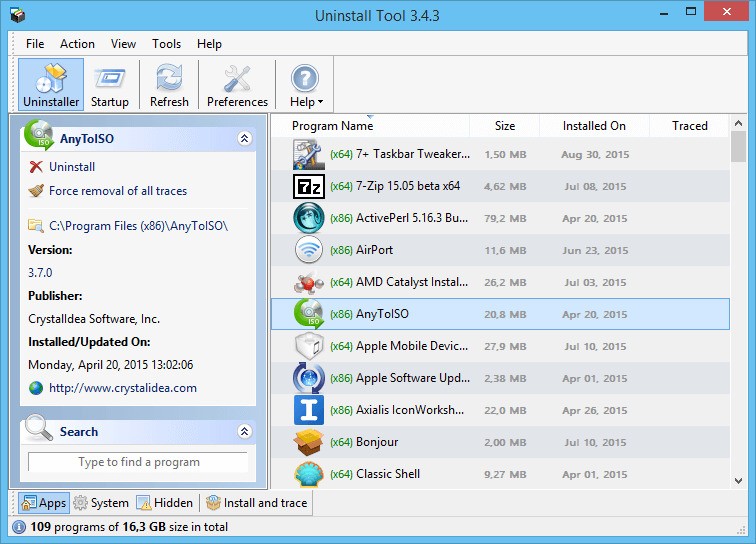
Uninstall Tool is a lightweight program that completely uninstalls unwanted programs, which often leave behind traces of the programs even when using the native Windows uninstaller. It was created by CrystalIDEA and is designed to drill into your system and delete programs, your old files, and dark files in the registry, which the default tool does not touch. In the process of deleting something using Windows, there is a leftover: folders, startup links, and registry junk. This application follows all of that.
You may also use it to uninstall the normal applications, Windows Store applications, or even damaged applications that do not want to quit. Not only does it erase files, but it logs all the elements that a program installs. So, by deleting the program later, it knows what to clean up. The tracking feature is an enormous strength to individuals who frequently test software or desire a squeaky-clean system after uninstalling.
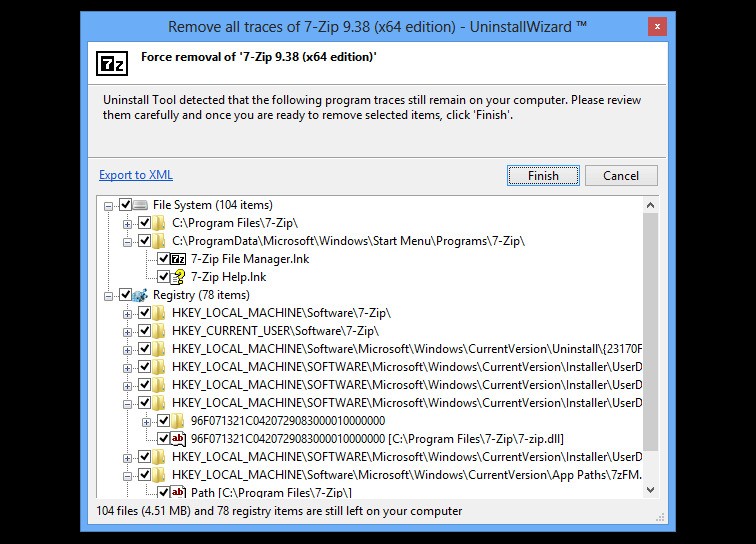
Right after the standard uninstaller has completed, a wizard known as the Uninstall Wizard replaces it. It searches for any residual of the software leftovers, traces of the registry, temporary files, and any running processes that may be associated with the software. After locating them, there is a list that you can get to select what you want to remove or retain. You even have the option of exporting that list to an XML file to keep records. The principle is not hard, and many programs do not apply it so well.
Why Should I Download Uninstall Tool?
This program will do any deleting that you need to do when you delete an application, and you still see an icon in your Start Menu, registry keys that keep reappearing, or folders that won’t empty. It concentrates on getting rid of all the minute traces that are left after normal uninstallers. It is slimmed down--there is no additional functionality or bogus optimizer. It simply does one thing, and it does it well.
It can force-delete programs that are recalcitrant to the Control Panel or contain defective uninstallers. In case a file is in use, the tool identifies it and aborts its process maintenance before cleaning. When it is not able to delete something now, it arranges to delete it on the next reboot-like a patient cleaner that waits for the right time rather than throwing error messages.
Each uninstallation produces a complete log. You will know what was cut, what was not successful, and why. It comes in handy when you feel wary of changes in the system, or you just desire to establish what is being changed behind the scenes.
The Install Tracker cannot be overestimated by tech-savvy users. It logs all the files and all the registry keys, and changes that have been made by a new program when it is installed. When you later uninstall the same program, the tool will know which files to delete, and it is quite accurate, something that uninstallers do not have. And the interface is user-friendly. It has a fast opening, is fast running, and does not consume resources.
Is Uninstall Tool Free?
Uninstall Tool can be downloaded and tried for free. The free version allows you to discuss the majority of features. A paid license will be necessary to gain access to all the features, such as monitoring the installation and some finer cleanup options. After buying it, it is a one-time purchase; there are no subscriptions or recurring expenses. The trial is sufficient to test its efficiency before making a purchase decision for many users.
What Operating Systems Are Compatible with Uninstall Tool?
Uninstall Tool is compatible with most of the Windows operating systems to date, Windows 11, Windows 10, Windows 8, and Windows 7, as well as older versions as far as Windows XP. The software is portable and lightweight, and hence does not need a heavy setup or background services. You can even play it out of a USB drive.
The tool is Windows-based, and therefore, it fits in the system-level processes. It scans the registry, startup entries, and installed program data in real-time. It has a small footprint — it will not slack anybody. You will see it will only take away something when it has actually been taking it away.
It can deal with 32-bit and 64-bit programs without any problem. The tool is regularly updated, and CrystalIDEA ensures that it is not out of context with the newest Windows releases. It does not support macOS or Linux, but since it is Windows-oriented, it is more polished and stable in the latter.
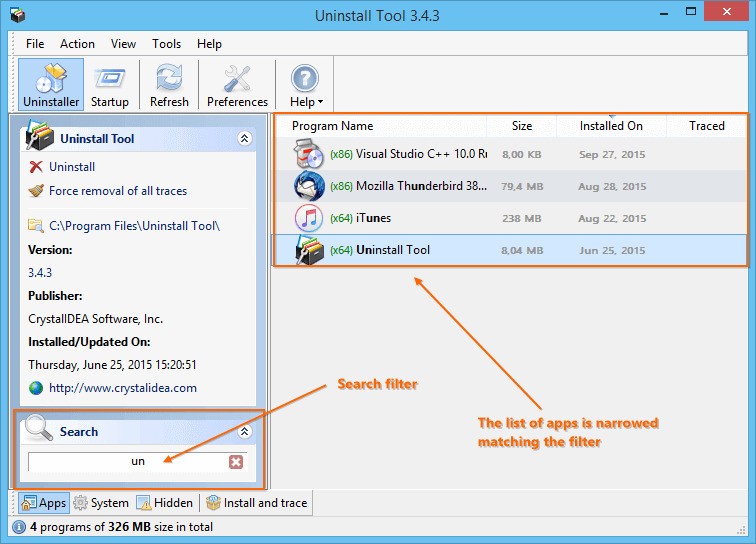
One more handy option: Uninstall Tool has an option to show hidden and system applications that ordinary Windows settings do not see. It also allows you to deal with startup items, whereby you can turn off unwanted programs that load on startup. Therefore, this is a performance helper even though it is named as Uninstall Tool.
What Are the Alternatives to Uninstall Tool?
The most famous competitor is likely to be Revo Uninstaller. It removes itself first and then goes to look around. It has a smooth interface and has several scanning levels. It also has a startup manager, a junk cleaner, and a browser cleaner. Although there are both free and paid versions of Revo, the Pro version includes forced uninstall, multi-user, and more extensive cleaning of the registry. It has a bit higher resource footprint than Uninstall Tool, but it is good with users who are going to be using an all-in-one system utility package.
Another good alternative that is free of charge is HiBit Uninstaller. It is easy, mobile, and loaded with power. The utility is able to delete the stubborn or damaged software, clean up the remaining files of the Registry, and, in batch mode, it can remove multiple programs. It also has more modules, such as junk file cleaning, startup control, and process management. The interface is not gaudy, and the performance is quick. In case the offered price is not exactly what some people can afford, but they still require the abilities of deep cleaning, HiBit can be a viable option.
Bulk Crap Uninstaller is a serious open-source force, although its name is a funny one. It is ideal for advanced users who are in need of automation and flexibility. You are able to remove dozens of programs simultaneously, filter by type of system, and compile scripts to clean them all up. It also upholds silent uninstall and automatic leftover detection. The layout is somewhat technical, but once you get used to it, it is extremely powerful, particularly for IT administration or even those who have to operate several systems. It is open-source and therefore completely free, and the community can make it regularly updated with new cleanup rules and performance optimizations.