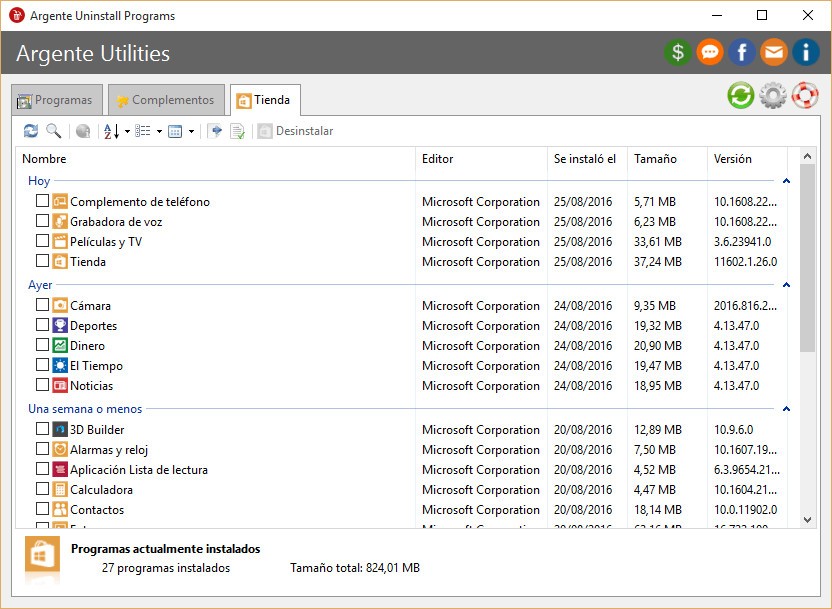
Argente Uninstall Manager is a Windows-based tool that helps you manage and remove installed software, and it provides a deeper level of cleanup than the default Windows uninstaller, which often leaves behind registry entries, folders, or temporary files. You can get the program as part of the Argente Utilities suite or download it as a standalone tool if you just want a lightweight and reliable uninstaller. Once launched, it scans your system and lists all installed applications with details such as their version, publisher, and installation date. You can easily sort and search through the list to find specific programs, and then choose to uninstall them completely.
When you remove an application, Argente Uninstall Manager runs its standard uninstaller first and then scans your system for leftovers. This second phase is crucial to ensuring that all traces of the software are completely removed, including hidden folders, invalid registry entries, and empty directories. It helps keep your computer free from clutter, which can otherwise slow down your operating system. Besides software removal, the program includes tools for managing startup entries and Windows services, so you can control which applications or background processes launch automatically at startup, improving boot time and reducing resource consumption.
On top of all that, you can utilize Argente Uninstall Manager's built-in backup and recovery tools. Before uninstalling a program, this utility can create a restore point so you can reverse changes if necessary. Argente Uninstall Manager is lightweight, fast, and requires minimal system resources, making it a great choice even for older computers. It works entirely offline and doesn't include ads or telemetry, so the tool is completely private and secure. You can download Argente Uninstall Manager for free for various Windows versions.
Why Should I Download Argente Uninstall Manager?
With Argente Uninstall Manager, you can be sure you're doing a complete removal process. When you uninstall a program using Windows alone, leftover files and registry entries often remain behind. Over time, these fragments accumulate and can make your computer slower. Argente Uninstall Manager prevents this by performing an additional scan after every uninstall, searching for related files, folders, and registry entries that the default uninstaller may have missed. This way, deleted software is truly removed from your system, resulting in a cleaner registry and file structure that helps your PC stay responsive and stable for longer.
In addition to uninstalling software, Argente Uninstall Manager also features startup and service management tools. Many programs automatically add themselves to your system's startup list, which can lead to long boot times and unnecessary background processes. Argente Uninstall Manager lets you view all startup items in one place, disable the ones you don't need, or remove them entirely. The built-in service manager works similarly, as it lists Windows services and lets you stop or delay those you don't use regularly.
Anyone can use Argente Uninstall Manager as it has a simple interface, and the main dashboard shows all installed applications in a single, clean window with easy-to-read details. You can sort by name, size, or installation date to quickly find programs. If you're trying to free up space, the list view helps identify large or outdated software that you may want to remove. The integrated search bar makes it effortless to locate specific programs instantly.
Before uninstalling anything, Argente Uninstall Manager automatically creates a system restore point, so you can undo any changes if needed. This gives you peace of mind when removing unfamiliar or large applications. Additionally, the software highlights potentially suspicious or incomplete installations, which can help identify unwanted programs or remnants from failed setups.
Unlike some optimization software that runs heavy background services, Argente Uninstall Manager only works when you launch it, consuming minimal CPU and RAM. You can use it safely alongside antivirus software and other system utilities without any issues. Even though the program focuses on uninstallation, its additional tools for startup optimization and system management make it a great alternative to larger, more complex, and paid options. The tool works on Windows only, and you can download Argente Uninstall Manager for free from its website.
Is Argente Uninstall Manager Free?
Yes, Argente Uninstall Manager is completely free to use, so all of its features, from deep uninstalls to startup management, are included by default. There's no trial version, premium plan, or hidden paywall, which is often the case in other tools. If you want, you can donate to its creator, but it isn't necessary.
What Operating Systems Are Compatible with Argente Uninstall Manager?
You can download Argente Uninstall Manager only for Windows computers, but the tool supports multiple versions of this operating system. Argente Uninstall Manager can run on Windows 7, 8.1, 10, and 11 (32-bit and 64-bit) and supports multiple languages, including Bengali, Chinese, Dutch, English, French, German, Hindi, Hungarian, Italian, Japanese, Polish, Portuguese, Russian, Spanish, and Turkish.
Argente Uninstall Manager has very low hardware requirements, and as a result, it runs efficiently even on older computers. You just need a minimum of 2 GB RAM and a dual-core processor, but it can also operate with less on lightweight systems. Please note that you don't even need an internet connection to use Argente Uninstall Manager, however, there are no versions of the tool available for other operating systems.
What Are the Alternatives to Argente Uninstall Manager?
Wise Program Uninstaller is a software removal tool for Windows that offers standard, safe, and forced uninstall modes, helping you remove stubborn programs and clean up leftover files. The program also includes a repair function that lets you fix broken installations without reinstalling them. Wise Program Uninstaller can work on multiple Windows versions, and you can use it for free or decide to upgrade to its Pro version if you need more advanced features.
Uninstall Tool by CrystalIdea is another Windows utility with which you can manage and uninstall software from your computer. It can monitor installations in real-time and log all changes made by programs during the installation, so that you can later completely reverse them. It also includes batch uninstallation, startup management, and system cleanup tools. You can download it for Windows computers only and test it for free during a trial period, but then you will need to purchase a license.
Revo Uninstaller is a utility that uninstalls programs better than the default process offered by Windows. Typically, when you uninstall software through Windows, it may leave behind temporary files or registry keys that can cause your computer to slow down over time. Revo has its own uninstaller and a special scanning system, so it's able to detect these leftovers and remove them so your PC stays optimized. Revo Uninstaller only works on Windows systems, and you can download it for free or get a paid version that offers advanced features.