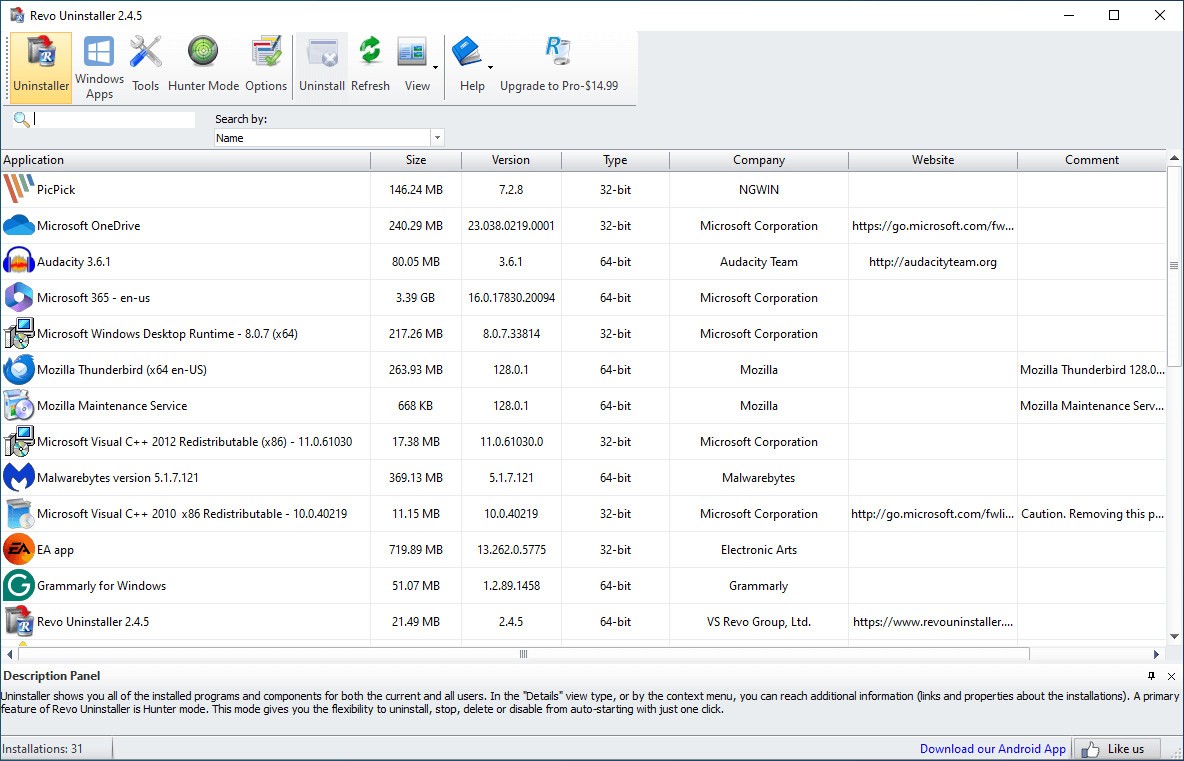
Revo Uninstaller is a utility that uninstalls programs better than the default process offered by Windows. Usually, when you uninstall software through Windows, it may leave behind temporary files or registry keys that can slow your computer down over time. Revo has its own uninstaller and a special scanning system, so it's able to detect these leftovers and remove them so your PC stays optimized.
When you open Revo Uninstaller, the interface lists all installed applications, so you can choose what to remove, sort items by name or install date, and search for specific programs. Revo includes several modes of scanning, from Safe Mode for basic cleanup to Advanced Mode, which digs deeper into the system to find hidden leftovers. It also offers tools like Forced Uninstall, which can remove stubborn or partially installed programs, and Hunter Mode, which lets you quickly uninstall or stop any software.
With Revo, you also get a set of utilities for cleaning browsers, managing startup programs, deleting junk files, and securely wiping sensitive data so it cannot be recovered. Revo Uninstaller only works on Windows systems, and you can download it for free or get a paid version that offers advanced features.
Why Should I Download Revo Uninstaller?
Revo Uninstaller is a great tool if you're looking for a thorough cleanup. When you uninstall software with Revo, it doesn't stop at the surface level. It scans your system for files and registry entries that would normally be left behind, then shows them to you so you can decide whether to delete them. This prevents the gradual buildup of clutter that can influence your computer's performance.
With Revo Uninstaller, you can use the Forced Uninstall feature, so if a program refuses to uninstall or its entry is missing from the Windows list, Revo can still remove it. You simply point it to the program's folder or registry path, and it clears it out. This is especially helpful for dealing with corrupted or broken installations. There is also the Hunter Mode, where you drag a specific icon onto any running application or desktop shortcut and get a menu of actions such as uninstalling, stopping, or disabling the software from startup.
Revo Uninstaller also offers extra utilities, like the startup manager, which lets you disable or delay unnecessary apps from launching when Windows starts, speeding up boot time. The junk cleaner helps remove temporary files, and the browser cleaner erases history and cookies across popular web browsers. With the secure delete tool, you can overwrite files you're deleting so they cannot be recovered. All of those features make Revo more than just a utility for uninstalling software on your Windows machine.
If you choose the Revo Uninstaller Pro edition, it adds real-time monitoring of installations. With this, every change a program makes during installation is logged, so when you remove it later, Revo can reverse all of those changes. Even if you have an older computer, Revo Uninstaller is lightweight and easy to use, so it can run smoothly on your PCs and the tool doesn't consume many resources. You can download Revo Uninstaller in its free version or get a paid license that adds even more functionalities to the tool, but please note that this utility is only for Windows.
Is Revo Uninstaller Free?
You can use Revo Uninstaller for free, and it includes the core uninstall engine, basic leftover scanning, Forced Uninstall, and some cleanup tools. If you get the Pro version, you can run multiple uninstallation operations at the same time, use it on more than one computer, create backups, and monitor system changes and logs in real time. There's also a 30-day free trial if you want to check the paid options before buying.
What Operating Systems Are Compatible with Revo Uninstaller?
Revo Uninstaller works on Windows and supports 32-bit and 64-bit versions of Windows Vista, 7, 8, 8.1, 10, 11, and Windows Server Editions. The app also has a version for Android mobile devices that can help you remove apps from your tablet or smartphone.
What Are the Alternatives to Revo Uninstaller?
HiBit Uninstaller is a free tool for Windows that can uninstall apps in batches, cleanup leftover files, and offers a tool to manage startup apps. You can use it from the context menu by right-clicking on an item, and it can also handle browser extensions and other stubborn software.
Bulk Crap Uninstaller (BCUninstaller) is an open-source program that you can use to remove large numbers of unwanted applications. Use it to scan for leftovers of already uninstalled programs and works smoothly with Windows' built-in uninstallers to automate mass removals. BCUninstaller is a free tool for Windows created and supported by a community of developers, but it has a somewhat complex interface.
Ashampoo UnInstaller is a paid tool for Windows that you can use to monitor installation processes, check for leftover files, and use different system optimization tools. It also includes extra features like backup and recovery options, a registry cleaner, and fast scanning tools. However, the utility is paid, though it offers a free 30-day trial.