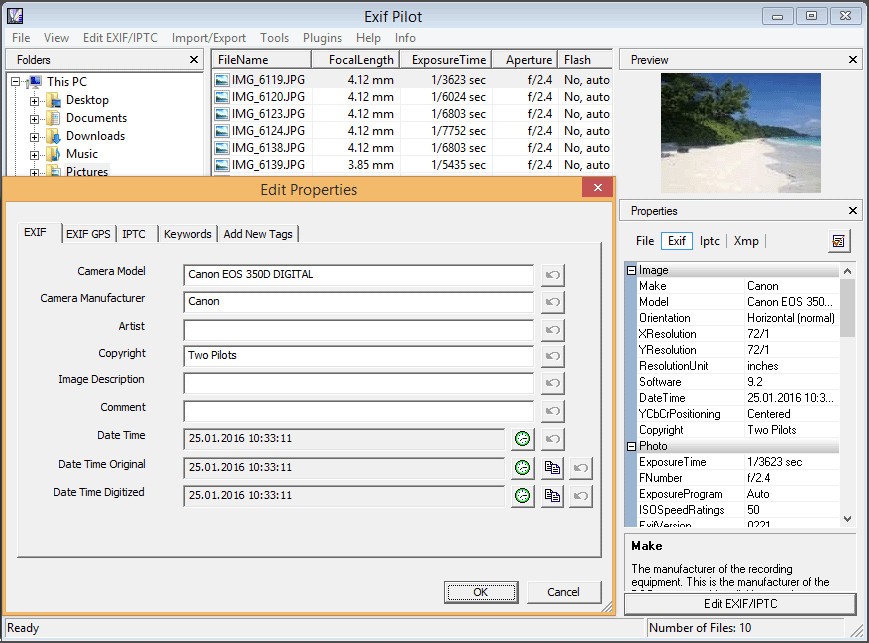
Exif Pilot is a compact Windows application for creating, viewing, and editing image metadata with a direct, file-based workflow. You open a folder, select a photo, and you can work on EXIF, EXIF GPS, IPTC, and XMP fields without importing to a catalog or changing how files are stored. You can add new tags when fields are empty, correct capture dates after a clock reset, repair location data on travel images, and remove private details before publishing.
It allows you to add or remove keywords so later searches make sense, and you can modify some Makernote tags that certain camera brands write. You can also create or adjust Photo Sphere metadata so panoramas display correctly in viewers that expect it. Field descriptions appear in plain language, which reduces guesswork when a tag name is unfamiliar. The interface is simple on purpose, so you focus on the values, save, and move on. Nothing about your folders changes unless you decide to.
Exif Pilot supports common formats used every day. You can read, create, and edit metadata in JPEG, TIFF, PNG, DNG, NEF, PEF, CR2, CRW, JP2, ORF, SRW, ARW, SR2, and PSD. You can read metadata from MRW, RW2, PGF, EPS, HEIC, and RAF. On Windows 10 or Windows 11 you can install a HEIC viewer so thumbnails appear in Explorer and inside Exif Pilot, which makes mixed shots easier to scan.
Why Should I Download Exif Pilot?
Download Exif Pilot when you want accurate edits without a heavy photo manager in the way. Correct a capture date after a battery pull, add missing GPS, so a map view has context, and normalize author and copyright lines across a job so downstream systems read them the same way. You can remove noisy application strings and private location data before you publish.
It allows you to copy a value into a related field when a camera writes to one place and your asset manager expects another. You can round-trip captions and credits through CSV or Excel so a teammate can help, then import cleanly. You can choose which tags to export so a report only contains what an editor or client asked for. Nothing tries to reorganize folders or push you into a new library; you keep your structure, point Exif Pilot at it, and work.
If you handle large images, you can install the sixty-four-bit build, so edits stay responsive with files over one hundred megabytes. If your set includes panoramas, you can fix Photo Sphere metadata, so viewers render correctly. If privacy matters, you can wipe EXIF, EXIF GPS, and IPTC in one pass and save a clean copy for public sharing.
Is Exif Pilot Free?
Base Exif Pilot is free to download and use. You can view, edit, create, and delete EXIF, EXIF GPS, IPTC, and XMP. You can add, edit, and remove keywords. Import from and export to XML, CSV, and Excel, and you can select which tags go out. Create and edit Photo Sphere metadata for panorama images. That free core covers common actions most editors and archivists need in day-to-day work.
There is a paid Batch Editing Plug-in sold for a one-time price that raises throughput when jobs repeat. With that plug-in, you can process multiple photos in one pass, copy the value of one tag to another across a batch, import, or export to a single file or to many files, and control edits from the command line for repeatable routines. One rule applies to batch work: processed files need to be in the same directory, so you plan your folders accordingly.
What Operating Systems Are Compatible with Exif Pilot?
Exif Pilot is compatible with Windows 7, Windows 8, Windows 10, and Windows 11. You can choose a 32-bit installer for general use or a 64-bit installer if you work with large images. If you want Excel import and export from the sixty-four-bit build, you can install Excel x64, Access x64, and the sixty-four-bit Microsoft Access Database Engine so bridges load correctly. On format coverage, you can read, create, and edit metadata in JPEG, TIFF, PNG, DNG, NEF, PEF, CR2, CRW, JP2, ORF, SRW, ARW, SR2, and PSD, and you can read metadata from MRW, RW2, PGF, EPS, HEIC, and RAF.
If Windows does not show HEIC thumbnails by default, you can add a HEIC viewer so you can browse and edit smoothly. Once that step is done, you move through mixed shoots without friction and confirm changes visually as you go. The combination of broad tag support and straightforward setup is the practical draw here because it fits into a Windows stack without ceremony and without forcing a new library. You keep your folders as they are, open them in Exif Pilot.
What Are the Alternatives to Exif Pilot?
ExifTool is the option where the most depth and control are important. You can read and write a massive variety of tags, manage sidecars, map fields, and script checks that maintain a collection. It executes on platforms and on very large scales. The learning curve does exist, but after having a small set of commands to work with, you are faster than any GUI in terms of heavy work, and you can automate anything you need to do more than once.
Metadata++ is a Windows tool that has a separate window and can reach the fields directly. You are able to navigate through folders, open a file, and change tags where necessary. It is fast to start up and remains near the file system, and does not lose track of information in a catalog layer. It accommodates small checks, quick edits, and spot fixes when reviewing it, when you do not wish to change to a larger organizer.
MediaInfo is for technical metadata in video and audio. You are able to read containers, codecs, bit rates, frame rates, language tracks, and time codes, and export readable reports to do audits and delivery. It never takes the place of a photo tag editor, yet it complements well when a team is assigned to deliver images and clips concurrently.
XnView is a quick viewer and converter that has effective tagging. One can navigate folders, rate a take, make edits, and leave it at that, then go and batch rename or convert. It is not going to be as detailed as ExifTool, but it is going to have that nice flow of visual information when going through big collections and updating the content with the correct changes as you pass.