Bulk Crap Uninstaller (BCUninstaller) is a free and open source bulk program remover for Windows built around automation and safety. You can queue many applications and run batch uninstalls with little input, while each original uninstaller does its work first.
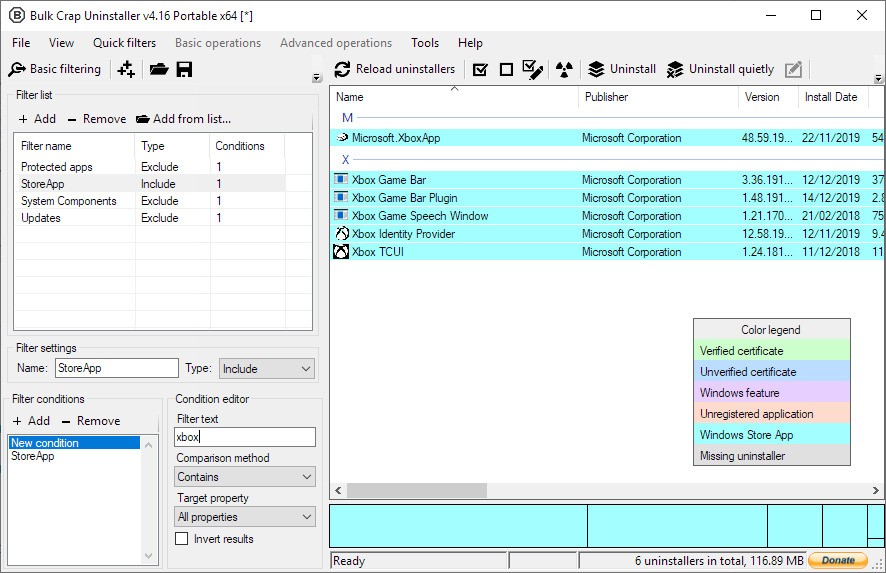
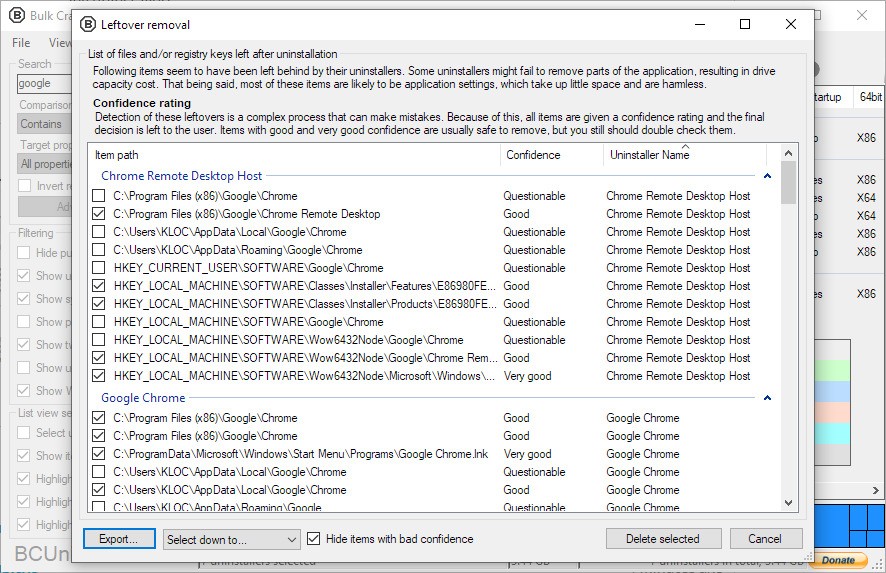
After that, leftover scanning removes files, folders, services, tasks, and registry entries that normal uninstallers often leave behind. Detection is broad and practical. You can see registered and hidden entries, items with damaged or missing uninstallers, portable apps on local or removable drives, Steam and Oculus installs, Windows Store apps, Windows Features, and Windows Updates.
Everything appears in one view, so you can filter by vendor, size, date, or source and act without jumping between tools. When a vendor uninstaller fails or is missing, you can use force uninstall to remove debris that blocks upgrades or reinstalls, with logs that explain what happened. BCUninstaller adds tools around the core job.
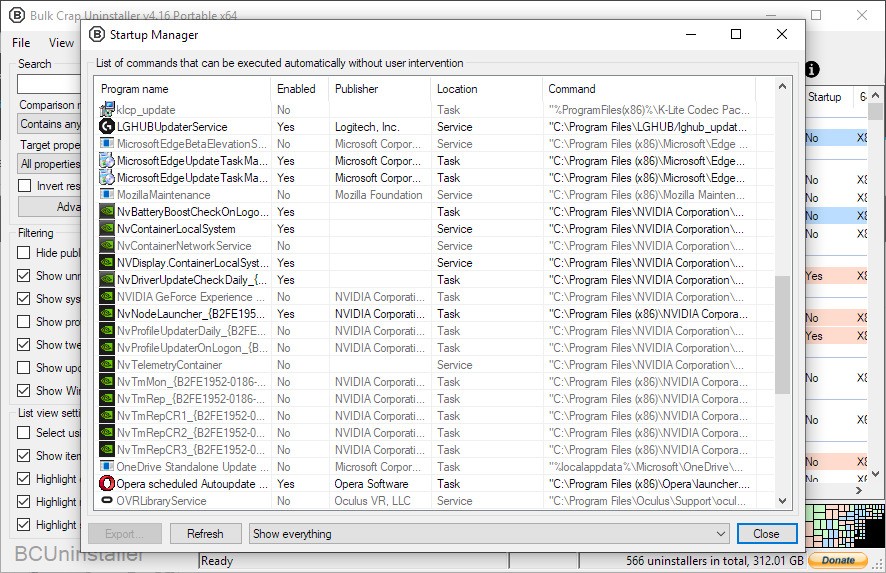
You can verify uninstaller certificates, preview Program Files directories for stale leftovers, and open a startup manager to stop launchers that slow boot. You can write custom rules, apply regex filters, export detailed lists, and rate applications to guide choices. Portable mode keeps settings in a single file so you can carry BCUninstaller on a USB drive and work on any supported machine without a full install.
Why Should I Download Bulk Crap Uninstaller?
You download Bulk Crap Uninstaller when a system is crowded with trials, toolbars, old launchers, and games that no longer serve any purpose. You can clean a home PC after years of installs, finish a migration, or prepare a handoff machine without babysitting dozens of wizards. Queue many items, review the plan, and start the run. Collision prevention reduces conflicts between uninstallers launched together. Quiet options cut prompts, and using original uninstallers keeps services, shell entries, and drivers unregistered correctly.
When uninstallers hang or crash, BCUninstaller can detect the stall, continue the queue, and return later for leftover removal so you do not lose time. You can uninstall by picking a window, shortcut, or folder when an entry does not show up in normal lists. After the batch completes, you can run a leftover pass to tidy Program Files and AppData and remove broken context menu items that slow right-click.
Console mode lets you script unattended cleanups with conditions, which is useful for technicians who repeat the same cleanup across many machines. You can add pre- and post-commands for backups, restore points, or log collection. The point is not speed alone, but predictable outcomes. You remove more in one session, you touch the system less, and you finish with a clean state that is easier to maintain.
Is Bulk Crap Uninstaller Free?
Bulk Crap Uninstaller is free under Apache 2.0 and open for personal and commercial use. You can run it at home, in a small shop, or across a fleet without buying licenses, as long as license terms are respected. There are no nags, no ads, and no bundled add-ons. Translations cover many languages, and configuration depth lets you tune how you work. You can set how aggressive leftover scanning should be, decide what to skip, and review every change before it applies.
You can export application data for audits and keep logs to prove what was removed and when. Because force removal and registry cleaning carry risk, you can keep them as last steps and prefer the original uninstallers first. That balance is what gives BCUninstaller a good safety profile even in bulk runs. A sensible workflow is simple. You create a restore point, close other programs, run the batch using quiet options when available, and let BCUninstaller clean leftovers under supervision. If a vendor uninstaller asks for a reboot, you finish the queue and restart once. You decide how much to automate, and you keep control at each step. Free here means cost-free and open to inspection, not stripped of features.
What Operating Systems Are Compatible with Bulk Crap Uninstaller?
Bulk Crap Uninstaller is compatible with Windows Vista or newer for normal use and still runs with reduced functionality on Windows XP and Windows Server 2003. Both 32-bit and 64-bit systems are supported. Recommended runtime is .NET 4.0 or newer for full features, with an option to run on .NET 3.5 when needed. Memory needs during scans sit around three hundred megabytes of free RAM, disk space needs are about fifty megabytes, and CPU is rarely a limit.
Slower hard drives can make detection and cleanup longer, while solid-state drives shorten scans and leftover passes. BCUninstaller is portable, so you can keep it in a tools folder and carry settings in one file rather than writing into user profiles. If a machine is locked down by policy, you may need administrator rights to remove protected entries, stop services, or tidy system folders. If antivirus blocks a vendor uninstaller, you can pause protection during the run and resume after logs confirm completion. Nothing in the setup is heavy. You download, extract or install, run as admin when needed, and begin with a simple filter to pick what goes first.
What Are the Alternatives to Bulk Crap Uninstaller?
Ashampoo UnInstaller is concerned with install monitoring and complete rollback. You can see a file written and then remove a program using the same journal to undo changes with accuracy. The interface is user-friendly, has cleanup assistants and snapshots, and guided views are rational when working on a single machine closely. Ashampoo UnInstaller provides a good experience with high hand-holding and a controlled step-by-step control in the event that a monitored, paid path with high hand-holding is desired.
The purpose of making an app like Argente Uninstall Manager is to have a simple list of installed programs that can be easily removed with just a few clicks and a small sweep over. The design is light and conversant, and more of classic control panel tools than of heavy suites. Browse, search, and delete without those intricate workflows to learn or those additional modules that come between you. To have a work panel that is not as ambitious as automation and scripting, you could look at the offerings of Argente Uninstall Manager, which keeps work simple but still achieves results on home machines.
Wise Program Uninstaller provides a forced and safe mode of removing programs in a small utility. You have the option of running regular uninstalls or invoking a more violent routine in case vendors do not cleanly uninstall. It also introduces features like context menu repair and remains scans that assist in daily repair on the home or office computer. In case you would like a free product with a very easy learning curve and regular updates, Wise Program Uninstaller can be used in conjunction with Bulk Crap Uninstaller as a one-off, bare bones, single app remover, or as a second opinion when all other methods fail to find a specific entry.