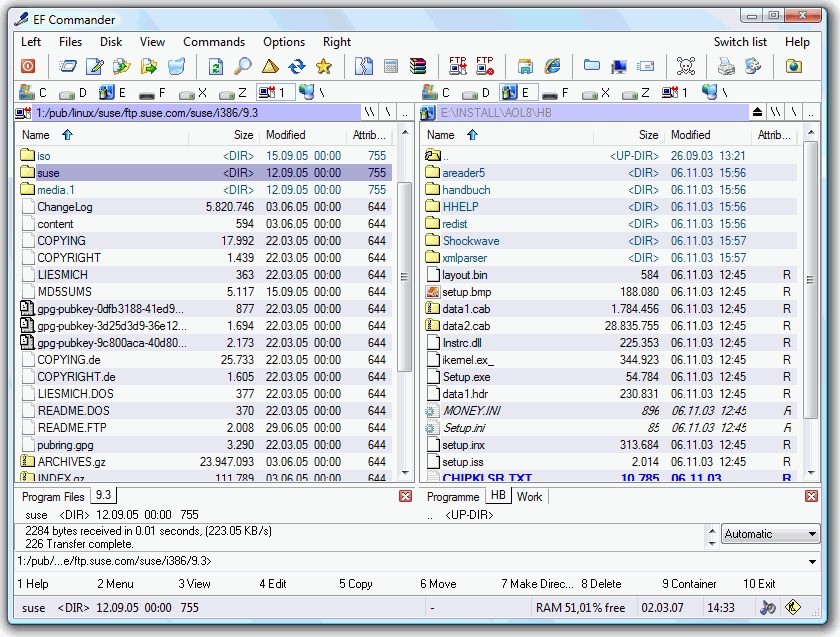
EF Commander is a dual-pane file manager for Windows designed to keep you in control without noise. You open two panes, stack tabs, and keep your working set in view instead of juggling windows. You can copy, move, delete, and queue jobs while other operations keep running because long tasks execute in parallel, and the window stays responsive. Archives open like folders, so you can step into ZIP, 7Z, RAR, ISO, and many other formats and repack when you finish.
You can preview images and videos in the internal viewer, and you can play audio with playlists and ID3 tags while heavy transfers run in the background. You can rename large sets in one pass with rules that draw on EXIF or MP3 data, which turns a long afternoon into a few careful minutes.
The software allows you to split and join big files, create and verify checksums in SFV, MD5, BLAKE3, and SHA, and you can sync folders so a laptop and a workstation stay aligned. You can connect to FTP, FTPS, SFTP, or SCP with resume and FxP, browse remote servers like local paths, and keep a steady rhythm. You can extend coverage with XnView or IrfanView, add plugins for packers, viewers, file systems, and contents, and keep everything inside one calm window.
Why Should I Download EF Commander?
Download EF Commander when Windows Explorer feels thin for real work, and you want tools that match how you actually manage files. You can stage on one side and deliver on the other, and you can keep both views steady while jobs run in the background.
The software allows you to start several copies at once, watch progress, pause, or reorder when priorities change, and still browse elsewhere. When a client spec demands a strict naming pattern, you can define rules, preview the result, and commit only when every line reads right. If you need a quick binary check, you can open the text or HEX editor and confirm headers without leaving the session.
When privacy matters, you can package work with hashes and send the list along, so integrity can be verified on the other end. If you handle photo sets, you can switch to thumbnails, skim fast, fix names with EXIF rules, and move on. When you ship archives, you can open, inspect, and repack from the same place.
The advantage is rhythm: two panes, tabbed views, predictable dialogs, and multitasking that keeps the interface available. You can glue tasks together without hopping between small utilities, and that steady flow is what saves time every day.
Is EF Commander Free?
EF Commander is commercial software with a trial. You can install it, run your actual workload, and decide if the time saved is worth paying for a license. Out of the box you can handle archives, previews, batch renaming, secure transfers, checksums, split and join, and folder sync, so you do not need to collect a drawer of little tools to cover gaps. You can integrate Nero to burn CDs or DVDs directly from EF Commander if optical media is part of your process.
You can expand behavior with plugins for packers, viewers, file systems, contents, and Winamp decode modules to keep familiar extras close without breaking your flow. The model is straightforward: evaluate in real conditions, license if it fits, and keep using the same workspace across machines. What you get for the price is consistency and reach in one application, not a bundle of moving parts that each need their own setup and shortcuts.
What Operating Systems Are Compatible with EF Commander?
EF Commander is compatible with modern Windows in both 32-bit and 64-bit editions. You can run it on a modest laptop or a heavy workstation, and you can carry your settings so muscle memory follows you. You can point one pane at local storage and the other at a network share or a secure server, and you can move files as if everything lived in one place. The software handles transfers in the background while you browse, and long operations do not freeze the interface.
You can keep thumbnails on when you are curating photos, or switch to lists for long runs and precise sorting. If you work with ISO images or large archives, you can open them directly, explore, and repack when you finish. If you prefer portable habits, you can keep a consistent layout and key bindings across boxes so the same shortcuts always land. The idea is simple: steady compatibility with the Windows stack you already use and minimal ceremony before work begins.
What Are the Alternatives to EF Commander?
SpeedCommander is a two-pane format that is upgraded to a glitzy interface and vast archiving. You can code anything, you can attach toolbar buttons to processes, tab groupings, and keep a modern look that is not sloppy. The previews are also clean, and dialogues are also clear, and the surface is also congenial when spending long periods. When refinement and comfort, as well as control, are concerned, SpeedCommander is a choice.
The long-established Total Commander offers a durable and very accurate design. You can expand it thanks to a huge plugin system, you can give keys to muscle memory, and you can automate virtually any aspect of your process. The look is also rather minimalistic in character, and this keeps attention on the decisions and not the decoration. Wish you have a manager made second nature, stay quick over the years, Total Commander has acquired its fame by acting consistently like one and being customizable to infinity.
Unreal Commander is less weighty and adheres to customary designs and sensible defaults. There is no need to spend much to install and maintain a heavy setup to get clean, dual-pane, tabbed sessions, batched rename, FTP, and archive management. It offers real performance with a high level of superiority to Explorer on old hardware, and it is available with portable kits that one can carry in-between machines. Unreal Commander is an option when you only require a simple upgrade, but with little overhead.