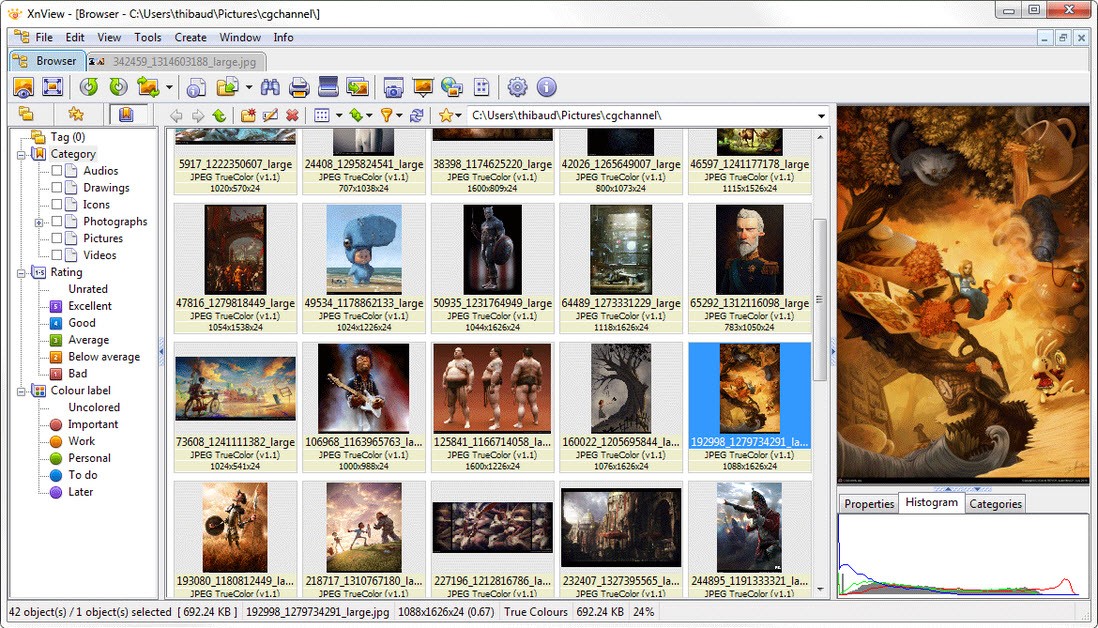
XnView becomes a necessary tool only after using it because its essential features quickly become indispensable. Users know XnView primarily for image viewing, yet that basic description hardly demonstrates its full potential.
The most distinct aspect of the software is its ability to function as an unobtrusive aid that performs file opening tasks and conversion duties while keeping everything else streamlined and efficient. The program operates with all image formats that exist, from everyday JPG and PNG to less common TGA and TIFF files.
The program allows users to perform additional tasks in addition to simple file opening. The program allows users to crop images and resize them while applying different filters and renaming multiple files at once and reorganizing full photo directories with one unified operation. XnView doesn’t overcomplicate anything. XnView requires no advanced learning process, nor does it tax your computer resources heavily.
The application works perfectly for people who need to manage everyday design work or basic photo sorting among family albums. Its simplicity doesn’t mean limitation. As you keep exploring you discover the deep intuitive nature of the program which never overwhelms you in any way. This program offers lightweight capabilities and valuable power in a subtle way.
Why Should I Download XnView?
Because it saves time. You can reduce it to its basic explanation. Available software tools provide excessive marketing claims together with complex interfaces that create challenges during regular work activities. XnView is not one of them. The tool functions as a genuine time-saving resource for workflow management and conversion tasks that people perform regarding images at some point during work activities.
The convenience of having all functionality in one program makes XnView a program worth using. XnView streamlines your workflow because it allows you to perform viewing as well as organizing, while converting and basic editing within a single program. With XnView, users can perform all tasks without experiencing the complexities of professional designer-grade software.
Users without tech expertise can operate without encountering any sense of confusion with this program. Many users find the user interface similar to Windows tools from past decades, which brings comfort to people who want to accomplish tasks efficiently.
The actual brilliance of this program lies in its batch conversion capabilities. The process of converting 300 PNG files to JPEG through other conversion applications proves laborious for every user. Pressing one button leads to instant completion of the task in this application. The program offers multiple small capabilities that accumulate over time.
The operation required users to remove borders from a large number of different images? Done. Changing metadata? Possible. The program allows users to develop contact sheets and slideshows, together with printing functionality. It’s all quietly sitting there.
Introducing XnView MP, which represents a modern development of the core concept and delivers better performance with universal system support. Users who require Unicode support or modern interface options will find the solution with the MP version. In conclusion, both XnView versions exist to reduce the difficulties of image-related work.
Is XnView Free?
XnView provides free access for users who use the program for personal reasons. XnView offers all its features free of cost, which you can acquire by conducting a download without needing to pay for anything. A license becomes mandatory for commercial applications of XnView. Regular users can access XnView for free, since the program does not require subscriptions or lifetime payments for updates.
What Operating Systems Are Compatible with XnView?
The application provides compatibility with the majority of widespread operating systems. XnView enables use on Windows desktop machines from XP through Windows 11 thus addressing current machines in the market. It also offers an App for iOS users.
XnView MP serves as the version of the software that supports both macOS and Linux platforms, in addition to its expected compatibility with Windows throughout all supported XP through Windows 11 versions.
Users of both vintage PCs and contemporary MacBooks can run the software without any difficulty or adjustment requirements. No special hardware requirements. No fuss. Just install and start using.
What Are the Alternatives to XnView?
Among the choices available for image handling, there exists a small number that competes directly with XnView by offering their independent image management systems.
FastStone Image Viewer establishes itself as one of the most powerful alternatives among the available choices. The software operates similarly to XnView because it provides quick performance and handles batch applications exceptionally well. The program comes with an integrated toolkit resembling XnView, while users value its slideshow section and full-screen mode. Although users find FastStone looks better in appearance, some admit the software shows identical capability when handling combinations and supports multiple formats.
DigiKam focuses on photo management exclusively for users who consider themselves professional photographers. The application operates under open-source conditions and functions with RAW files, while enabling detailed library organization capabilities. DigiKam stands out for photographers who require complete metadata control, together with geotagging and face recognition capabilities, while managing extensive photo collections. While XnView operates faster, users will need to invest time in learning this application, but they will gain a robust system to manage high-end image organization and processing tasks.
The multimedia app IrfanView has earned fanbase status by staying in the market for many years. This image editor provides amazing speed performance together with minimal resource usage for a wide variety of functions. Its speed as well as its expandable plugin system make IrfanView popular among users despite an outdated design. IrfanView provides users with fast conversion capabilities and basic editing options, together with customizable automated processes. Users seeking fast performance more than visual appeal will benefit from this application as an effective choice.
The discussion about XnView MP deserves a final emphasis. The update represents development from the primary program rather than a completely different solution. The application delivers better functionality together with contemporary design aesthetics along with enhanced interoperability between different platforms. The MP version of XnView Classic would be an organic progression for users who already love the program, particularly when they require cross-platform capabilities or modern file format support.