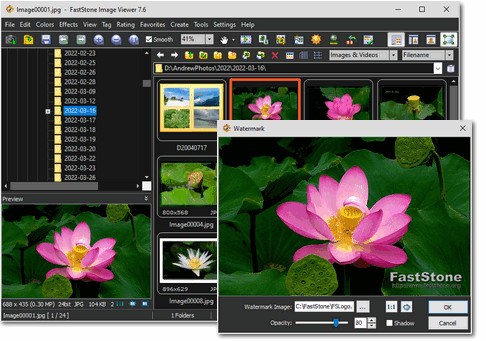
If you are searching for an image management tool with many features, certainly missing from yours, then you should turn to FastStone Image Viewer. The core function of FastStone Image Viewer centers on image viewing, though its capabilities extend beyond that to include additional features.
Users who install the tool will discover that it includes editing tools, batch processing, slideshow creation, and screen capture. The application appears compact and simple to use, which might explain why it feels reliable. The software starts quickly and processes large image directories with ease, supporting JPEG, PNG, BMP, TIFF, and RAW file types used in digital cameras.
The user interface features a basic design that seems old-fashioned at first but remains easy to use. Users avoid experiencing confusion because the interface design does not include numerous hidden elements or too many buttons. Your required options are both front and center or accessible through a right-click command.
The application exists to serve users who want advanced capabilities beyond image viewing while avoiding complex workflows. The application quickly handles sorting images, resizing multiple files, and slideshow playback after travel. The programmers seemed to create this tool first as a functional tool and then worked on other features later.
Why Should I Download FastStone Image Viewer?
Users who need to rearrange multiple photos discover that FastStone Image Viewer eliminates the need to switch between applications to crop or resize individual pictures, all without leaving the directory. It’s simple, but not limited. Through its interface, the program presents multiple simple tasks that guide users in handling pictures efficiently.
The app offers fast picture cropping alongside red-eye removal, border addition, and annotation features, keeping you browsing your folder constantly. The program functions similarly to a viewer, as it includes basic image editing features directly within the display area.
The program provides excellent slideshow functionality. The slideshow feature lets you transform a photo album into personal media with its 150 effects and background music. You can use this tool to unify visual elements from family albums and work presentations, as it eliminates the need for additional software during the process.
The time-saving nature makes batch processing extremely efficient when using the software. Through its user-friendly interface, you can apply renaming effects to large file collections and simultaneously adjust dimensions and switch file formats to another type. Having multiple disorganized photo folders leads to better organization through this control system.
The ability to capture screen images stands as a top advantage because it helps those creating tutorials or working with visual assets. The program allows you to select a specific section, scrolling panel, or full display, which automatically opens in the editor after capture.
Another big thing? This program operates without causing performance declines to your PC. The application launches rapidly while keeping system memory usage low. Unlike other image tools, which run slowly and heavily, this tool maintains a quick, responsive operation. Users regularly keep this program installed because it runs smoothly and has never caused any issues over time. For casual users, it’s intuitive. Advanced users will find sufficient expert functions in this application, while basic users can easily understand its simple user interface. The program exists to be helpful through quiet, dependable operation.
Is FastStone Image Viewer Free?
FastStone Image Viewer is a free program for educational and personal use. You get this product at no cost since you can install the entire feature set through simple download and installation procedures. The user can access FastStone Image Viewer at no cost, yet commercial users need an additional license to use it.
What Operating Systems Are Compatible with FastStone Image Viewer?
FastStone Image Viewer runs on the Windows operating system. It provides complete functionality on Windows 11, Windows 10, Windows 8, and Windows 7, as well as Windows 7. FastStone Image Viewer does not require advanced operating system specifications to function properly.
It’s lightweight and installs quickly. The application exclusively supports Windows on its platform and provides reliable image-viewing solutions for Windows users.
What Are the Alternatives to FastStone Image Viewer?
The way people approach their image needs depends on their requirements.
IrfanView stands as the most similar program in terms of speed, with an equally lightweight design structure. FastStone shares the same advantage as this program, offering a quick interface and support for diverse file types. The software has been in use for an extended period, providing users with fundamental editing and batch processing capabilities. Although its interface resembles an older style, the program provides quick processing and provides complete flexibility. The application suits those users who want quick entry for quick edits before leaving.
The targeted group of photographers using Adobe Photoshop Lightroom is professionals, since it provides advanced features beyond basic photo editing needs. The software places greater importance on image grouping methods and chromatic adjustments. Lightroom delivers complete control of RAW format image adjustments, including contrast adjustments, together with exposure and tone manipulation to users who work with this format. A subscription system is built into the product, but you should take this into account before proceeding. Your usage requirements will determine whether the powerful, resource-hungry system or the industry-grade tools in this software suit your needs.
Users who maintain extensive libraries of images can take advantage of digiKam, which operates as an open-source platform. The tool primarily handles photographs but goes beyond basic viewing capabilities. The program features tagging options, geographic information system capabilities, automated facial detection, and additional tools. You can use this program on Windows, macOS, and Linux, as it offers flexible platform support. The setup process takes extra time, though the learning progression is gradual, while this application serves perfectly for those with large photo libraries who require sophisticated organizational systems.