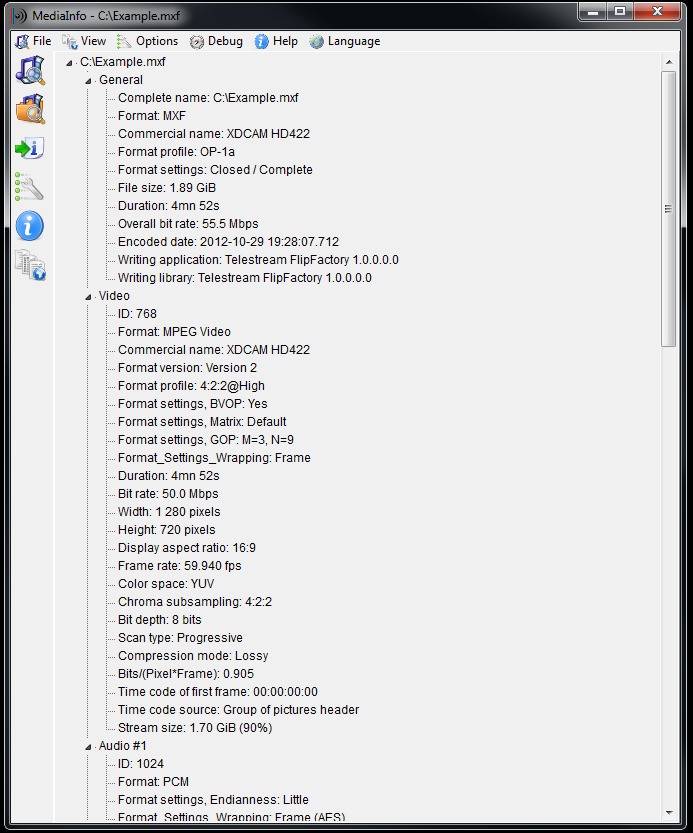
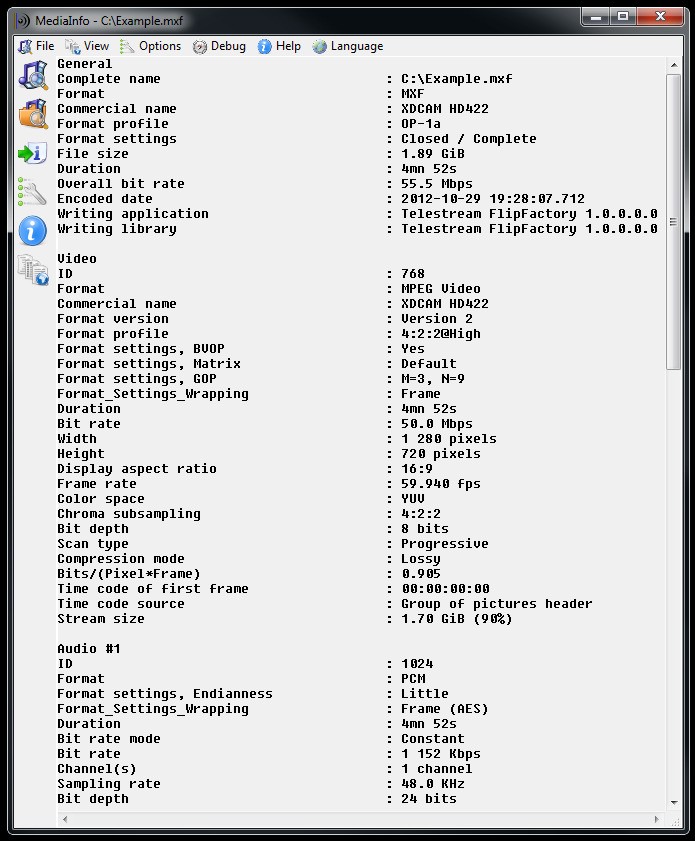
MediaInfo is a super helpful, free, and open source utility that works on pretty much any computer and shows you all the technical details and metadata of your media files. You can use it to check all information about the file, like codecs used, number of chapters in audiobooks, and audio channels, just to name a few options, without opening the file and searching through different settings. It's a quick solution for anyone who needs to manage an extensive media library or just regularly works with editing media files.
The main problem that MediaInfo solves is that a file's extension, like .mp4 or .mkv, only tells you what kind of file it is, but it doesn't tell you exactly how it's built. Use MediaInfo to identify things like the specific video codec, which is the technology used to compress the video, the audio codec, the number of subtitle tracks, the resolution, the frame rate, and a ton of other important technical details that determine a file's quality, size, and whether it will work on specific devices.
Even though personal users may not need to check such details often, MediaInfo has an interface that's easy to understand and use. It shows all the information in a clean, easy-to-read format, and there's also a command-line interface for advanced users and developers who want to use the tool in automated scripts. You can download MediaInfo for free on Windows, macOS, Linux, iOS, and Android.
Why should I download Mediainfo?
If you need to see the complete technical specifications of any video or audio file, then MediaInfo is the right solution. The tool can tell you everything there is to know about your media. For video, this includes the container format, like MKV, MP4, or AVI, the specific video codec used, such as H.264, HEVC/H.265, or AV1, the exact resolution, like 1920x1080 or 4K, the frame rate, the bitrate, and the aspect ratio. For audio, it will show you the audio codec, for example, AAC, AC3, DTS, or FLAC, the number of audio channels (2.0 for stereo or 5.1 for surround sound, etc.), and the language of the audio and subtitle tracks.
For personal users, the most compelling reason to use MediaInfo is to troubleshoot why a video/audio file won't play correctly. If you've ever had a video file that stutters on your smart TV, plays without sound on your tablet, or won't import into your video editing software, MediaInfo can tell you why. By opening the file in the app, you can quickly see if it was encoded with a new, unsupported codec or if the audio format is incompatible with your device. This information helps you to know exactly how you need to convert the file to make it work.
MediaInfo has views with different levels of detail, depending on what you need. While the information it displays can be highly technical, you can always open a "Basic" view that shows only the most essential information in plain language. There is also an "HTML" or "Tree" view that provides an exhaustive breakdown of every single data stream in the file. You can easily switch between these views and can copy and paste the information as plain text to share with others or research it further.
Advanced users can also use MediaInfo in automated scripts, which is great for developers and system administrators. The command line interface (CLI) version that MediaInfo has is an incredibly powerful tool that you can use with batches of files or include in scripts to automatically analyze thousands of media files at once. You can customize the output to show only the specific information you need and can have it export the data in structured formats like XML, JSON, or CSV, which can then be easily imported into a database or used by other programs for further processing.
MediaInfo is a professional-level analysis tool that isn't limited by a trial version or ad-supported software. It comes from an open-source project and can be downloaded completely free for any operating system. This means you can review its source code, modify it, and distribute your own version of it. MediaInfo is available on a wide variety of operating systems, including Windows, macOS, Linux (multiple versions), iOS, and Android.
Is Mediainfo free?
Yes, MediaInfo is completely free and open-source software. You can download and use the tool on any operating system without any cost. There are no ads, subscription fees, locked "Pro" features, or limitations on its use. You can also modify the software and distribute it on your own without any licensing costs. Consider donating if the software is of any use to you.
What operating systems are compatible with Mediainfo?
You can download MediaInfo and use it on a wide variety of systems, including Windows 95, 2000, XP, 7, 8, 10, 11, macOS 10.4 to 14.0, and all the major Linux distributions, like Debian, Ubuntu, Fedora, and Arch Linux. You can also get it for mobile devices that run on iOS 12.0 or higher and Android 4.4 or newer.
What are the alternatives to Mediainfo?
ExifTool is a utility for reading, writing, and editing metadata, not just viewing technical specs, and it can work with the descriptive metadata inside a file. This includes EXIF data from cameras, like shutter speed, aperture, and GPS location, as well as IPTC and XMP data for keywords, headlines, and copyright information. It's primarily a command-line tool, which makes it incredibly powerful for scripting and batch editing of metadata across thousands of files. It is a free and open source tool that's available for Windows, macOS, and Linux.
FFprobe is a highly technical, command-line tool that is part of the FFmpeg project. It is a software library for nearly all video and audio processing on the internet. FFprobe analyzes media streams, and the tool is most useful for developers as they can use it in automated workflows. It provides an incredibly detailed, frame-by-frame analysis of a media file, and you can export its findings into machine-readable formats like JSON, XML, or CSV. It's a great solution if you need to integrate media analysis into your own software or are a system administrator who needs to run complex, automated quality control scripts on a large library of video files. It is free and open source, and you can download it for Windows, macOS, and Linux.