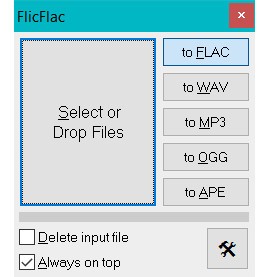
FlicFlac Audio Converter is a super lightweight and simple utility that allows you to quickly convert an audio file. Use it to transform your music files from one format to another so that you can use them on various devices. You can turn a FLAC file into an MP3 for your phone or a WAV file into a FLAC for archiving without any complicated processes or setup.
With FlicFlac Audio Converter, you have no complex installation process. The whole utility is super fast and simple. The interface is limited to a tiny window with a few buttons, one for each of the supported output formats. To convert the file, all you need to do is grab the audio file you want to convert, drop it onto the button for the format you want, and the conversion starts instantly.
FlicFlac Audio Converter does not have non-essential features, as the tool focuses purely on fast and easy conversion. It supports the most common and important audio formats, both lossless for high quality and lossy for smaller file sizes. Since it's a portable app, you can keep it on a USB drive or in a folder, and the tool is totally free, but it works only on Windows.
Why should I download FlicFlac Audio Converter?
When using FlicFlac Audio Converter, there's no learning curve or complex configurations, so the entire interface is just a small window with a few buttons for each output format, like FLAC, WAV, MP3, and OGG. To convert a file, you just drag your audio file from a folder and drop it directly onto the tool. The utility then immediately converts the file, making it one of the fastest and most straightforward ways to change the audio format.
FlicFlac Audio Converter is a completely portable solution, so you don't even need to install it to run it. There's also no initial setup process to go through, so you just download FlicFlac Audio Converter and run it from anywhere, whether that's your desktop, a downloads folder, or even a USB flash drive. You can convert files on any Windows computer you're using, without installing anything.
When using FlicFlac Audio Converter, you can work with the most essential audio formats, so it lets you convert files to high-quality, lossless formats like FLAC and WAV, which are perfect for archiving your music collection without losing any quality. You can also turn them to popular, space-saving lossy formats like MP3, OGG, and APE, which are ideal for storing music on your smartphone or other portable players where file size is more important.
While FlicFlac Audio Converter is designed to be simple, it does give you some control over the quality of your output files, especially for MP3s. If you open the app settings, you can select from a range of presets for the MP3 quality; it even supports 320 kbps files for the best possible sound. FlicFlac Audio Converter uses a tiny amount of your computer's resources. It launches instantly and converts files quickly. You can download it for free, but the app only works on Windows computers.
Is FlicFlac Audio Converter free?
Yes, FlicFlac Audio Converter is a completely free tool that you can download and use without any cost. There's no pro version that offers more features, so it's all available to you for free.
What operating systems are compatible with FlicFlac Audio Converter?
FlicFlac Audio Converter is a tool that works exclusively on Microsoft Windows, but it covers a wide range of versions, including Windows 7, 8, 10, and 11. There are no official versions of FlicFlac for other operating systems, such as macOS or Linux.
What are the alternatives to FlicFlac Audio Converter?
Fre:ac is an audio converter and CD ripping tool that you can use for free, as it comes from an open source project. It has a huge library of built-in encoders, which means it can convert between almost any audio format you can think of, including MP3, M4A/AAC, FLAC, and many more. You can also use it to turn your CDs into digital files, and it will automatically check online databases to fetch the song information and album art for you. You can download Fre:ac for Windows, macOS, and Linux.
LameXP is a popular audio converter that's a bit more technical than some other options. It gives you a lot of control over the encoding process as it offers some best open-source command-line encoders, including LAME for MP3s and OGG for Vorbis files. It's a great utility for audiophiles who want to fine-tune the technical settings of their audio files. It supports multi-threading to speed up batch conversions. LameXP is available exclusively for the Windows operating system, and you can use it for free.
MediaHuman Audio Converter is a user-friendly audio conversion tool that has a clean, drag-and-drop interface, but it's also packed with features. You can use it to convert audio files between all the most popular formats, including lossless formats. The tool can also split a single large audio file using a CUE sheet, and it can automatically add album art. You're also able to export your converted music directly to your iTunes or Music app library. MediaHuman Audio Converter is free to use and is available for both Windows and macOS.