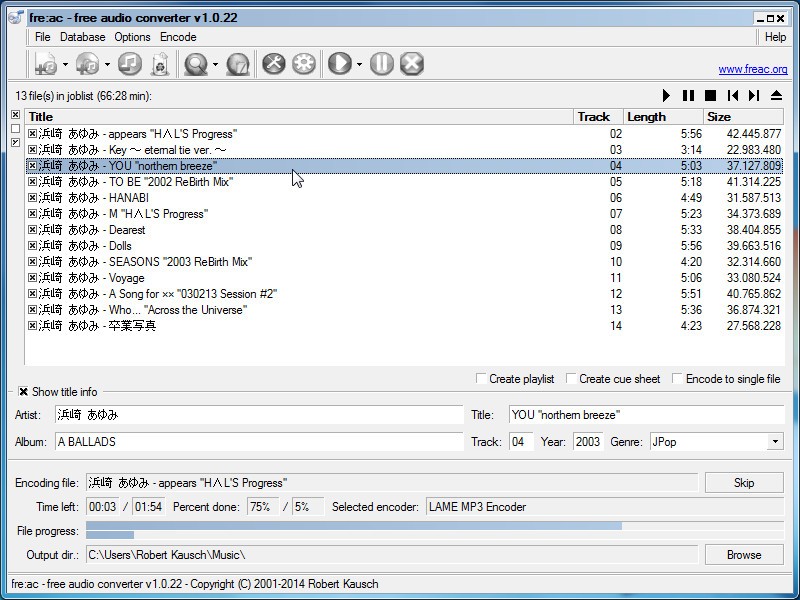
Fre:ac is an audio program people pick up when they just want their music files to work without worrying about formats. That’s really what it does. You can have MP3, FLAC, AAC, Ogg, Opus, WAV, WMA, and even uncommon ones like Monkey’s Audio or WavPack, and it can take them all and turn them into something you can play.
The software also allows you to rip CDs. If you still have old CDs in boxes or shelves, you can put them in the CD player of your computer, and Fre:ac will save the music into the format of your choice. It doesn’t leave you with “track01” type names, either. It checks with online databases and fills in artist and album names for you.
Fre:ac doesn’t need a big setup when installed, and you can even carry it on a USB stick. This allows you to run it on any computer without installing. Over the years the developers kept adding new functionalities. It now uses multiple cores, so conversions go faster, it has support for newer formats, Unicode so names don’t get scrambled, better scaling for new screens. Nothing loud about it, no flashy design, just a tool that sits there and does the work you ask.
Why Should I Download Fre:ac?
Because music collections don’t stay neat. They get messy. Some are ripped from discs, some downloaded from different places, some in formats that only play on one machine. And after a while you just want one tool that handles them all. That’s what Fre:ac gives you. You don’t have to open five different programs, just this one. Feed it a folder, even an entire library, and it just processes it. The thing people notice is it doesn’t wreck your structure. Folder names, file names, all of it stays the same. You finish with the same collection, but files are in the format you want.
Speed is another thing. A lot of converters are fine with one or two tracks, but freeze when you give them hundreds. This one doesn’t. It spreads the load across your processor cores. You see it moving and finishing in a reasonable time, even with thousands of tracks.
Through the years, updates have seen the arrival of some pretty interesting functionalities. For example, they added splitting for long recordings. If you’ve got a talk, a podcast, a live set that runs for hours, you can split it into smaller files right in the program. Users can also use filters like volume adjustment, surround sound decoding, support for newer formats like WebM and DASH. Even the little things, like sharper text on high-resolution screens or tag handling for ratings, make a difference when you’re using it often.
And it doesn’t matter if you’re new or advanced. Beginners can just click and convert, while advanced users can dig into settings for bitrate, tagging, or custom naming. It doesn’t push you either way. You use it as simple or as detailed as you want. That’s why people keep it.
Is Fre:ac Free?
Yes, it is free. Not the kind of free where you get a trial and then pay later. It’s free, as in open source free. You download it, you use it, and every feature is there from the start. Updates are free as well. There’s no pro version waiting in the corner. Free here just means free, plain, and simple.
What Operating Systems Are Compatible with Fre:ac?
Fre:ac runs on Windows, macOS, and Linux. That covers most machines people use. On Windows, you can even download the portable version. Copy it to a USB stick and run it on any machine, no installation needed. On Linux, it blends in with the desktop, even picking up color themes or dark mode in KDE. On macOS, it keeps working with new versions, so updates don’t break it.
It also looks fine on modern hardware. If you’ve got a high-DPI laptop or a 4K monitor, the interface adjusts instead of looking broken. That matters more than people think because conversions sometimes take hours, and you don’t want to stare at a fuzzy interface.
The main point, though, stays the same across systems. You don’t need to learn a different workflow depending on the computer you’re using. Whether you’re on Windows, Linux, or macOS, it behaves the same. That consistency is what makes it dependable.
What Are the Alternatives to Fre:ac?
LameXP is one option. It doesn’t try to look modern, but it’s quick and focused on batch jobs. You drag in files, choose what you want, and it does it. It supports MP3, AAC, Opus, and Ogg Vorbis. People use it because it’s fast, plain, and doesn’t get in the way.
MediaHuman Audio Converter is another. This one feels cleaner and is easier to look at. It supports both common formats and lossless ones like FLAC and Apple Lossless. It runs on Windows and macOS. People who care about keeping audio quality while converting often lean toward it. It’s simple, you drop in files, and it works.
Any Audio Converter works a bit differently. It handles local files, yes, but it also lets you save audio from online sources. That’s useful if you want to mix downloaded music with things from videos or streams. It supports a wide list of formats, both audio and video. Some versions add extra paid features, but the base program still covers a lot. It’s kept by people who need one tool to handle offline and online audio together.