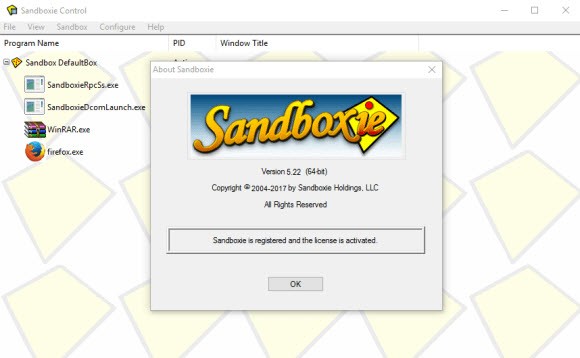
Every time you run an unfamiliar program on your PC, you’re putting your machine’s safety at risk. Sandboxie Plus eliminates that gamble. Sandboxie Plus is an open source tool that creates isolated containers on your Windows system where applications can run, install, write files, and modify registry entries without any of those changes reaching your actual operating system. When you are done, you delete the sandbox, and everything inside it vanishes as if it never existed. No leftover files, no registry clutter, no risk.
The concept is not new. Sandboxie has been around since the mid-2000s, originally developed by Ronen Tzur and later acquired by Invincea and then Sophos. When Sophos released the source code under the GPL 3.0 license in 2020, community developer David Xanatos forked the project and built Sandboxie Plus, which adds a modern Qt-based interface and a growing list of features that the original never had. Unlike a full virtual machine, Sandboxie Plus does not boot a separate operating system. It hooks into Windows at the kernel level, intercepting file and registry writes and redirecting them into a sandbox folder. The result is fast, lightweight isolation that runs programs at near-native speed without the overhead of spinning up an entire OS.
Why Should I Download Sandboxie Plus?
Safe web browsing is the reason most people download Sandboxie Plus. Running your browser inside a Sandboxie Plus container means that any malware, tracking cookies, or unwanted downloads get trapped in the sandbox. Close the box, delete its contents, and your system stays clean. The same logic applies to email. Open a suspicious attachment inside a sandboxed instance of your mail client, and even if it turns out to be malicious, the damage is contained.
Beyond browsing, Sandboxie Plus is a favorite among people who test software regularly. You can install a program inside a sandbox, evaluate it, and then wipe the entire thing without leaving behind junk files or registry entries that a normal uninstaller would miss. Software developers use it to test builds in a controlled environment. You can create multiple sandboxes running simultaneously, each with its own rules for internet access, file permissions, and resource limits. A per-sandbox network firewall using the Windows Filtering Platform lets you allow internet access in one box while blocking it in another, effectively turning Sandboxie into an application-level firewall.
The snapshot system lets you save the state of a sandbox and revert to it later, which is useful for repeatable testing environments. Privacy-enhanced boxes restrict sandboxed programs from accessing sensitive user data like browsing history and saved passwords. Security-enhanced boxes go further by limiting which system calls are available to processes inside the sandbox. There is also RAM disk integration, which stores sandbox contents entirely in memory for faster access and automatic disposal on reboot. Encrypted sandbox support adds AES-based encryption to the sandbox file system, protecting contents even if someone gains access to the host machine. USB sandboxing automatically isolates any flash drive you plug in, adding a layer of protection against infected removable media.
Is Sandboxie Plus Free?
Sandboxie Plus is open source software released under the GPL 3.0 license. The core application is free to download and use for personal, non-commercial purposes. The basic features, including creating sandboxes, running programs in isolation, deleting sandbox contents, and managing multiple boxes, are all available without paying anything.
Some of the newer and more advanced features require a "supporter certificate," which is essentially a paid license that funds ongoing development. These features include box snapshots, privacy and security enhanced boxes, the per-sandbox network firewall, sandbox encryption, RAM disk integration, proxy injection, DNS filtering, and ARM64 support. Paid tiers range from personal home use to family packs, developer licenses, and business certificates for commercial use.
There is also an Advanced Feature Pack that unlocks encrypted sandboxes, proxy injection, and DNS filtering on top of the standard certificate. The project accepts donations through PayPal and Patreon, and supporters get access to insider builds with the latest features before they reach the stable release.
What Operating Systems Are Compatible with Sandboxie Plus?
Sandboxie Plus is a Windows-only application. It supports both 32-bit and 64-bit versions of Windows, with compatibility spanning Windows 7, 8, 10, and 11. ARM64 support is available on paid tiers, with a trial option for free users. There is no macOS or Linux version, since the tool operates at the Windows kernel level by hooking into NT system calls and the Windows registry, making it fundamentally tied to the Windows architecture.
You can download Sandboxie Plus from the official website or from GitHub, where the full source code is publicly available. The installer offers both a standard installation and a portable mode, which lets you extract all files to a directory and run Sandboxie without a traditional install. The portable option is handy for running it from a USB drive or keeping it off your main system drive entirely.
What Are the Alternatives to Sandboxie Plus?
Every time you run an unfamiliar program on your PC, you’re putting your machine’s safety at risk. Sandboxie Plus eliminates that gamble. Sandboxie Plus is an open source tool that creates isolated containers on your Windows system where applications can run, install, write files, and modify registry entries without any of those changes reaching your actual operating system. When you are done, you delete the sandbox, and everything inside it vanishes as if it never existed. No leftover files, no registry clutter, no risk.
The concept is not new. Sandboxie has been around since the mid-2000s, originally developed by Ronen Tzur and later acquired by Invincea and then Sophos. When Sophos released the source code under the GPL 3.0 license in 2020, community developer David Xanatos forked the project and built Sandboxie Plus, which adds a modern Qt-based interface and a growing list of features that the original never had. Unlike a full virtual machine, Sandboxie Plus does not boot a separate operating system. It hooks into Windows at the kernel level, intercepting file and registry writes and redirecting them into a sandbox folder. The result is fast, lightweight isolation that runs programs at near-native speed without the overhead of spinning up an entire OS.
Why Should I Download Sandboxie Plus?
Safe web browsing is the reason most people download Sandboxie Plus. Running your browser inside a Sandboxie Plus container means that any malware, tracking cookies, or unwanted downloads get trapped in the sandbox. Close the box, delete its contents, and your system stays clean. The same logic applies to email. Open a suspicious attachment inside a sandboxed instance of your mail client, and even if it turns out to be malicious, the damage is contained.
Beyond browsing, Sandboxie Plus is a favorite among people who test software regularly. You can install a program inside a sandbox, evaluate it, and then wipe the entire thing without leaving behind junk files or registry entries that a normal uninstaller would miss. Software developers use it to test builds in a controlled environment. You can create multiple sandboxes running simultaneously, each with its own rules for internet access, file permissions, and resource limits. A per-sandbox network firewall using the Windows Filtering Platform lets you allow internet access in one box while blocking it in another, effectively turning Sandboxie into an application-level firewall.
The snapshot system lets you save the state of a sandbox and revert to it later, which is useful for repeatable testing environments. Privacy-enhanced boxes restrict sandboxed programs from accessing sensitive user data like browsing history and saved passwords. Security-enhanced boxes go further by limiting which system calls are available to processes inside the sandbox. There is also RAM disk integration, which stores sandbox contents entirely in memory for faster access and automatic disposal on reboot. Encrypted sandbox support adds AES-based encryption to the sandbox file system, protecting contents even if someone gains access to the host machine. USB sandboxing automatically isolates any flash drive you plug in, adding a layer of protection against infected removable media.
Is Sandboxie Plus Free?
Sandboxie Plus is open source software released under the GPL 3.0 license. The core application is free to download and use for personal, non-commercial purposes. The basic features, including creating sandboxes, running programs in isolation, deleting sandbox contents, and managing multiple boxes, are all available without paying anything.
Some of the newer and more advanced features require a "supporter certificate," which is essentially a paid license that funds ongoing development. These features include box snapshots, privacy and security enhanced boxes, the per-sandbox network firewall, sandbox encryption, RAM disk integration, proxy injection, DNS filtering, and ARM64 support. Paid tiers range from personal home use to family packs, developer licenses, and business certificates for commercial use. There is also an Advanced Feature Pack that unlocks encrypted sandboxes, proxy injection, and DNS filtering on top of the standard certificate. The project accepts donations through PayPal and Patreon, and supporters get access to insider builds with the latest features before they reach the stable release.
What Operating Systems Are Compatible with Sandboxie Plus?
Sandboxie Plus is a Windows-only application. It supports both 32-bit and 64-bit versions of Windows, with compatibility spanning Windows 7, 8, 10, and 11. ARM64 support is available on paid tiers, with a trial option for free users. There is no macOS or Linux version, since the tool operates at the Windows kernel level by hooking into NT system calls and the Windows registry, making it fundamentally tied to the Windows architecture.
You can download Sandboxie Plus from the official website or from GitHub, where the full source code is publicly available. The installer offers both a standard installation and a portable mode, which lets you extract all files to a directory and run Sandboxie without a traditional install. The portable option is handy for running it from a USB drive or keeping it off your main system drive entirely.
What Are the Alternatives to Sandboxie Plus?
Windows Sandbox is Microsoft's built-in isolation feature, available on Windows 10 and 11 Pro, Enterprise, and Education editions. It launches a lightweight, disposable virtual machine using hypervisor-based virtualization, giving you a clean Windows desktop where you can install and test software. Closing the sandbox deletes everything inside. The main advantage is that it requires zero setup beyond enabling the feature in Windows, and it provides strong kernel-level isolation through the Microsoft hypervisor. The downside is that it only runs one instance at a time, does not persist data between sessions (outside of a single reboot), and is not available on Windows Home. Sandboxie Plus offers more granular control, multiple simultaneous sandboxes, and works on Home editions, making it more flexible for everyday use.
VirtualBox is a free, open-source hypervisor from Oracle that lets you run full operating systems inside virtual machines on Windows, macOS, and Linux. Unlike Sandboxie Plus, which isolates individual applications within Windows, VirtualBox boots an entire guest OS. This means stronger isolation but significantly more overhead in terms of disk space, memory, and setup time. VirtualBox is the better choice when you need to test software across different operating systems or run a full Linux environment on a Windows host. For quick, lightweight isolation of a single Windows program, Sandboxie Plus is faster and simpler.
VMware Workstation and Fusion are desktop hypervisors that became free for all users, including commercial use, in November 2024. Workstation runs on Windows and Linux, while Fusion covers macOS. Like VirtualBox, these are full virtual machine platforms that boot entire guest operating systems. VMware generally offers better performance and hardware compatibility than VirtualBox, with features like virtual GPU support, USB 3.2 passthrough, and snapshot management. The tradeoff is the same as with any VM: you need to allocate dedicated CPU cores, RAM, and disk space to each virtual machine. For users who need full OS-level isolation or cross-platform testing, VMware is a strong download. For sandboxing individual Windows apps with minimal resource cost, Sandboxie Plus remains the lighter tool.