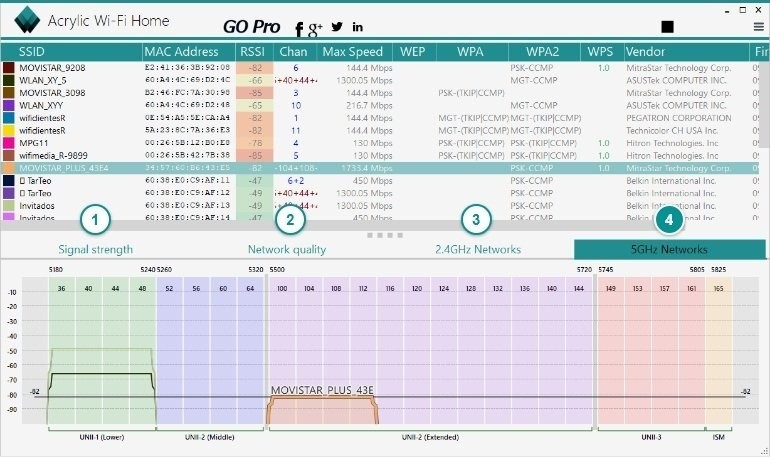
Acrylic Wi-Fi Home – Scanner WiFi is a software tool designed to help users visualize, analyze, and understand the wireless networks around them. At its core, it’s a Wi-Fi scanner, but it does much more than simply list the networks in your area. It provides detailed information about signal strength, security protocols, encryption, channels in use, and even the potential interference between different access points.
The software is particularly handy for people who live in apartment buildings or crowded neighborhoods where multiple Wi-Fi networks overlap. Instead of guessing why your connection keeps dropping, Acrylic Wi-Fi Home gives you the hard facts. It shows you exactly what’s happening in the airwaves around you, so you can make informed choices about your network setup.
For many, it becomes an educational tool as well. It helps everyday users learn what WPA2 means, why channel overlap matters, and how different frequencies like 2.4 GHz and 5 GHz behave. For tech enthusiasts and home network tinkerers, it’s like having X-ray vision into the invisible Wi-Fi world that most of us take for granted.
Why should I download Acrylic Wi-Fi Home – Scanner WiFi?
The simplest answer is this: it can dramatically improve your Wi-Fi experience. Most people don’t realize how much interference can affect their internet speeds. Maybe your neighbor’s router is blasting on the same channel as yours, or maybe your device is struggling to connect to the right frequency. Without a tool like Acrylic Wi-Fi Home, you’re left in the dark.
By downloading the software, you gain visibility. You’ll see a list of all networks around you, with real-time data about their performance. For example, if you notice that your Wi-Fi shares a channel with four other networks, you can log into your router and switch to a less crowded one. That simple tweak can mean faster speeds and fewer disconnections.
It’s also a great tool for troubleshooting. Instead of calling your internet provider every time something goes wrong, you can run Acrylic Wi-Fi Home and figure out whether the issue is with your router, your environment, or the provider itself. That saves time, frustration, and often money.
Beyond troubleshooting, it’s useful for optimization. If you’re setting up a home office, streaming device, or gaming console, knowing where the signal is strongest can make a huge difference. Acrylic lets you walk around with your laptop and see how the signal changes from room to room, helping you decide the best spot for your router or access points.
Is Acrylic Wi-Fi Home – Scanner WiFi free?
Yes, there is a free version available. Acrylic Wi-Fi Home is offered as a no-cost solution for personal use, giving you access to a solid range of features without having to spend anything. The free edition provides information such as SSIDs, signal strength, encryption methods, and basic channel analysis.
However, there are also paid versions of the Acrylic Wi-Fi family, like Acrylic Wi-Fi Professional, which come with more advanced features such as packet capture, deeper analytics, and support for larger-scale environments. Those versions are tailored for IT professionals, auditors, and network administrators.
For the average home user, the free version is more than enough. It strikes a balance between being powerful and approachable, without overwhelming you with too many technical details. If you find yourself needing more advanced functionality down the line, you always have the option of upgrading.
What operating systems are compatible with Acrylic Wi-Fi Home – Scanner WiFi?
Acrylic Wi-Fi Home is primarily built for Windows. It runs smoothly on modern versions like Windows 10 and Windows 11, and it also supports earlier editions, including Windows 7 and 8. The software takes advantage of Windows’ native wireless card support, so most standard Wi-Fi adapters will work out of the box.
Currently, there isn’t an official macOS or Linux version of Acrylic Wi-Fi Home. That might feel like a limitation, but for Windows users, the program is well-optimized and doesn’t require heavy system resources. It’s lightweight, so even on modest laptops, it runs efficiently.
On the go, many users still pair it with their Windows laptops to analyze networks in different places—whether at home, in coffee shops, or while traveling. If you’re in the Apple ecosystem, you might need to look into alternatives, but for Windows-based setups, Acrylic Wi-Fi Home is one of the most user-friendly choices available.
What are the alternatives to Acrylic Wi-Fi Home – Scanner WiFi?
Although Acrylic Wi-Fi Home is a good application, it is possible to find other applications that may perform the same tasks and be more compatible with different users.
InSSIDer is one of the more popular substitutes. It equally offers similar scanning capabilities of the network and is tailored to help home users learn more about the application of the channels and signal interference, among other things. One of the good points of inSSIDer is the refined user interface; hence, users who value simplicity and the simplicity of the tool will be interested in it.
WifiInfoView is less complex. It is highly portable and lightweight, and it has been created by NirSoft. It lacks images that capture attention, but provides a deeper look than a mere wallpaper description of the technical details in a style that is easily understandable. This would be a great option for fast diagnostics in case you are not concerned with the graphical representation of data.
A competitor that is also worthy of mentioning is NetSpot, and it is particularly helpful in cases when you need to map your Wi-Fi connection area. It allows you to map a floor plan of your area and feature it as it traces the signal strength of different positions. The resultant effect is that you end up with a colored map that clearly shows where you have good coverage or where you are weak. That is why this is to be the option of larger houses or offices, where the location of routers and access points is significant.