QuickInstaller is a lightweight yet surprisingly powerful utility built to make one of the most frustrating parts of computer ownership easier: dealing with software installation and updates. If you’ve ever set up a new PC, you know the drill—open your browser, search for each program, download installers one by one, and then click through endless prompts asking you to confirm terms, choose installation folders, and decline offers for extra add-ons you never asked for. It’s time-consuming, repetitive, and honestly a bit of a headache. QuickInstaller was designed to cut that process down to just a few clicks.
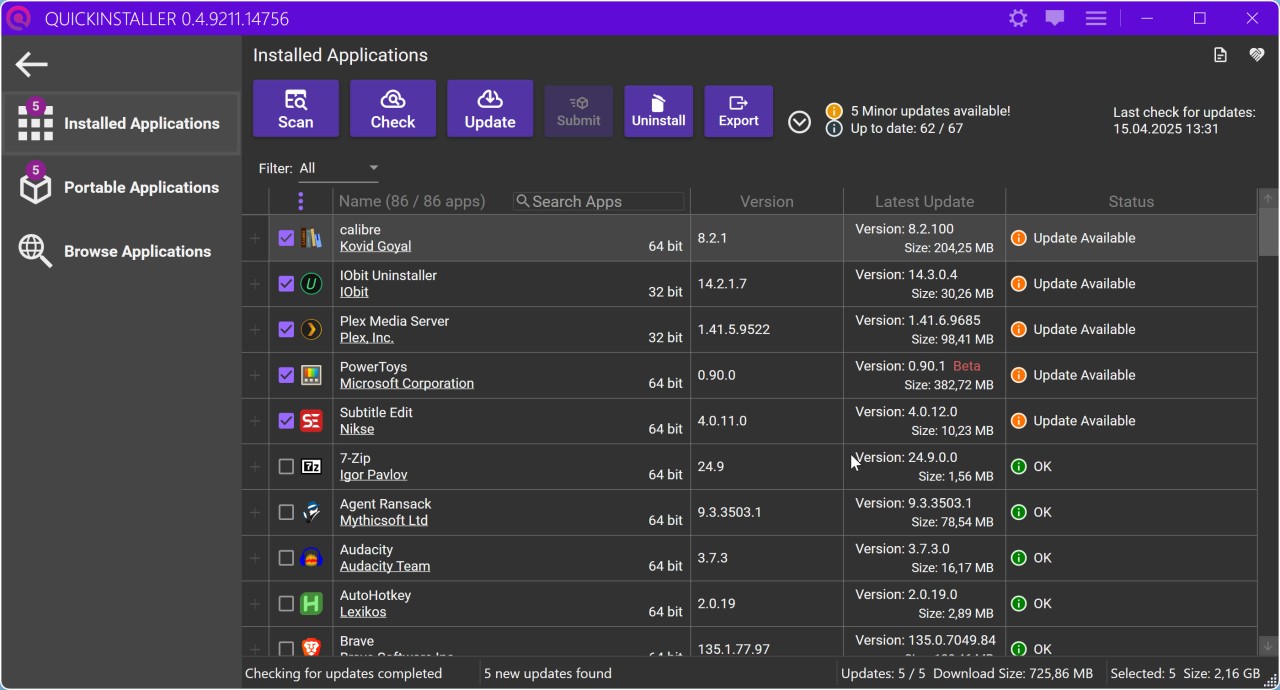
QuickInstaller acts as a central hub for keeping all installed applications up to date. It can scan your system, show you which apps are outdated, and update them all at once. If there’s something you don’t need anymore, you can also uninstall it cleanly from the same interface. In short, it’s not just an installer—it’s a full software management solution that prioritizes simplicity and efficiency.
But it doesn’t stop there. With this tool, you get access to a curated library of applications covering browsers, utilities, media players, messaging tools, and more. You simply select the programs you want, hit install, and QuickInstaller takes care of the rest. It runs each setup silently in the background, skips unnecessary pop-ups, and ensures you don’t end up with unwanted toolbars or extra software piggybacking on your downloads.
Why Should I Download QuickInstaller?
The biggest reason is obvious: it saves time and keeps your system safe. When using a computer, you have lots of different software installed. From office suites, to photo editor, utilities, and so on. Each of these software programs needs to be regularly updated, because if not, there could be vulnerabilities on your computer.
When you first run QuickInstaller, the software scans your computer and establishes a list of all installed programs. You will then easily find them in the interface in the “Installed software” tab. From there, you’ll be able to check if all of them are up-to-date or if you need to install an update. Never been so easy. And it is even capable of checking portable applications that it was able to find on your computer!
The convenience factor is hard to ignore. Imagine you’re halfway through your workday when a program refuses to run because it’s out of date. Instead of searching the web for the latest installer, you can launch QuickInstaller, see what needs updating, and fix everything at once. That means less downtime and more productivity.
For IT professionals, the benefits are even bigger. Managing multiple machines—whether it’s for a small office or a classroom—usually involves a lot of repetitive work. QuickInstaller reduces that workload dramatically by letting you roll out updates or new installations across several systems quickly and efficiently.
If you’re setting up a new laptop or desktop, you can easily spend an hour downloading your favorite programs individually. With QuickInstaller, you select them all in one go and let the software handle the rest. That alone makes it worth a look.
Another reason is security. A lot of people unknowingly put their computers at risk by downloading programs from shady sites. Some installers hide adware or worse, and it only takes one bad download to cause problems. QuickInstaller pulls its apps from trusted sources, so you can install with peace of mind knowing you’re not accidentally opening the door to malicious software.
At its core, the software makes your life easier. It’s like having a personal assistant for your applications, quietly taking care of the boring stuff so you can focus on what actually matters.
Is QuickInstaller Free?
QuickInstaller is completely free to use. There’s no hidden subscription, no premium upgrade, and no paid plan waiting behind the download button. What you see is what you get; you can install it, run it, and access its features without spending anything. For people who just want a straightforward tool to manage installations on Windows, it does the job without asking for money or showing pop-ups about paid versions.
What Operating Systems Are Compatible with QuickInstaller?
QuickInstaller is only available for Windows. This makes sense, since Windows is the platform where installing and updating software tends to be the most complicated. It works on most modern Windows versions, including Windows 10 and Windows 11 in 64-bit, and doesn’t require heavy system resources to run smoothly. That means even older laptops or budget desktops can benefit from it without slowing down.
Being a lightweight application, it installs quickly and runs quietly in the background. You don’t need to be especially tech-savvy to use it, which makes it a good fit for casual users as well as IT professionals.
What Are the Alternatives to QuickInstaller?
Though QuickInstaller is a good option, several alternatives should be considered based on your requirements.
UCheck is one option. Similar to QuickInstaller, it allows one to install, update, and delete applications from one location. It is easy to use, and it is suitable in case a user requires a no-frills solution. The disadvantage is that it does not always provide as many advanced features, which might be too much for power users.
Another competent rival is IObit Software Updater. It is well polished and provides automated update scheduling, and some users are in love with this feature. It also puts into the limelight suggested programs that you may wish to consider, although that can really seem an unnecessary intrusion should you just wish to keep what you already have.
A more sophisticated version, which may be of interest to technologically minded users, is UniGetUI. It is open-source and compatible with package managers such as Chocolatey and Winget to provide access to a huge library of programs. The trade-off is that it is not as easy or simple to use as QuickInstaller and may overwhelm a user who just wants a simple installer.