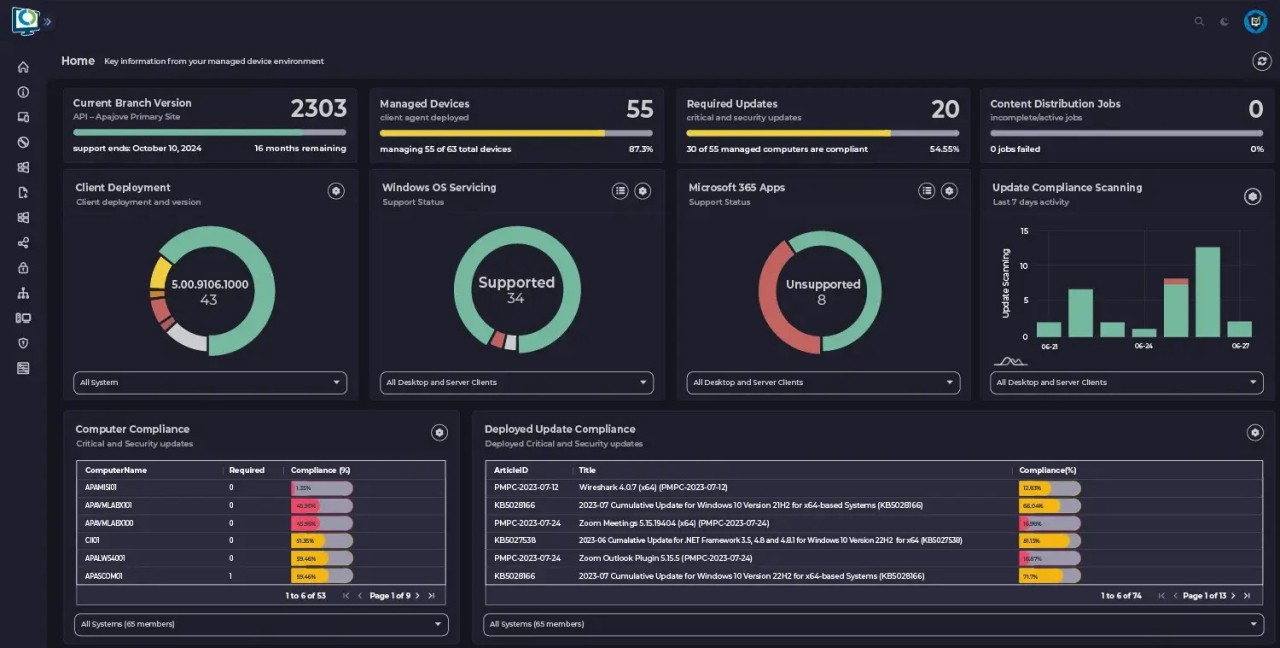
Patch My PC is a patch management tool developed for IT pros who use Microsoft ConfigMgr (SCCM) and Intune. It automates the boring task of maintaining third-party apps, which can be a pain if you do it manually. The basic premise is simple and helpful: the software searches for outdated applications and deploys newer versions automatically, allowing administrators to stop looking for installers or deployment packages.
The tool was created in 2011 as a small side-project. Its developer released a home updater for free to help users keep their personal PCs clean and secure. It quickly became a commercial product trusted by thousands of businesses all over the world that need to manage updates at scale and protect themselves against the security risks of having out-of-date software.
Patch My PC is an automated way to do almost everything. After being configured, it figures out what is available for updates, then downloads the latest versions tested, packages them silently, and pushes them to the users, with no interruptions. It's designed for teams that deal with large software catalogs and would like to spend less time packaging and more time ensuring system stability.
Why Should I Download Patch My PC?
The main advantage is automation. Instead of searching for new versions, developing MSI or EXE packages, testing them, and then deploying, the program does all these steps for you. It integrates with ConfigMgr and Intune, which are the tools in place in many IT departments, so it integrates right in.
Another advantage is consistency. Manual updates on hundreds or thousands of computers often leave gaps — somebody will forget about it, or an app will fail to patch properly. Patch My PC keeps all supported apps in a single workflow, which reduces downtime, saves resources, and maintains compliance.
The software also provides Advanced Insights — a practical dashboard that displays which updates succeeded or failed, as well as any configurations that are at risk. Most admins want a tool that does its thing without being too noisy, and this feature provides that insight without all the unnecessary frills.
Control is built in. You decide how and when updates will run, whether they will install automatically or require your approval. Customization options allow you to add scripts, control reboots, and control silent installs — ideal for large organizations with strict IT policies.
In short, Patch My PC is perfect for anyone who wants to reduce manual labor and eliminate the surprise of outdated apps. It offers a simple method to ensure that systems stay healthy without chasing down updates each week.
Is Patch My PC Free?
Patch My PC began as a freeware for home users, and this version is still available. The enterprise edition integrates with ConfigMgr and Intune is a paid product. You can try it free for 30 days to see how it works for you in your environment. After the trial, the pricing is based on the number of devices and the plan that is chosen. The company also provides demos and setup assistance before purchase.
What Operating Systems Are Compatible with Patch My PC?
Patch My PC is geared more towards Windows environments with a focus on integration into Microsoft ConfigMgr and Intune. It is for system administrators for Windows-based desktops, laptops, and servers.
The free version of Home Updater runs on Windows 7, 8, 10, and 11. It's lightweight and portable — you can run it from a USB stick without installing it to clean or update a PC.
The enterprise version supports on-premises and cloud-based systems. If your organization is using Microsoft infrastructure, you have seamless compatibility. It also integrates with Intune for hybrid deployments, which makes it ideal for remote device management.
There is no version for macOS and Linux, since the product is based on the Microsoft ecosystem. For Windows users and IT admins, that's where the benefits of automation can come to most natural fruition.
What Are the Alternatives to Patch My PC?
Ucheck is targeted at individual users or small offices. It checks out your system and lists the outdated programs, and allows you to update them with a single click. The interface is clean and simple, and doesn't have enterprise-level integrations like Patch My PC does. Ucheck supports many popular applications and allows automatic as well as manual update modes. It has a free version for personal accounts and a premium plan for those who would like to have more control or automation. It's not as feature-rich as it is for large networks, but it's fine for home or small business environments.
IObit Software Updater is known for being simple. It's less technical than Patch My PC, so it's friendly for non-IT users. The program checks for outdated apps and updates everything at once. It also recommends other tools from IObit's lineup, so it is more of a tool for casual users than for enterprise teams. Automation is basic compared to Patch My PC, but it's a good alternative to use around the home, and to have a clean, safe PC that doesn't require any complex system management.
QuickInstaller is different and has a similar purpose - ease of application installation and update. It's a web-based platform where users can install a variety of different applications simultaneously without having to download each individual application separately. It's particularly useful when configuring new systems or restoring PCs after a clean install. QuickInstaller is all about speed and simplicity. You select what you want from a list, and it does the rest. It does not integrate with Microsoft management tools as Patch My PC does, but it is still a good option for users who want to perform fast batch installations instead of full patch management automation.