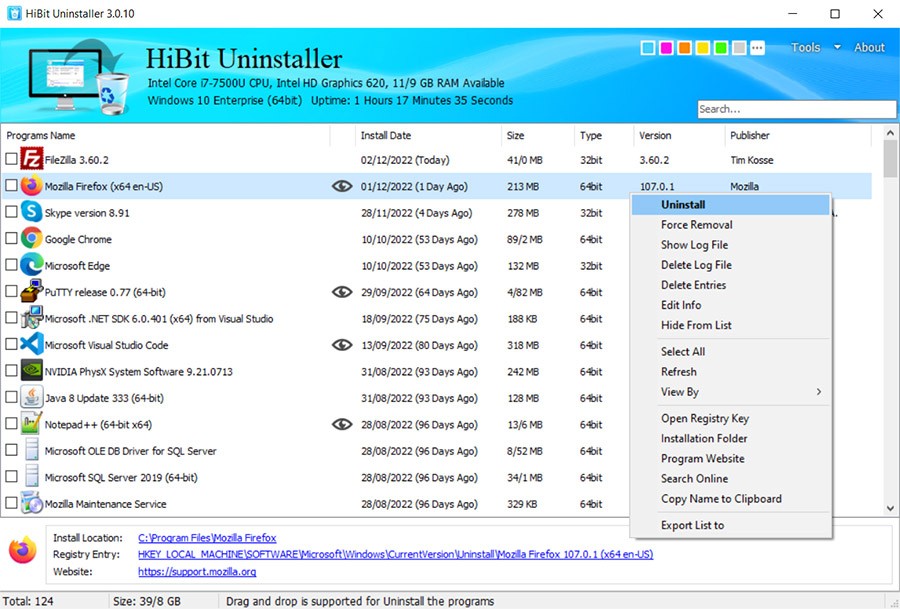
HiBit Uninstaller is a free Windows application that is used to uninstall programs fully on your computer. It extends past the default uninstall procedure on Windows. After uninstalling an app, some registry entries or leftover files and folders are usually left behind. With time, these small remnants accumulate and slow down your computer. So the program itself gets fully removed from your drive, and cleans up the leftovers.
Its interface is clean and not glitzy or complex, and that is the core idea. The utility enlists all the applications, browser extensions, and Windows Store apps installed on your computer. Select one or a few and delete them immediately. It also has a Forced Uninstall feature for tenacious programs that cannot be removed. It can be helpful in situations when a regular uninstall does not work or the application does not have an uninstaller.
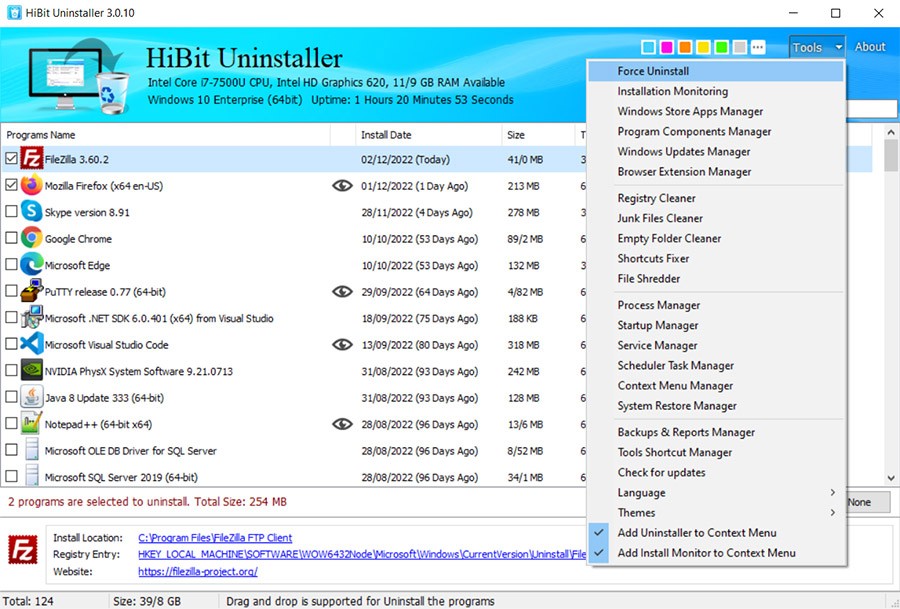
HiBit also has additional functions like junk file clean, registry repair, start-up manager, and controlling system restore points. All these characteristics make it a lightweight system-maintenance package, rather than an uninstaller. People who would prefer keeping their PC clean, organized, and productive would usually choose HiBit.
Why Should I Download HiBit Uninstaller?
The primary motive to download HiBit is that the default uninstaller of Windows fails to completely achieve the task. Uninstallations are done regularly, leaving behind hidden files or registry remnants. These amass and impair performance or free disk space over months or years. That issue is solved by cleaning up with HiBit.
It is multipurpose and therefore useful. It can be used not only to uninstall, but it is also in charge of startup programs, broken shortcuts, and maintains the registry clean. Startup Manager: This tool shows all the programs that start automatically when Windows boots. Unnecessary ones can be disabled or deleted to accelerate the startup.
The Forced Uninstall in HiBit really helps when you’re dealing with broken or stubborn programs that just won’t uninstall. It looks through related files, folders, and registry keys, then removes them one by one. The junk cleaner also deletes the temporary files, log files, and empty directories.
It applies to normal and high-level users. Assuming that you have tried and installed numerous programs, HiBit will save time when it comes to bulk removal; you can have several applications removed at a time. Installed software is also noted by the tool, and it allows you to track changes in your system more easily.
The interface will not be littered with advertisements or complicated menus. It is practical, quick, and it does what it claims without any redundancy. This is ideal for any person who would like to get a clean, efficient PC without spending money on high-end cleaners.
Is HiBit Uninstaller Free?
Yes, HiBit is completely free. It has all the basic and superior features, such as forced uninstall, startup control, junk cleanup, and registry repair, by default. The updates are provided by the developer through the built-in updater. No registration or activation is necessary.
What Operating Systems Are Compatible with HiBit Uninstaller?
HiBit supports most modern Windows: Windows 7, 8, 8.1, 10 in 32-bit and 64-bit, and Windows 11. It’s light on your system, takes little space, and barely uses any processing power. It works well with older PCs and is therefore a suitable option in a legacy system or low-spec hardware.
The installation is simple: one needs to download the setup file, run it, and you are in business. There is a portable version, which can be used on a USB drive, and is useful when a technician operates on more than one computer. HiBit does not use heavy background services; as such, it does not slow your system when not in use.
The app also works with Windows Explorer; you can right-click any shortcut or folder and see the option to uninstall it through HiBit. This saves time for people who want to take faster steps than opening the main window every time. The software is automatically updated with the latest Windows releases and bug fixes.
What Are the Alternatives to HiBit Uninstaller?
Bulk Crap Uninstaller is a free tool that lets users take full control over how programs are removed. It is best suited to advanced users who have to uninstall dozens of programs simultaneously. BCUninstaller identifies the programs that are not found in the Add or Remove list on Windows and removes the remaining traces of those programs. It also helps in automation and thus can run batch uninstallation without supervision. It is less attractive to the eye than HiBit, but it provides very high flexibility to system administrators or power users who require more cleaning and scripting options.
Ashampoo UnInstaller is a commercial product that is characterized by a refined interface and additional system-maintenance utilities. It monitors all the changes incurred in the process of installing a program, such that it can undo them flawlessly at the time of uninstallation. This monitoring will ensure that there are no files and registry entries left behind. It also comes with tools to clean browsers, defragment drives, and manage startup programs. Ashampoo is more polished and has wizards compared to HiBit, but it has to be paid for with a license. It is a good, professional-grade solution for the user who wants a branded experience and technical support.
Argente Uninstall Manager provides a lightweight option that is concerned with simplicity. It identifies the programs installed and allows the user to delete them with a single mouse press. It does not include as many system tools as HiBit or Ashampoo, but it is faster and more straightforward. The interface is very simple and presents the specifics of each application and its corresponding entries on the registry. The application also has a backup option to recover deleted records in case of a failure. Despite its limited features, it is an excellent option in the case of users aiming to have a relatively fast and simple uninstaller that simply works.