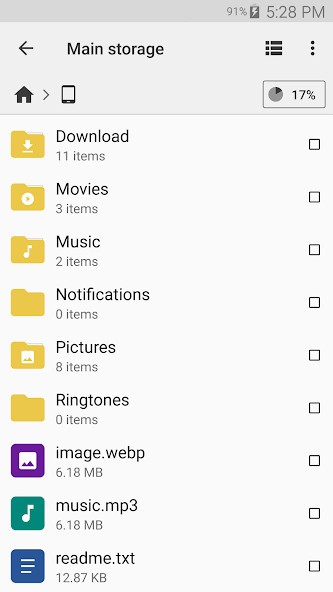
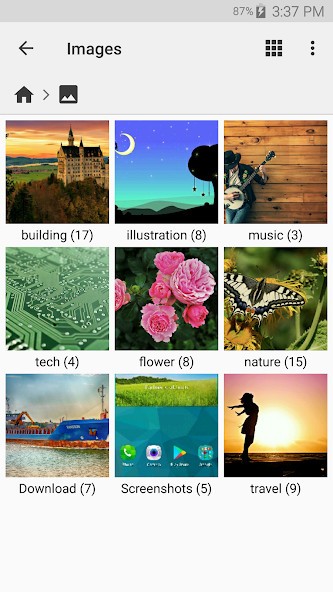
Cx File Explorer brings a clear and easy way to manage your files on Android. It helps you browse local folders or jump into cloud drives and shared network folders. Everything is laid out in a way that feels natural, even if you’ve never used a file manager before. It acts as the file manager used in PCs (Windows Explorer or macOS Finder), but is designed for touch screens. Open folders, rename and move files, and compress them into ZIP files, without a computer.
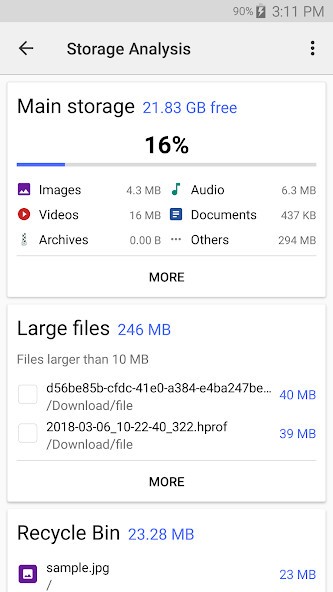
It gives you tremendous control without cluttering. The design is clear and scan‑friendly, and all essential information is captured on the first screen. The app transfers data but also displays the overall storage usage and shows the largest consuming photos, videos, APKs, or downloads. The items are categorized graphically, which allows you to select what to retain and what to discard. A small recycle bin helps stop files from being lost by accident.
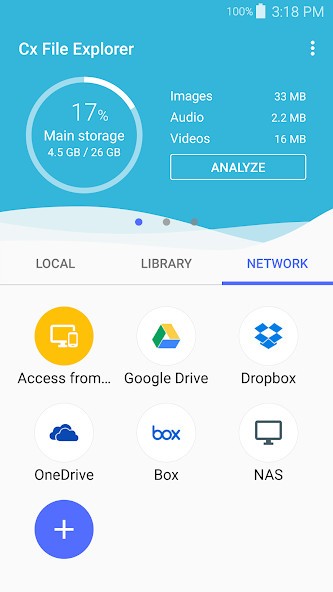
Cx File Explorer supports remote via FTP, external drives, and SD cards. It offers a combination of easy‑to‑use browsing with advanced storage management options for those who prefer to be more technically minded.
Why Should I Download Cx File Explorer?
Most Android devices come with a basic file application, but many do not have network folder support, unzip functionality, or a view of storage usage. Cx File Explorer plugs those holes, bringing you a “desktop‑like” experience to your phone. You can copy a movie to your SD card, connect to Google Drive, and control internal folders all in one place.
People like this one for its light feel. The interface is free of advertisements and pop‑ups and works well even on older phones. Browse root directories, verify large file sizes, or clean up duplicates without delay. A built‑in storage analyzer creates a colorful chart of what’s consuming gigabytes, videos, images, documents, and tapping any section launches it instantly.
The app can also communicate with other devices. If you have a NAS in your home or share files on a local LAN, Cx File Explorer connects to it via SMB or WebDAV. You can transfer files between your phone and computer via Wi‑Fi without using any cables. For cloud storage, it has support for Google Drive, Dropbox, and OneDrive, so your files are synchronized wherever they are stored.
Another feature that comes in handy is the app manager. App Explorer lists all installed apps with size and permissions, making it easy to uninstall or share APKs directly. Couple this with a little junk‑file cleaner and the ability to compress or extract ZIPs, and you have a useful toolbox to keep Android devices clean.
In summary, for those of you looking for something between an ordinary file viewer and a full system manager, Cx File Explorer fits perfectly in the middle, powerful yet simple to use.
Is Cx File Explorer Free?
Yes, Cx File Explorer is totally free to download and use on Android. No lock‑ins, no upgrade chokepoints, no advertising banners left and right. Just install it from Google Play and start using it. No sign‑in is required, so your data remains local unless you add your own cloud accounts. For those who prioritize privacy and simplicity, this is an obvious benefit.
What Operating Systems Are Compatible with Cx File Explorer?
Cx File Explorer is compatible with Android 5.0 (Lollipop) and higher and will work on most phones, tablets, and Android TV devices in use today. It plays without issues on old mid‑range hardware as well as relatively new flagship devices. The interface automatically adapts to the size of the screen, so it is comfortable both on a small phone and with the remote on an Android TV box.
Because there is no dependency on Google’s proprietary file system, the app is designed to work with local and network storage. You can plug in external USB drives using OTG cables, manage SD cards, or browse a network drive over your home Wi‑Fi. If your device supports split windows, you can even drag and drop files between two folders in split‑screen mode.
Being a native Android app, it doesn’t have an iOS or a desktop version. However, it can be connected to PCs via FTP, which allows you to use the same folders from a browser or third‑party tool. Regular updates through Google Play keep it compatible with the latest Android versions and security regulations.
What Are the Alternatives to Cx File Explorer?
Files by Google is the default app on many devices and is focused on freeing up space more than allowing deep file control. It automatically recommends deleting duplicate photos, unused APKs, or cached files. The design is minimal (hence easy for novices to use), but it lacks support for such features as LAN or direct FTP connection.
File Manager+ resembles Cx File Explorer in appearance, and people tend to compare them. It allows for internal, external, cloud, and local LAN and FTP connections. The interface is slightly brighter, more traditional, with large icons and easy shortcuts. It is equipped with a built‑in media player and a zip and rear compressor/extractor. Compared to Cx, it’s a little chunkier in design but provides similar basic functionality, and is therefore another good all‑in‑one for Android users who deal with large collections.
Amerigo is focused on media downloads and cataloging. It allows users to surf the web, download videos or music directly, and then organize that content into its own file system. It has offline playback, cloud integration, and password protection for private files. Unlike Cx File Explorer, Amerigo is not a system‑level management application but is more orientated to multimedia management. One great feature is that you can tell it where to store downloaded content and how to organize it, though it doesn’t offer network or NAS functionality. However, for individuals who view or store a lot of media on their Android device, this is a useful alternative.