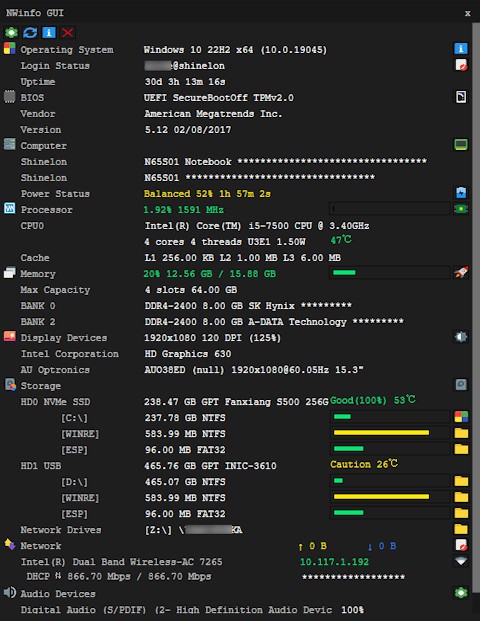
NWinfo is a lightweight system information utility that gives you a clear picture of what’s happening inside your computer. It gathers and displays detailed data about your hardware and software, including information about your processor, memory, storage devices, motherboard, and even network configuration. Instead of guessing what components are inside your PC or digging through endless menus, NWinfo lays it all out in a straightforward report.
The tool is developed by a1ive and is open source, meaning it’s transparent, community-driven, and free of unnecessary bloat. Unlike many commercial tools that come bundled with ads or trial limitations, NWinfo focuses entirely on functionality. Its reports can be exported into different formats, making it easy to save, share, or use for troubleshooting.
One of its most valuable strengths is simplicity. You don’t need to be an IT professional to make sense of the data. The information is presented clearly, so even casual users can figure out their system details quickly. At the same time, advanced users will appreciate how thorough and reliable the reports are.
Why should I download NWinfo ?
The most obvious reason is that it helps you truly understand your computer. If you’ve ever wondered how much memory you actually have, what model your motherboard is, or what your network settings look like, NWinfo answers those questions in seconds. This is useful for anyone who builds PCs, upgrades hardware, or even just wants to check compatibility before installing new software.
Another reason to download NWinfo is troubleshooting. Imagine your computer starts slowing down, or you’re having compatibility issues. Instead of fumbling around and guessing what might be wrong, you can generate an NWinfo report and see exactly what components are installed and how they’re configured. That information can be shared with support teams or posted on forums to get targeted advice.
It’s also a great tool for record-keeping. If you manage multiple computers, having detailed reports on each machine can save you time when issues arise. You can compare changes over time or keep a backup of your system details in case something goes wrong.
Then there’s the fact that NWinfo is portable. You don’t need to go through a complicated installation process. Just download it, run it, and you’re good to go. That makes it handy for IT technicians who move between different machines and need quick diagnostics without setting up new software on each computer.
Is NWinfo free?
Yes, NWinfo is completely free. There’s no premium version, no trial period, and no hidden paywall waiting for you after a week of use. The developer has released it as open-source software, which means not only can you use it freely. But you can also look at the source code, contribute to its development, or even customize it for your own needs if you have the technical know-how.
This openness is a breath of fresh air compared to many other utilities that lure you in with free downloads but limit the functionality until you pay. With NWinfo, you get the full experience right away. That makes it an excellent option for students, hobbyists, small businesses, or anyone who wants reliable system information without spending money.
Being free doesn’t mean it’s any less reliable. On the contrary, open-source projects like NWinfo often gain strength from their communities. Users can report issues, suggest improvements, and contribute code, which helps the software stay relevant and trustworthy over time.
What operating systems are compatible with NWinfo ?
NWinfo is designed primarily for Windows systems, and that’s where it really shines. It works smoothly across a wide range of Windows versions, from older builds like Windows 7 and Windows 8 to modern releases such as Windows 10 and Windows 11. This flexibility makes it useful not just for people running the latest machines, but also for those still relying on older desktops or laptops. Whether you’re firing it up on a brand-new gaming PC or a computer that’s been around for years, NWinfo can generate accurate and reliable system reports without any fuss.
Because it’s a portable tool, there’s no heavy installation process and no need for special system requirements. You don’t need high-end hardware or loads of memory just to get it running. It launches quickly, pulls together the information you need, and won’t bog down your system while it works. That efficiency is one of the main reasons people prefer it over bulkier, commercial alternatives that can sometimes feel bloated or overwhelming.
At this time, NWinfo isn’t designed for macOS or Linux, so it remains focused on the Windows ecosystem. Still, considering that Windows continues to power the majority of desktops and laptops worldwide, its coverage is more than enough for most users. For those who stick to Windows, NWinfo is a dependable and straightforward choice, whether you’re a casual home user, a student, or an IT professional moving between multiple systems.
What are the alternatives to NWinfo ?
Although NWinfo is a very good option, there are some you could seek to explore and see with respect to your requirements.
One is the popular SIW (System Information for Windows). SIW is enabled with advanced features such as retrieving license keys and password management in addition to its detailed reporting, as in NWinfo. It is a feature-rich tool, though at the expense that it is not being free. SIW can be a decent option, provided that you are ready to pay extra to get extra features.
HWiNFO is another good alternative. This is one that goes deep into the monitoring of the systems and the hardware. Not only does it provide you with detailed reports about the system, but it also reports in real-time the temperature, voltages, and fan speeds. HWiNFO provides more detailed monitoring than NWinfo, to the user who may wish to monitor the health of their hardware, or to overclock their systems. It is also free, thus making it attractive to tech enthusiasts who cannot afford merely reading reports.
Belarc Advisor is a third option. This app creates detailed system profiles, which can be seen in your web browser. It provides you with information on installed software, security patches, and hardware, which is particularly beneficial when auditing a system. When being used by home users, it becomes simple and easy to comprehend, and may seem a bit older than HWiNFO.