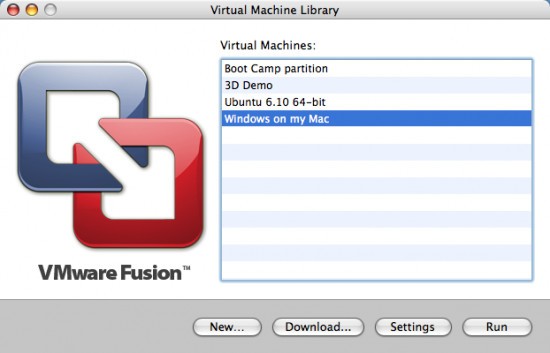
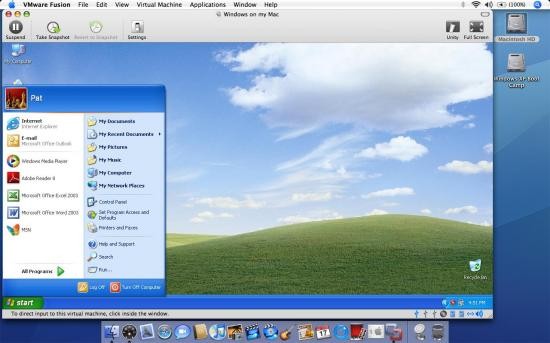
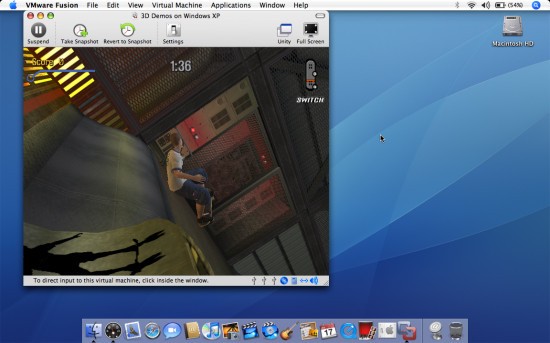
Mac users can run VMware Fusion as their virtualization tool since this application operates similarly to VMware Workstation, yet specifically functions well in macOS. With VMware Fusion, users can deploy additional operating systems for their Mac without modifying their regular configuration. You can establish a digital duplicate of another computer system within your Mac operating environment.
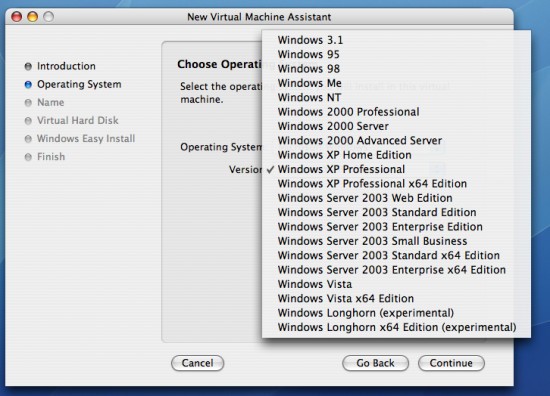
The software allows you to implement Windows, Linux, or alternative macOS versions, which operate along with your current operating system. VMware Fusion offers an easy way for users to evaluate software compatibility with macOS through its seamless function. In addition, it enables testing of applications that work only on specific OSes and exploration of multiple operating systems within closed digital environments.
The opportunity to control an additional operating system extends beyond mere installation, since it involves complete management of the virtual environment. VMware Fusion provides users with full control over virtual machine customization tools that enable them to manage memory allocation, performance adjustments, and network configuration setup.
VMware Fusion enables developers, along with testers and regular users, to thrive due to its adaptable capabilities. The virtual environment provides you with a key advantage: the ability to use multiple computing sections at once. Each time users initiate a new VM (Virtual Machine), they obtain a fresh starting point that leaves no modifications on their existing system. The program feels authentic because it integrates seamlessly with macOS rather than competing directly, making it superior to clumsy virtualization solutions.
Why Should I Download VMware Fusion?
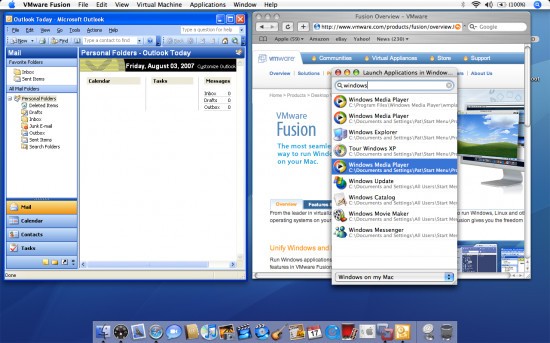
One of the biggest distinctive features of VMware Fusion is that it enables Mac users to overcome operating system differences. With VMware Fusion, users who need to run Windows-based software on their Mac can run those applications directly without requiring machine swaps or dual-boot setups. Running a Windows VM is as simple as opening an app because it functions like an integrated app on your desktop. The simple access of VM programs through the integrated interface enables workflow transformation.
Users should consider downloading the program because it provides extensive customization and full command over system operations. Running a second operating system provides more than just coexistence; it enables you to customize it to your specifications. You can direct more Random Access Memory to your Virtual Machine without any difficulties. Easy. Your application needs to run various network tests and specific performance constraints to gauge its behavior.
Fusion gives you those tools. Developers who need to test their software applications in various environments find this utility particularly useful because of its function in their workflow. The program enables users to establish multiple configurations and take snapshots that they can restore if an issue arises, but it maintains the security of their basic system. Experimentation happens with the reassurance of a protective shield provided by this tool.
Fusion enables users to transfer files with the drag-and-drop method between macOS and guest OS instances, along with file-sharing support and system-to-system copy-paste functionality. The user experience feels like using one unified operating environment rather than multiple separate machines. VMware Fusion Pro users gain advanced networking capabilities and VM cloning tools for enterprise-level testing. NAS users who want to test Linux without an actual installation can easily access the program through Fusion.
Is VMware Fusion Free?
Users can access a free version of VMware Fusion, known as Fusion Player, for personal use. A paid license is required when you use VMware Fusion in commercial or business contexts.
An individual with basic needs can achieve functionality with the free version of VMware Fusion, since Fusion Pro, which offers advanced networking capabilities, requires a paid license for professional use only. Fusion Pro has been free for personal use since May 2024.
Which Operating Systems work with VMware Fusion?
VMware Fusion runs on macOS and supports both Intel-based Macs and newer Apple Silicon models, but the chip architecture determines the experience and compatibility. VMware Fusion enables users to deploy multiple guest operating systems, including Windows 10 and 11, numerous Linux distributions, and older macOS versions when available.
The x86 compatibility on Apple Silicon models has some restrictions, but VMware continues actively to develop this support through regular updates. The operating requirements for Fusion include macOS version 12 (Monterey), while backward compatibility functions are based on the installed Fusion version.
What Are the Alternatives to VMware Fusion?
Although VMware Fusion remains dependable, it is not the only available virtualization solution.
VirtualBox is a major alternative because it provides a free, open-source platform. VirtualBox maintains availability on macOS systems, as well as on other platforms. This virtualization solution provides functionality despite its lack of premium Fusion aesthetics and macOS integration. Users can run various guest operating systems with VirtualBox, as it uses a lightweight setup process. Users should consider VirtualBox as their initial free choice when seeking a virtualization platform that provides bare minimum performance, although it lacks the speed and advanced features of Fusion for 3D processing acceleration or system-to-system file transmission.
Parallels Desktop is the main competitor to Fusion among Mac users. The program enables Windows applications running from the Mac dock environment, together with Spotlight-based Windows program launching capabilities. This application provides users with a smooth, polished user experience. The application delivers a significant advantage through its seamless integration of two environments, which both regular users and experts find attractive. Some users find paid subscriptions inconvenient because they prefer one-time licenses, such as Fusion, for their price structure.
VMware Workstation serves Windows and Linux users who seek features similar to those in Fusion. This software solution maintains many Fusion core capabilities. Knowledge of one virtualization tool will help you quickly become comfortable with any other such application. Virtual Machine users who operate across various systems will find this product ideal because it delivers consistent behavior across their virtual machines. Those who already work with Workstation on Windows will find Fusion on Mac very familiar because the systems use the same core environment, apart from operating system differences. Familiarity with the interface design accelerates understanding of all features and reduces adoption difficulty.