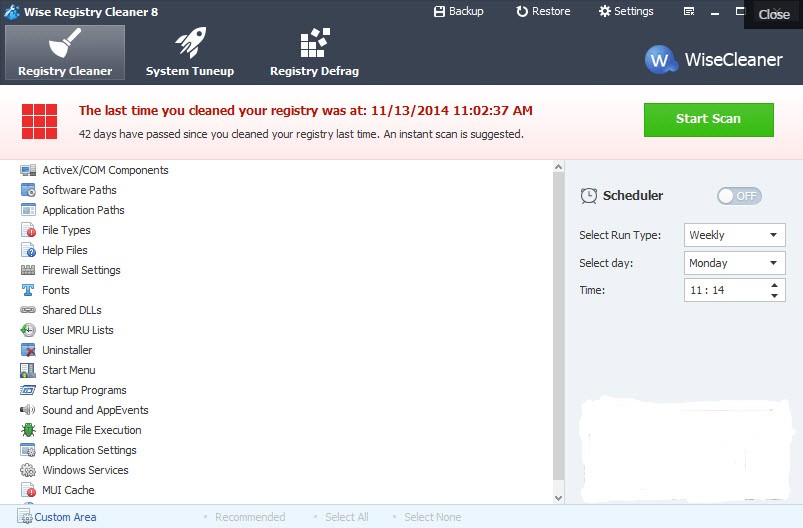
Wise Registry Cleaner is a compact tool that scans the Windows registry to identify and remove obsolete or damaged entries. A Windows system's operating system uses its registry, which stores multiple types of data and configuration details.
Your entire registry fills with unused remnants each time you install or uninstall programs, modify system configurations, or use your computer regularly. The buildup of unused system data does not cause system failure, but it can cause performance slowdowns that sometimes result in error notifications.
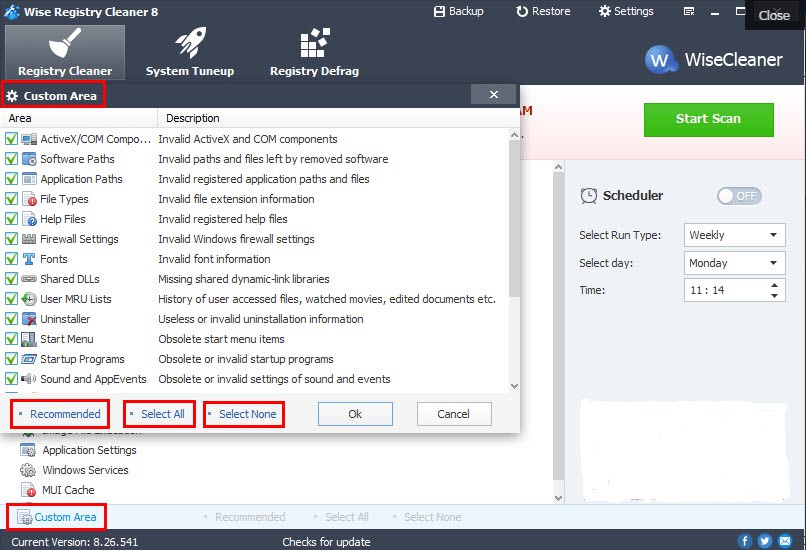
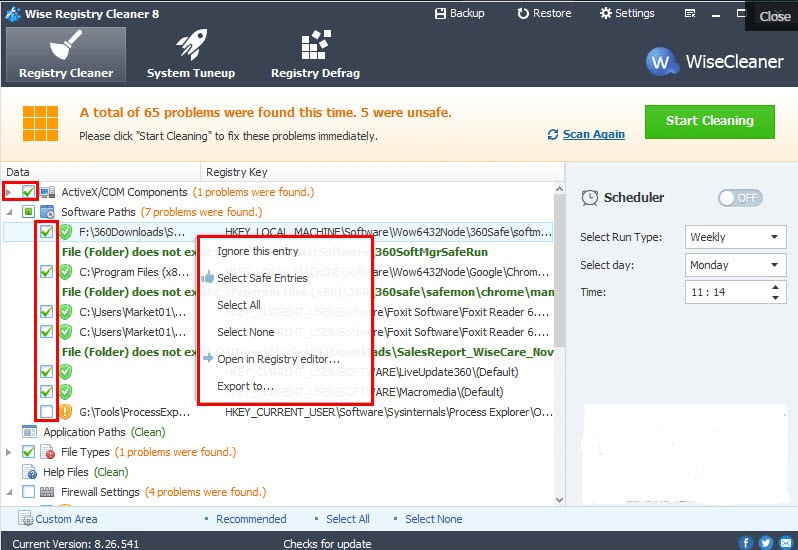
Wise Registry Cleaner is the solution to this problem. The program analyzes the registry to discover entries that are unused. The cleaning application groups detected changes into separate categories before informing users about both safe and questionable alterations. This function enables you to safely prevent the elimination of essential registry items.
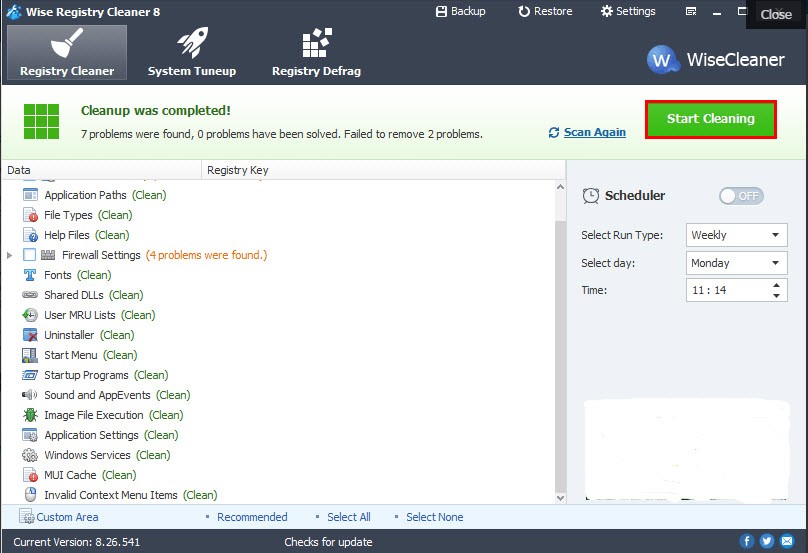
The program includes a backup feature that lets users restore the system configuration if cleaning operations are canceled. The program delivers peak performance alongside proper system maintenance, ensuring a background process that runs automatically to avoid unexpected system issues.
Why Should I Download Wise Registry Cleaner?
The registry normally disappears from view; thus, users tend to overlook it. The registry remains hidden behind the system until it reveals itself through improper system operations. Clutter accumulates similarly in storage areas because of the mess. As Windows attempts to load non-existent references, it creates entries alongside unresolved program changes and unintended leftovers from uninstallations. The system traces accumulate on your PC without crashing it, but they continuously degrade performance.
Wise Registry Cleaner helps clean up a portion of the system's disorder. The tool functions without extensive technical understanding, as it provides different options for users. The program allows users to perform immediate scans or deep scans, or to configure background operation during work sessions.
People enjoy using Wise Registry Cleaner because it provides straightforward explanations during its operations without technical jargon. You don’t feel lost. The program displays safe removal areas, as well as necessary precautionary zones. Users develop trust in the tool because of its open technical approach to handling the sensitive registry component.
The program has functions that extend beyond basic maintenance. Users can enhance system performance by letting the tool disable nonessential Windows services through the system tune-up functionality. The software presents changes as advice, allowing users to decide which to accept. Users maintain full control over their system with the provided interface. Ultrafast performance and optimal system startup, alongside improved multitasking, can be achieved by implementing the small extra optimization steps in Wise Registry Cleaner.
There are several reasons to use Wise Registry Cleaner, such as it does not require high system resources during operation. Wise Registry Cleaner consumes minimal resources because it does not eat up memory, does not restrict CPU performance, and does not overburden older machines.
The program runs smoothly on all existing hardware levels and effectively on older systems as well. The background operation leaves no sense of sluggishness, as the system maintains consistent performance. The ability to extend computer life is an excellent win for individuals who maintain older systems.
The built-in backup and restore functionality plays a vital role among all features. Before conducting any registry modifications, the program establishes a backup as a standard step in the cleanup process. The backup and restore feature allows users to undo changes made during a scan by using a single click.
Safety protection serves as an essential component that functions as both a performance tool and a backup system. You need reassurance when manipulating essential system elements, which is why this feature is crucial even for risk-averse users. The software in Wise Registry Cleaner cleans using both speed and intelligent operational methods, along with safety protocols.
Is Wise Registry Cleaner Free?
Wise Registry Cleaner offers a free personal version of its software. The tool's basic functions involve scanning and cleaning, together with creating backup files.
Users who need registry cleaning reliability without spending money will find their needs adequately met with Wise Registry Cleaner's free version, even though its Pro version offers additional features such as automatic updates and multi-user cleaning.
What Operating Systems Are Compatible with Wise Registry Cleaner?
Wise Registry Cleaner is compatible with modern Windows versions on computers. The software operates on Windows XP, Vista, Windows 7, Windows 8, Windows 10, and Windows 11. This software requires no high-end machine to run, as it combines quick installation with operational stability on both older and newer PCs.
You can easily use Wise Registry Cleaner on 32-bit and 64-bit platforms without any configuration. Simply download and install it before scanning. Wise Registry Cleaner is a small, efficient app that works with all Windows versions without adding additional system burden.
What Are the Alternatives to Wise Registry Cleaner?
Many users seek system maintenance tools beyond Wise Registry Cleaner and can select a few reliable alternatives based on their needs.
Hundreds of users start their search for a registry cleaner with CCleaner among the top choices. Wise Registry Cleaner has established itself over numerous years of operation with an impressive reputation for trustworthiness. After registry cleaning, the program handles various other system maintenance tasks, including cleaning garbage files, browser profiles, and startup activation points. The application provides extensive system-cleanup capabilities, despite past privacy concerns that led users to seek alternative solutions. While CCleaner remains popular among users, it demonstrates effectiveness during well-organized application procedures.
The system optimization world recognizes Advanced SystemCare by IObit as among its prominent players. The program provides members with a single, integrated user experience that bundles antivirus tools with system cleanup and registry repair, along with performance improvement capabilities. The system dashboard contains many controls that might require some time to master, yet enables a comprehensive monitoring of system status. The comprehensive feature set makes SystemCare lightweight for users who prefer short, simple registry cleaning applications.
The Mac-oriented disk space visualizer DaisyDisk deserves attention for its unique features. DaisyDisk provides a visual representation of disk usage while guiding users to identify and remove excessive, unnecessary files. The tool falls under the category of applications that assist users in maintaining an efficient system without directly addressing Windows registry entries. DaisyDisk is particularly useful for users who switch between Mac and Windows because it helps them manage their system storage without addressing registry entries.