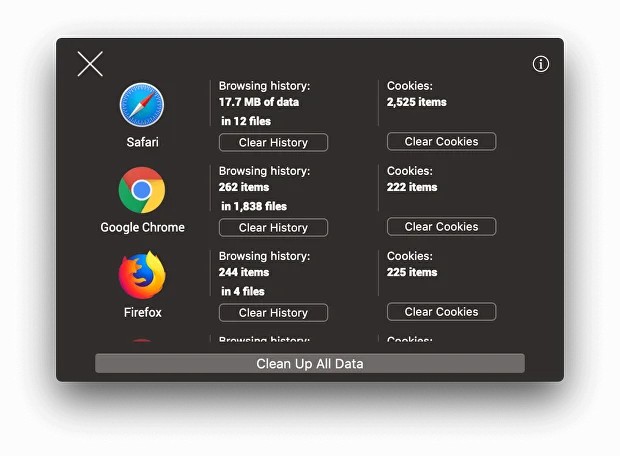
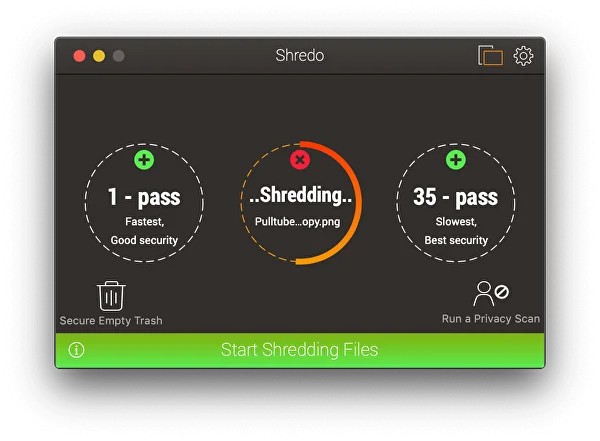
Shredo is a great option if you're looking for a safe solution to removing your files on macOS. It can permanently remove data and sensitive information, such as cookies, browser history, or other information from Safari, Chrome, Firefox, Opera, and more. You can also use it to empty your computer trash, so Shredo works as if it were a native part of your system.
What users usually don't know is that when you simply remove files from your computer using the built-in method, they aren't actually gone forever. In fact, the way it works is the system marks the space these files took as free, but the files themselves can still be recovered using specialized software. To avoid it, you would need to overwrite the disk space they occupied, which is what Shredo does. When you remove data using this tool, it automatically overwrites it with random characters, which makes the files impossible to recover.
Use Shredo, especially if you're selling or giving away your computer and need to remove sensitive information like confidential work documents, financial reports, or personal photos. This utility uses government-level algorithms to get rid of all the details and permanently destroys any data you want it to. You can test the tool for free for 14 days, and then you need to buy a license to continue using Shredo.
Why should I download Shredo?
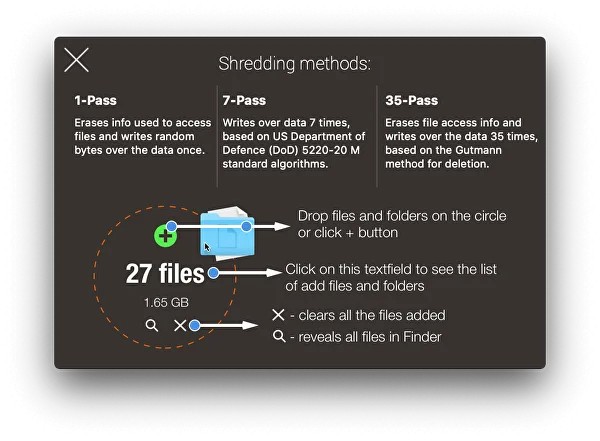
If you have any sensitive files or information on your computer that you want to erase without leaving any trace on your Mac, then Shredo is the best tool for that. This utility is extremely easy to use, as all you need to do is open the app and drag and drop the files or folders you want to delete. There are no complex menus or settings, you just confirm the action and the tool shreds all your selected files. Shredo also fully integrates with Finder on macOS, so you can access it through the context menu without launching the app.
When it comes to security, Shredo offers military-grade algorithms to destroy files, and you can choose which one you want to use. It has simple one- or three-time overwrite options that are great for personal use, but there's also a 7-pass overwrite method that follows the US Department of Defense standard or a Gutmann method that overwrites your data in 35 different patterns.
Deleting files from your computer doesn't really mean they are wiped from your disk. Most systems just mark them as deleted to free up the space they've occupied, but until something else takes their space, all this data can be recovered, even months or years later. If you want to ensure your free disk space is cleaned, you can use Shredo to overwrite any unused space on your disk and remove ghost files and folders from it, while avoiding existing files.
With Shredo, you also get tools that protect your privacy when it comes to temporary and browser files. When you're using your computer, temporary data is constantly created in the background by various apps and software. These can contain private details about your activities that could be harmful if your computer gets hacked. Shredo can find and erase these files, but it also supports wiping browsing history, cache, or cookies from browsers like Chrome, Safari, Firefox, Opera, and more. You can download Shredo for free and use its 14-day trial period, but after that time, you have to get a paid license for the tool to work.
Is Shredo free?
While Shredo offers a 14-day free trial, during which you can download it and test its features, it's not a free utility. If you decide you want to keep Shredo on your Mac, you need to get a permanent license with a one-time payment.
What operating systems are compatible with Shredo?
Shredo is designed exclusively for Macs, and it works with macOS 10.11 or later, and it integrates seamlessly with Finder thanks to that. There are no versions of the tool for other operating systems, like Windows or Linux.
What are the alternatives to Shredo?
O&O SafeErase is a data destruction tool for professionals developed for Windows computers. It can use it to wipe out files, folders, or even entire hard drives. It provides a military-grade method for erasing files and can also clear your browsers of information about your internet activities. It's a paid tool that comes in multiple versions, and it's a great option for anyone who's giving away or selling their Windows PC or laptop.
Eraser is a free utility from an open-source project that allows you to delete files directly from the Windows context menu. It's enough to right-click on your file and select the right options. Eraser also offers scheduled cleaning tasks and can wipe your free disk space to ensure there are no ghost files. Please note that this tool only works on Windows, and there are no versions dedicated to Linux or macOS.
EaseUS BitWiper lets you wipe and destroy data from partitions, hard drives, and any external storage devices. It makes all the removed files completely unrecoverable, and you can also use it to wipe the entire system on your machine if you launch it from a bootable drive. You can use EaseUS BitWiper for free with limited features, like removing individual files, but to access advanced options, you need to get a full paid version, and the tool only works on Windows computers.